
NHTSA ID Number: 10071684
Manufacturer Communication Number: PI1012
TSB/Document Date: 2016-06-17
Summary
SUMMARY TO BE PROVIDED ON A FUTURE DATE.
If the PDF is very large, it may not load in the preview below.
Some older TSBs had multiple PDFs — visit the NHTSA Website to view all PDFs.
If the TSB PDF does not show, download or view it on the NHTSA Website.
Click on the (+) Plus Sign
Then Click on Associated Document(s)

- 💝【Questions? We’re Here Anytime】MK808S is a...
- 🔥🔥🔥【2026 NEWLY RELEASED BI-DIRECTIONAL...
- 【28+ MOST POPULAR RESET SERVICE FOR 150 MAKES】Autel...
- 【ALL SYSTEM DIAGNOSTICS, FACTORY-LEVEL SCANNER】The...
- 【AUT0 SCAN & AUT0V1N, 10X FASTER】How much have you spent...


- 💯【Conta.ct us for Support Directly】If you met any...
- 🔥🔥🔥【2026 AUTEL FLAGSHIP MK900BT MK900-BT, NEW...
- 🚗【3000+ ACTIVE TESTS (50➡3000+), SAME AS MS...
- 🚗【40+ HOT SERVICES FOR 150 MAKES (28+➡40+)】Full...
- 🚗【OE ALL SYSTEM DIAGNOSE, AUTO SCAN 2.0: SCAN LICENSE...
This product presentation was made with AAWP plugin.
Search NHTSA Database for Recalls
Search NHTSA Database for Vehicle Investigations
View Latest Vehicle Investigations
Search NHTSA Database for Vehicle Complaints
View Latest Vehicle Complaints
TSB/Document ID: PI1012
Replacement Service Bulletin Number:
MFR Communication Date: 2013-07-01
MFR Internal Campaign ID/Software Version:
Communication Type: Service Bulletin/Repair Instructions
NHTSA Components: EQUIPMENT:OTHER:OWNERS/SERVICE/OTHER MANUAL
MFR Component System:
MFR Component Subsystem:
Previous TSB | Next TSB |
File in Section:
Service Bulletin
Bulletin No.:
Date:
PI1012
July, 2013
PRELIMINARY INFORMATION
Subject:
Spark EV New Model Features and Service Guide
Models:
This is a special bulletin to introduce the new 2014 Chevrolet Spark EV. The purpose of this bulletin is to familiarize
dealership service personnel with the vehicle’s features and describe the actions the Service Department will need
to take to ensure they are able to fully service this exciting new model
SAFETY PRECAUTIONS
Danger: To reduce the risk of severe shock and burns, treat all high voltage cables and connectors as
though they are energized until it can be verified that they are not. Always perform the High Voltage
Disabling procedure prior to servicing any High Voltage component or connection. Personal Protection
Equipment (PPE) and proper procedures must be followed.
The High Voltage Disabling procedure will perform the following tasks:
• Identify how to disable high voltage.
• Identify how to test for the presence of high voltage.
• Identify condition under which high voltage is always present and personal protection equipment (PPE) and
proper procedures must be followed.
Before working on any high voltage system, be sure to wear the following Personal Protection Equipment:
• Safety glasses with appropriate side shields when within 50 feet of the vehicle, either indoors or outdoors.
• Certified and up-to-date Class "0" Insulation gloves rated at 1000V with leather protectors.
• Visually and functionally inspect the gloves before use.
• Wear the Insulation gloves at all times when working with the high voltage battery assembly, whether the
system is energized or not.
Failure to follow the procedures exactly as written may result in serious injury or death.
About the Vehicle
The 2014 Chevrolet Spark EV is building on the technology and innovation momentum Volt has brought to
Chevrolet. There is no gasoline engine and no gasoline fuel system. It is a five door, four passenger vehicle. The
vehicle is built in Korea and shipped to the United States and Canada. The Spark EV is only sold in California and
Oregon in the United States. In Canada the Spark EV will be available through the GM fleet program to fleet
customers at three locations in Vancouver, Toronto and Montreal.
Electrical Architecture
Global Diagnostic system (GDS2)
Global Diagnostic system (GDS2)
The 2014 Spark EV is utilizing GM’s Global A electrical architecture, which is common with the Chevrolet Camaro,
Cruze, Equinox, Volt, Sonic, Malibu (2013) and Orlando (Canada). This requires the use of the Global Diagnostic
System (GDS2) software and the Multi Diagnostic Interface (MDI) module. Training courses 16048.30W-R2, H (U.S)
and 16039.16H (Canada) cover the use of the MDI and GDS2 for diagnostics.
Dealerships requiring assistance in the process of installing GDS2 and the MDI should contact the Techline
Customer Support Center@1-800-828-6860 (English) or 1-800-503-3222 (French).
Transmission and High Voltage Battery
Transmission General Description (MME — 1ET35)
The Chevy Spark EV is a fully electric vehicle. The propulsion of the vehicle is achieved by an electric drive
transmission. The Transmission is a fully automatic, front wheel differential drive transaxle, variable-speed,
electronic-controlled transmission. It consists primarily of an 85kW drive motor, 1 planetary gear set, high voltage
electric auxiliary transmission fluid pump and housing, 1 differential gear set, and 2 axles.
The planetary gear set provides the fixed forward and reverse ratio. Changing speed and torque is fully automatic
and is accomplished through the use of a drive motor generator power inverter control module located under hood.
The drive motor generator power inverter control module receives and monitors various electronic sensor inputs and
uses this information to vary the torque output to the drive axles based on throttle position.
This transmission will be on exchange during the launch period. Please refer to the latest Exchange PI or #PIP5131
for details.
Spark EV Transmission Gear Ranges
The transmission may be operated in any of the following gear ranges:
PARK (P)
This position locks the wheels and prevents the vehicle from rolling either forward or backward. PARK is the best
position to use when starting the propulsion system for the vehicle. Because the transmission utilizes a shift lock
control system, it is necessary to fully depress the brake pedal before shifting out of PARK. For safety reasons, use
the electronic (EPB) parking brake in addition to the PARK position.
REVERSE (R)
This position allows the vehicle to be operated in a rearward direction by reversing the rotation of the electric drive
motor.
NEUTRAL (N)
This position allows the vehicle to be moved without the park pawl engaged.
DRIVE (D)
Drive range should be used for all normal driving conditions for maximum efficiency and range economy. Drive range
allows the drive unit to operate in a forward direction by electrically varying the output torque and speed of the
electric drive motor.
LOW (L)
This position is used for the “feel” of engine braking and can be used for the slowing of the vehicle once the throttle is
lifted. While in the position the vehicle will slow quicker and use the motor to more aggressively collect energy during
a regenerative braking event.
High Voltage Battery — 360V
Drive Motor Battery System
The heart of the Spark EV’s Electric Propulsion system is its advanced LiIon Drive Motor Battery System. This HV
battery is liquid cooled for long life and optimum performance. The battery is covered by an 8 yr 100,000 mile
(160,000 km) warranty. The HV battery contains 336 cells with a nominal system voltage of 360V direct current. The
battery cell groups are joined to form 4 equal sections.
The hybrid/EV battery energy control module will diagnose its own systems and determine when a fault condition is
present. Diagnostics and system status is communicated from the hybrid/EV battery energy control module to the
hybrid/EV powertrain control module 2 through serial data. The hybrid/EV powertrain control module 2 is the host
controller for diagnostic trouble code (DTC) information.
The high voltage drive motor battery is located beneath the vehicle above the rear axle. The battery energy control
module, hybrid battery interface control modules 1-8, hybrid battery interface control module 9 or also known as the
current sensor module, heater control module, and high voltage contactors are located within the hybrid battery
assembly. The hybrid powertrain control module 2 is located under the front driver seat.
The Spark EV’s high voltage drive motor battery will be on exchange through Technical Assistance from June 14th,
2013 thru December 14th, 2013 or the launch period, whichever is longer. The exchange program is designed to
gain important feedback on this new High Voltage LiIon battery assembly including validating the service
diagnostics, repairs, and requalification procedures. As more repairs are allowed, internal to the high voltage battery
pack, the exchange P/I will be updated. Refer to the #PIP5112 for details.
Unique Characteristics and Normal Operation Conditions
Drivers of the Chevrolet Spark EV may experience some operating characteristics that are unique to this vehicle.
Due to the quiet nature of the Spark EV Populsion system, certain sounds that may have been masked by the
engine's natural harmonics will be apparent. Among them is the electric engine cooling fan, coolant pumps, the air
conditioning compressor and the HVAC blower. In addition to those sounds, the drive motor battery cooling system
may be operational during charging or when the vehicle is powered down. This may be more evident when charging
or during remote cabin conditioning.
12V Operation
The Chevrolet Spark EV uses the 12V battery to "wake up" and initialize control modules. If the vehicle does not
power-up, ensure the 12v battery is sufficiently charged to allow for all of the control modules to "wake up" and
initialize.
• To prevent excessive drain on the 12 volt system and a potential no start condition, it is recommended that
customers allow the vehicle to remain in "run" condition when listening to the radio for extended periods of time.
• It is also important that when exiting the vehicle, ensure the system is powered “off” by verifying the instrument
cluster is no longer active and there is no power steering.
Note: The 12 volt battery is located in the front compartment. The battery is an Absorbed Gas Mat (AGM) Absorbed
Gas Mat type battery that requires different charging voltages than conventional lead acid batteries. The essential
tool (GR-8) EL-50313 has this algorithm built in. When using the GR-8, you must select AGM when prompted or
damage to the battery will result.
Brake Pedal Feel and Brake Pedal Vibration
• The Spark EV has a unique brake pedal feel. This is because the hydraulic system is not the lone provider of
vehicle deceleration. The electric system blends in regenerative and hydraulic braking forces depending upon
vehicle conditions. Over several braking events, the customer may perceive that they are applying a consistent
brake force and yet the vehicle may decelerate at slightly different rates. This is a normal operating
characteristic to maximize battery efficiency.
• The Spark EV utilizes a braking system that employs a high-speed electric motor/pump. Pump operation can
sometimes be heard and felt in the brake pedal as the system sometimes builds pressure.
Whine Sound During Electric Operation
Due to the electric nature of the vehicle, the electric motor may be heard as the vehicle moves. This is a normal
operating characteristic.
Hatch Release
There is no rear hatch release switch in the cabin of the Spark. To release the rear hatch use the door unlock feature
on the Key Fob or use the key to unlock the hatch. Press the electric switch located directly beneath the Chevrolet
Bowtie on the cross car center of the rear hatch lid.
Keys
Due to the uniqueness of the Spark EV ignition/door lock key, special equipment is required to cut a key. If you do
not have the required equipment, a cut/coded key can be ordered through GM CC&A. Refer to the latest version of
Corporate Bulletin Number 09-00-89-029 (Key Cutting Procedure for Obtaining Replacement Key) for additional
information. The remote control transmitter and the key shank are not serviced separately.
Air Conditioning
The Air Conditioning (A/C) system uses R1234YF refrigerant and POE oil, and is similar to conventional vehicles
with the exception of an electric compressor and a drive motor battery chiller. The compressor is driven by a high
voltage electric motor and provides the necessary refrigerant pressures to meet cooling demands. During conditions
with high ambient temperatures and high humidity, the driver may notice a unique high-pitched sound from the
compressor. This is considered a normal characteristic, and may be heard when the vehicle is stopped or at low
speeds.
Starting the Spark EV
START: With the vehicle in Park or Neutral, press the brake pedal and then press the POWER button to turn on
the car.
3470970
The POWER push-button switch is located on the center console just below left of the infotainment screen. The
Instrument Cluster and Infotainment Center will light up once the vehicle turns on.
Note: The transmitter must be in the vehicle to turn on the vehicle. If the transmitter battery is weak or in certain
zones (especially military zones due to frequency interference), there will be a NO REMOTE DETECTED or PLACE
KEY IN TRANSMITTER POCKET when you try to start the vehicle. The REPLACE BATTERY IN REMOTE KEY
message may also display at this time.
3470971
To start the vehicle remove the rubber cap on the right side of the steering column and insert the key into the slot and
try to restart the vehicle.
Note: Some cell phone chargers may interfere with the operation of the keyless start system and should not be
plugged in when starting.
Important: The vehicle will not shift out of Park and will display a Charge Cord Connected message if the vehicle is
still plugged in.
Stop/Power Down: Shift to Park and press the POWER button to turn off the car. Power to the audio system and
windows will stay active for 10 minutes or until any door is opened.
Charging the Spark EV
The Spark EV is powered by a 21.4 kilowatt hour (kW/h) lithium-ion high voltage battery pack. The high voltage
battery is located beneath the vehicle and straddles the rear axle.
It is recommended to keep the vehicle plugged in when temperatures are below 32°F (0°C) or above 90°F (32°C). A
CHARGE SOON message indicates that the driving range is getting low and the vehicle needs to be charged. Fully
charge the battery at each charge event.
3470972
There are currently two ways to charge the Spark EV; 120v and 240v outlet. Later this year a DC fast charge
vehicles will be available.
3470973
The provided 120-volt AC portable vehicle charge cord is located in the storage compartment under the cargo floor.
0.1.With the vehicle parked, press the Leaf button on the center stack to review the Charge Level Preference on
the touch screen for selected Charge Mode. Select the Change Charge Level screen button if an increased
charging level is desired. Use the reduced charge level until a qualified electrician inspects your electrical circuit
capacity, or if the electrical circuit or socket capacity is not known. Once the charge level is selected, turn off the
vehicle.
Note: The Charge Level selection returns to the reduced level (8 amps) each time the vehicle is cycled on/off.
0.2.Plug the AC charge cord into an electrical outlet. DO NOT USE AN EXTENSION CORD. Charge cord indicators
should be green. Where possible, secure the charge cord to the wall.
0.3.Push and release the rear edge of the charge port door, located just in front of the driver’s door, to open
the door.
0.4.Plug the charge cord into the vehicle’s charge port.
0.5.The Charge Status Indicator on top of the instrument panel will illuminate green and the horn will chirp when
properly connected.
Note: To change the horn chirp setting, go to Charging Alerts in the Vehicle Settings menu.
If the vehicle is locked with the RKE transmitter, the charge cord theft alert is armed automatically after 30 seconds.
3470975
The provided 120-volt portable vehicle charge cord is located in the storage compartment under the cargo load floor.
Store the 120–volt portable charger face down and tightly wrapped to ensure the lid will completely close to prevent
unwanted noises from entering the cabin.
3470978
•
240V — Stationary mounted to a wall, hard wired by a certified electrician.
Volts
Charging Time
120
Greater than 20 Hrs
240
7 hrs
3470981
Volts
Charging Time
480
80% in 20 minutes
Programmable Charging Modes
There are three different charge modes:
3470984
0.1.Immediate - The vehicle starts charging as soon as it is plugged in.
0.2.Delayed based on departure time - The vehicle estimates the charging start time considering the programmed
departure time for the current day of the week.
0.3.Delayed based on Electric Rate & Departure Time -The vehicle estimates the charging start time based on the
utility rate schedule, utility rate preference, and the programmed departure time for the current day of the week.
The vehicle will charge during the least expensive rate periods to achieve a full battery charge by the
departure time.
To change charge modes, press the leaf button and touch the charging tab at the bottom of the display screen.
Important: To start charging immediately when on delayed mode plug charge cord into the vehicle, unplug and
re-plug within 10 seconds.
Charge Status Indicator (Green is Good!)
3470987
The status of charging events is communicated through visual indications and horn chirps. The charge status
indicator is located on the vehicle dash, and glows green or yellow to display the charging status. If there is no
indicator, the drive motor battery charger cable is not working properly or not connected.
• Solid green indicates that the vehicle is charging.
• Fast flashing green indicates that charging is delayed.
• Slow flashing green indicates that charging is complete.
• Solid yellow indicates that the vehicle is not able to accept a charge.
Instrument Cluster
3470988
(1) Enhanced with Power
(2) Enhanced with Efficiency
(3) Simple with Efficiency
(4) Simple with Power
The instrument cluster features a configurable LCD screen that can display basic information for EV operation as
well as more detailed operating information with additional gauges. To change between the four displays, press the
CONFIG button on the left side of Instrument Panel.
The Instrument Cluster also has the Driver Information Center (DIC) menus such as Trip A, Trip B, Vehicle
Messages (such as driver door open), Tire Pressure, Units (between Kilometers and Miles), Tutorial Mode (available
in Park).
3471004
Turn the Driver Information Center (DIC) controls knob located on the left side of steering wheel on the instrument
panel to toggle between the menu options. Push the select button to see details.
Driver Operating Modes
3471007
There are two driver operating modes Normal and Sport mode. The bottom to switch between the two modes is
located on the center console behind the shifter. Note: The vehicle will always default to Normal at every key cycle.
Normal (Default)
Use in normal driving conditions for efficient operation; this mode is active each time the vehicle is started.
3471010
Sport Mode
Use the sport mode when more responsive acceleration is desired. When used the efficiency is reduced. To activate
the sport mode push the sport mode button. A sport mode light will illuminate on the instrument cluster. Press the
button again to return to Normal Mode.
Information Displays
3471014
Leaf Button
The Leaf button displays three tabs: Power Flow, Charging and Energy Information. Press the Leaf button on the
center stack and then touch the desired tab at the bottom of the screen to display the information.
3471016
•
Power Flow: The Power Flow screen shows the power flow between the propulsion battery and the electric
drive unit, including Battery Power (Active), Battery Power (Stationary), Regenerative Power Recovery, and
Power Off. Each component is highlighted when it is active.
3471018
Figure (1)
3471015
Figure (2)
3471020
Figure (3)
• Charge Mode: The Charge Mode screen shows the current charge mode status. The three programmable
charge modes are:
• Immediately upon plug-in. Figure (1)
• Delayed based on departure time. Figure (2)
• Delayed based on electric rate and departure time Figure (3)
Note: Charge complete times are estimates and most accurate at moderate temperature.
3471023
3471041
•
Energy info: The Energy Information screen shows how energy is being used since the last full charge, energy
use over the last 5 miles (8 km) or 50 miles (80 km), and energy tips to improve energy use and increase
economy.
Note: This screen will only reset after the battery has a complete charge.
3471021
3471023
Climate Control
3470970
The climate control operates the blower, air delivery modes and discharge temperature based on customer settings
and environmental conditions (ambient temperature, sun load, interior temperature). These settings adjust the
impact the climate control system has on the vehicle's electric range. The HVAC settings can be adjusted by using
the manual control knobs or the infotainment touch screen.
Heated Seats
3471045
The heated seat switches are located under the HVAC control panel on the center console. Push the buttons in to
turn on the front seat heaters. Push in to turn off. Heated seats come standard in all Spark EVs.
Note: The seat heaters can be used instead of the cabin heat to keep the occupants warm. The will help increase
the efficiency of the battery range.
Infotainment System
3471049
3471051
The infotainment system features the MyLink audio system. MyLink features a large 7-inch (178 mm),
high-resolution, color touch screen display for most input functionality. The radio integrates selected functionality
through voice commands and steering wheel controls. Music, pictures and videos are accessible through the
vehicle’s display unit. For non-smartphone users, MyLink offers both Bluetooth for phone and Bluetooth audio
streaming for music stored on a phone.
Chevrolet MyLink
MyLink uses Bluetooth, USB and 3.5 input jack connection to link a compatible smartphone, cell phone, USB flash
drive or portable audio player/iPod™ to the touch screen infotainment display. It offers a variety of entertainment
options and smartphone apps. For more information, including device compatibility, visit www.chevrolet.com/
mylink or call 1-855-4-SUPPORT (1-855-478-7767). In Canada, contact Customer Assistance at 1-800-263-3777
or visit www.gm.ca/gm/english/vehicles/chevrolet/infotainment/ (English) and www.gm.ca/gm/french/vehicles/
chevrolet/infotainment/ (French).
Some of the currently available apps are described below. Apps must be downloaded (separate purchase may be
required) to the smartphone. Connect the smartphone using a USB cable or Bluetooth.
• Pandora — Listen to personalized radio stations based on favorite artists or genres (not available in Canada).
• Stitcher — Stream favorite podcasts, radio shows and news.
• TuneIn — Listen to music, sports and news stations from all over the world.
•
•
Siri® Eyes Free — As a feature of the IPhone® 4s and 5, Siri® can be used in the vehicle to send text
messages, set reminders and use other IPhone® functions.
BringGo — Display and control full-function navigation and traffic features. Use to plan a route, search for
points of interest, view maps, get traffic data, find the nearest charging station and more. (Separate purchase
required).
Bluetooth
Spark EV features Bluetooth® connection to link compatible smartphone, cell phone or portable audio player/iPod™
to the touch screen infotainment display. Before using a Bluetooth-enabled device in the vehicle, it must be paired
with the in-vehicle Bluetooth system.
To pair a device, on the touch screen, touch settings > connection settings> Bluetooth settings > pair device.
Start the pairing process on the device and confirm the code.
Notice: To Canadian Service Agents, the following URL link is a United States website that is presented in English
only. Canadian carriers are not listed directly, however when identified the phone model functions are similar.
Note: Not all Bluetooth cellular phones are guaranteed to work with the vehicles Bluetooth system. Bluetooth
enabled phones will be tested for vehicle compatibility and a feature compatibility list will be provided via the
Bluetooth website: www.gmtotalconnect.com/.
Navigation Features
There are two ways to obtain navigational information, OnStar® Way Point Navigation and BringGo:
OnStar® Way Point Navigation
• Way Point Navigation — Lets customers plan trips using OnStar’s® Turn-by-Turn Navigation, finds charge
stations along the way and recommends when to charge based on how long it takes to reach the desired
destination.
• Uses the Driver Information Center to display navigation information.
• The OnStar® Directions and Connections plan is standard for three years on all Spark EV models.
BringGo
• Display and control full-function navigation and traffic features. Use to plan a route, search for points of interest,
view map, get traffic data, find the nearest charging station and more.
• BringGo is downloaded to a compatible smartphone and uses Bluetooth to display on the infotainment screen.
(Separate purchase required).
Chevrolet RemoteLink
Mobile Onstar® RemoteLink
Mobile Onstar® RemoteLink
3471053
3471055
3471056
Spark EV customers will also enjoy a number of OnStar RemoteLink mobile applications first introduced in the
Chevrolet Volt. Through the mobile apps, customer can check battery level, range, lifetime miles and miles since last
full charge, tire pressure, lock, unlock mode turn by turn navigation and other vehicle details. Review owner’s
manual for further details.
Personalized Configuration
3471057
Vehicle features can be customized using the touch screen menus. Personalization menus may include Time & Date
Settings, Radio Settings, Connection Settings, Vehicle Settings, Language, Text Scroll, Touch Beep Sound, and Max
Startup Volume.
• Press the Home button.
• Touch settings on the home page.
• Touch the desired screen menu to access the various menus and settings.
• Touch the BACK screen button in the upper-left corner to move back within a menu.
Refer to the Owners Manual for complete configuration details.
Pedestrian Friendly Alert Functions (PFAF)
3471058
Manual
• To activate a friendly horn, pull the multifunction switch towards you like you are flashing the headlights.
• The alert will only work in Drive.
Automatic
3471059
•
•
•
•
A speaker is mounted in the front of the vehicle.
A sound is played to alert hearing impaired pedestrians and is audible to leader dogs.
This function is active in ‘Drive’ and ‘Reverse’ at speeds below 18 MPH.
The sound is intended to be barely audible in the cabin.
Tires and Wheels
The 2014 battery electric vehicle features low rolling resistance Bridgestone ECOPIA tires. The sizes are different
from front to rear, P185/55R15 are in the front and P195/55R15 in the rear to handle the additional weight from the
battery pack. Since the tires are different sizes they cannot be rotated.
If the vehicle will be driven in snow or mud all-season tires are recommended. Both front and rear tires must be
replaced with all-season tires.
The Spark EV factory-installed tires are designed to operate satisfactorily with loads up to and including the fully
rated load capacity when the tires are inflated to the recommended pressures. Important influences on tire life
include:
• Correct tire pressures.
• Correct wheel alignment.
• Proper driving techniques.
The Spark EV wheels are 15” painted aluminum wheels and are standard on all models regardless of trim level. The
standard alloy wheels are light weight and along with the low rolling resistance tires help contribute to the energy
range of the HV battery.
Tire Inflation Kit
The Spark EV features a tire inflation kit instead of a spare tire. In the event of a flat tire, the tire sealer should be
used in combination with the air compressor to inflate the tire. The tire inflation kit is located in the rear hatch under
the storage compartment, where the spare tire is normally located. Any tire or wheel damage that is not repairable
with the tire sealer and air compressor requires that the vehicle be flat-bed carried to the nearest dealership or tire
repair facility.
Towing and jump Starting
Disabled Vehicle Towing
• Vehicle must ONLY be flat-bed towed.
• Proper procedures must be followed to prevent vehicle damage.
• Refer to Owner’s Manual for towing specifications.
For Jump Starting using the 12V Battery Under the Hood
Refer to Owner Manual for towing and jump starting specifications.
Note: The high voltage battery CANNOT be jump started with either another vehicle or battery charger.
Roadside Assistance
Spark EV customers are automatically enrolled in the Chevrolet Roadside Assistance program, which provides
roadside service for 5 years/100,000 miles (160,000 km) at no expense to them.
Chevrolet’s Roadside Assistance toll-free number (U.S. 1-888-811-1926 or Canada 1-800-268-6800) is staffed by a
team of trained advisors who are available 24/7 to contact a service provider for light service emergency
(jump-starts, flat tire and lock-outs) or make arrangements to tow the vehicle to the nearest Spark EV Authorized
Chevrolet dealer.
Spark Technical Support
A specialized Technical Assistance (TAC) team has been established to provide diagnostic support for the Spark EV.
Dealers are encouraged to report all issues through TAC. To support TAC a field support process has been
established and a letter has been sent to the dealerships in the U.S. Dealers are also encouraged to submit Field
Product Reports (FPRs) with pictures (when appropriate). Canadian Dealers should report any product issues via a
Product Information Report (PIR).
Warranty Information
Chevrolet continues to provide excellent warranty coverage and peace of mind the competition can’t match.
Chevrolet’s premium warranty protection includes:
• 3-year/36,000-mile (60,000 km) comprehensive warranty coverage.
• 8-year/100,000-mile (160,000 km) transferable Electric Propulsion warranty (includes HV battery).
• 5-year/100,000-mile (160,000 km) powertrain components warranty.
• 6-year/100,000-mile (160,000 km) rust-through warranty.
• 5-year/100,000-mile (160,000 km) coverage for emergency roadside.
• 5-year/100,000-mile (160,000 km) coverage for emergency roadside assistance and courtesy transportation
Special Tools
Essential tools will be shipped to selling and servicing dealers.
Training
In the U.S., training will consist of the following courses.
In Canada, training will be supplied to the dedicated dealer locations involved in the pilot Fleet distribution
program only.
2014 Spark EV Specific Course
Course Number
Course
Delivery Method
18430.05W
Battery Electric Vehicle Introduction
Web
18420.02W2
High Voltage Energy Storage Systems 2
Web
18420.04W2
Advance Technology Vehicle Transmission 2
Web
11045.07V
R1234yf Refrigerant Tools and Procedures
VOD
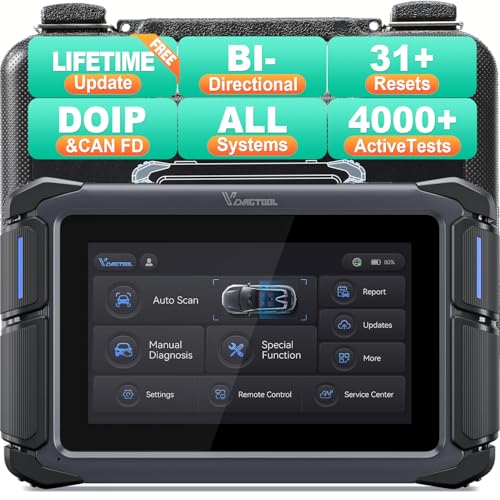
- Affordable Solution for Professional-grade Car Diagnostics & Repair: As the budget-friendly OBD2 scanner under $300, the VD70 Lite car diagnostic tool offers 31+ hot resets, full bi-directional controls with 4000+ active tests, all system diagnostics, 8-in-One live data graphing (export as CSV Export/Recording/Playback), CAN FD & DoIP protocols, and long-term free update. Additional features include Auto VIN & Auto Scan, diagnostic report sharing/printing, with coverage for over 10,000 vehicle models worldwide, suitable for DIYers, Car Owners, Technicians, and Mechanics on car repairs and maintenance tasks.
- OBD2 Scanner with Full Bi-directional Control: The Bidirectional scan tool VIDAGTOOL VD70 Lite performs 4000+ active tests that can send execution commands to the ECU module and identify the repair status, covering for windows, doors, ABS, valves, wipers, headlights, rear mirrors, sunroof,and more in-vehicle components. This bidirectional OBD2 scanner is a must-have diagnostic tool for auto technicians and mechanics on a budget! The available function tests vary by model—please check compatibility via vdiagtool2 @ outlook . c o m before purchase.
- OE All Systems Diagnostics & 8-IN-One Data Graphing: VD70 Lite is a dealer-level car scanner diagnostic tool with Auto VIN that can do in-depth diagnostics for 100+ modern car brands, covering all systems including engine, transmission, airbag, ABS, ESP, TPMS, radio, etc, to read/clear code, view live data, freeze frame, and read ECU info. This advanced OBD2 Scanner with 8-in-one data graphing and detailed diagnostic reports makes data viewing more intuitive, ensures quickly accurate repairs by identifying issues, and easily masters the car situation.
- Stay Ahead with 31+ Reset for Faster & Easier Repairs: VDIAGTOOL VD70 Lite scanner for car meets almost all daily maintenance needs for both home mechanics and workshops as a professional automotive scan tool. It can perform Oil Reset, ABS Bleed, Crank Sensor Relearn, Idle Relearn, Injector Coding, Window Initialization, HVAC Calibration, Suspension Calibration, Throttle Matching, etc, ensuring efficient repairs and complete maintenance. Besides, long-term free updates keep its functionality and broad vehicle compatibility up to date. Functions vary by model, please send us the Vehicle Model, Year, VIN for compatibility before purchase.
- 150+ Models, 10000+ Car Coverage & 22 Languages:As a powerful car computer diagnostic tool, VD70 Lite helps you to quickly troubleshoot issues for 95% of US, European, and Asian vehicles. Supporting 22 languages makes it a global car diagnostic scanner for auto mechanics worldwide without language barriers. Note: Simply provide your tool’s S/N and reach out to vdiagtool2 @ outlook . c o m to change the menu language.
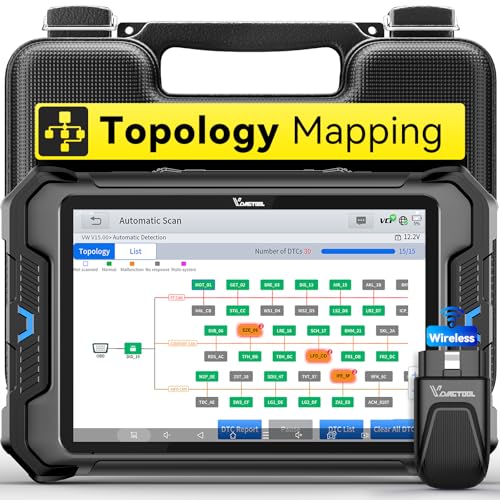
- Smarter Diagnostics, Broader Coverage, Greater Value Than $1,000+ Tools: The game-changing VD80BT OBD2 scanner delivers 4000+ active tests, 42+ hot services, advanced ECU coding, PMI & V.A.G Guided—all in one scanner for car. With OE-level full system scan and intelligent topology mapping that cuts diagnostic time by up to 50%, you'll work smarter and faster. Supporting FCA
 AutoAuth, CAN FD & DoIP protocols, this car scanner covers over 10,000 vehicle models worldwide. Built for serious pros and DIYers, it features 8" HD screen & 4+64GB storage, 7.3V fast charging with long-lasting battery, and 33–66ft stable wireless connection—making it the most complete diagnostic solution you’ll ever own
 - Intuitive Topology Map, Fast Locate Faults: Why waste time clicking module by module? VD80BT car diagnostic scanner takes diagnostics to the next level with its intuitive Topology Map—a premium feature usually found in $1000+ obd scanner. With one tap, it performs all system scan and presents all modules and DTCs in a clear, color-coded layout, boosting diagnostic efficiency by up to 200% and helping you locate issues instantly and reduce repair time and costs. Whether you're a pro boosting efficiency or a beginner learning diagnostics, this obd2 scanner diagnostic tool makes fault-finding faster and smarter for you. Note: varies by vehicle model, please check compatibility before purchase
- Wireless Connectivity Simplifies Bi-Directional Control: With 4000+ active tests, including throttle reset, window calibration and solenoid check, VD80BT bidirectional scan tool lets you diagnose and verify functions faster, smarter, and more efficiently. This scanner for car redefines flexibility in bi-directional control through a fully wireless connection, freeing you from the constraints of wired car diagnostic tool in the workshop. Imagine actively controlling components like the A/C clutch, fuel injector, ABS pump, or radiator fan within a wireless range of 33–66ft around the vehicle—all while enjoying stable, high-speed wireless diagnostic and real-time data monitoring
- 42+ Hot Services, One Powerful Scanner for Car: Why pay a shop $100 just to reset a light? VD80BT car scanner diagnostic tool gives you 42+ hot services from basic resets to advanced maintenance tasks like Crank Sensor Relearn, Injector Coding, ABS Bleeding, Oil Reset, Throttle Relearn, EPB, BMS Reset, Tire Size Reset and more. Plus, it offers 100+ vehicle-specific features including Idle Relearn, VIN Write, Brake Fluid Replacement, Fuel Trim Reset, ABS Initialization and more. Whether you’re resetting TPMS or fixing a stubborn SAS, this car computer diagnostic reader delivers shop-grade precision at a fraction of the cost. Varies by model. Send VIN to verify compatibility before purchase
- OE-Level Full System Diagnostics in Your Hands: Dominate diagnostics like a dealership with VD80BT scan tool for all vehicles, delivering factory-grade scanning for aLL systems—including ABS, SRS, ECM, TCM and more. View up to 8 PID graphs simultaneously to quickly catch intermittent issues and troubleshoot with confidence. Easily read and clear DTCs, retrieve freeze frame data, and run active tests for faster, more accurate repairs. It’s like having a dealership-grade scan tool in your pocket, complete with data playback and CSV export for in-depth analysis. Stop guessing and start fixing with surgical precision—professional diagnostics made simple and portable. Check compatibility Please

- 【OE-Level Full System Diagnostics-Lifetime F*REE Software Updates】The VDIAGTOOL D200 OBD2 Scanner for cars is a all system bidirectional scan tool that enjoy lifetime f*ree software updates, delivers complete system coverage. reading/clearing codes across engine, transmission, ABS, SAS, EPB, TPMS plus full access to body, chassis, powertrain and all control modules. This D200 Bidirectional car scanner works with most 1996+ OBD2 gasoline and hybrid cars and light trucks. It does NOT support pure electric and heavy-duty trucks. PLEASE CHECK COMPATIBILITY BEFORE ORDERING or Contact us with VIN to confirm compatibility.
- 【Supports OBD2 Full Functions-ZERO Subscription Fees】D200 Bidirectional OBD2 Scanner is a upgarde of universal car code reader. It supports OBD2 full functions to help you turn off the annoying instrument fault indicator, such as read/clear codes, O2 sensor test, I/M readiness, on-board monitor test, datastream, freeze frame, E-VAP system test, and retrieve vehicle information. This professional obd2 scanner diagnostic tool can full access to diagnostics, reset tools and maintenance features with a single payment. NOTE: The fault code can only be cleared after the vehicle's malfunction has been repaired; please ensure the vehicle issue is fixed before clearing the code.
- 【D200 Hidden 2 Advantages: 1. $169 Expandable 49+ Advanced Resets. 2. $199 Get J2534 P*a*s*s-Thru Programming】Your core car diagnostics and 26 reset remain lifetime f*ree for everyday maintenance. When you need deeper repair capability, upgrade with 3-year access for $169 in Store on VDIAGTOOL App, gaining 49+ advanced resets. D200 configured with J2534 hardware, upgrade only when you need without replacing the entire device. You also can Lifetime Unlock for $199 in Store one-time, perform module programming, software re~flashing and ECU data updates directly. Supports 17+ major brands, including for BMW, for Audi, for GM, for Ford and more. Note:D200 does‘t provide any OE software.
- 【Full Bidirectional Control / Active Tests】The D200 car scanner diagnostic tool is a true bidirectional scan tool that lets you send commands directly to the vehicle’s ECU for active tests. Quickly test fuel pumps, relays, solenoids, injectors, cooling fans, windows, sunroofs and more to verify operation instantly. Get dealership-level diagnostic control at a fraction of the cost (ofter $100-200$ per diagnostic visit), reduce guessworkand confirm repairs faster, avoid unnecessary parts replacement, towing fees and wait times.
- 【26 F*ree Essential Reset & Relearn Functions – Everyday Maintenance Made Easy】Handle common maintenance and repair jobs without visiting the shop. The D200 code readers & scan tools includes 26 f*ree high-demand reset functions, including Oil Reset, EPB Service, SAS Calibration, ABS Brake Bleeding, Throttle Relearn, Injector Coding, Headlight Adjustment, Tire Size Reset and more. Perfect for home car owners, mechanics and DIYers – just plug and diagnose anytime, anywhere! Note: Service functions vary by vehicle model—please confirm compatibility.
This product presentation was made with AAWP plugin.
Last update on 2026-05-12 / Affiliate links / Images from Amazon Product Advertising API