
NHTSA ID Number: 10070739
Manufacturer Communication Number: DVD-140-00
TSB/Document Date: 2016-06-13
Summary
SUMMARY TO BE PROVIDED ON A FUTURE DATE.
If the PDF is very large, it may not load in the preview below.
Some older TSBs had multiple PDFs — visit the NHTSA Website to view all PDFs.
If the TSB PDF does not show, download or view it on the NHTSA Website.
Click on the (+) Plus Sign
Then Click on Associated Document(s)

- 💝【Questions? We’re Here Anytime】MK808S is a...
- 🔥🔥🔥【2026 NEWLY RELEASED BI-DIRECTIONAL...
- 【28+ MOST POPULAR RESET SERVICE FOR 150 MAKES】Autel...
- 【ALL SYSTEM DIAGNOSTICS, FACTORY-LEVEL SCANNER】The...
- 【AUT0 SCAN & AUT0V1N, 10X FASTER】How much have you spent...


- 💯【Conta.ct us for Support Directly】If you met any...
- 🔥🔥🔥【2026 AUTEL FLAGSHIP MK900BT MK900-BT, NEW...
- 🚗【3000+ ACTIVE TESTS (50➡3000+), SAME AS MS...
- 🚗【40+ HOT SERVICES FOR 150 MAKES (28+➡40+)】Full...
- 🚗【OE ALL SYSTEM DIAGNOSE, AUTO SCAN 2.0: SCAN LICENSE...
This product presentation was made with AAWP plugin.
Search NHTSA Database for Recalls
Search NHTSA Database for Vehicle Investigations
View Latest Vehicle Investigations
Search NHTSA Database for Vehicle Complaints
View Latest Vehicle Complaints
TSB/Document ID: DVD-140-00
Replacement Service Bulletin Number:
MFR Communication Date: 2014-12-01
MFR Internal Campaign ID/Software Version:
Communication Type: Service Bulletin/Repair Instructions
NHTSA Components: ELECTRICAL SYSTEM:SOFTWARE
MFR Component System:
MFR Component Subsystem:
Previous TSB | Next TSB |
SDD SOFTWARE
UPDATE
REF: DVD 140 – 00 CALIBRATION FILE V.195
BRASIL
Use a lista adjacente para selecionar o idioma desejado
简体中文
使用此列表选择您需要的语言
NEDERLANDS
Gebruik de lijst om de gewenste taal te selecteren.
ENGLISH
Use the list to select the language you require
FRANÇAIS
Sélectionnez dans la liste la langue souhaitée.
DEUTSCH
Wählen Sie die gewünschte Sprache aus der Liste aus.
ITALIANO
Utilizzare la lista per selezionare la lingua desiderata
日本語
リストを使用し、必要な言語を選択してください。
한국어
다음 목록을 사용하여 원하는 언어를 선택하십시오.
PORTUGUÊS
Use a lista ao lado para seleccionar a língua que necessita
РУССКИЙ
ESPAÑOL
Используйте прилагаемый список для выбора требуемого языка.
Seleccione en la lista el idioma que desee
Page 1 of 97
SDD SOFTWARE
UPDATE
REF: DVD 140 – 00 CALIBRATION FILE V. 195
DATE: 12/2014
USE GUIDANCE:
ALL SDD USERS MUST INSTALL THESE UPDATES
Updates consist of SDD Software Updates (Patches/DVDs) and Calibration File releases.
The number after the DVD reference in the header indicates the software update level - 00, 01, 02 etc.
The Calibration File version indicates the current release of the vehicle calibration file databases.
•
Current Installed Software levels can be checked via Settings – System information.
•
Updates can be triggered via Settings – System Utilities
For further information on keeping your software updated please refer to the information on TOPIx.
FAILURE TO FOLLOW THESE INSTRUCTIONS MAY RESULT IN COMPROMISE OF WARRANTY
CLAIMS AND CUSTOMER SATISFACTION
Introduction:
This document contains important information, as it describes the content of the DVD software update
referenced in the header; please ensure that all users of the SDD diagnostic platform are made aware of its
content.
SIZE:
00: 2299 MB
DVD Installation
During the install of DVD 140, the user will be presented with an additional setup
process:
You will see a Pop up titled ‘Setup - MOXA UPort 1110/1130/1150 Windows Driver’
The setup process will install software required for a Land Rover , Fuel Fired Booster
Heater (FFBH) programming application.
This process must be completed by following the on screen install prompts.
If the install is cancelled, SDD functionality will be affected.
Page 2 of 97
SDD SOFTWARE
UPDATE
REF: DVD 140 – 00 CALIBRATION FILE V. 195
DATE: 12/2014
During the installation of DVD 140, the SDD folder structure will be reorganised to enhance the
operational stability of SDD.
To a Technician, there is No functional change to SDD, only a reconfiguration message which is
displayed after a Pre 10MY VIN has been entered:
Page 3 of 97
SDD SOFTWARE
UPDATE
REF: DVD 140 – 00 CALIBRATION FILE V. 195
DATE: 12/2014
As part of the DVD install, SDD will check to confirm your SDD machine is compatible with the latest
software.
Before you install DVD 140, the software listed below must be installed:
●
●
●
●
●
●
DVD 139
Software update 01
Software update 03
Software update 05
Software update 06
Software update 11
To make sure the SDD machine is at the latest level of As-built and Calibration files:
1. Select the ‘SETTINGS’ tab from the SDD main menu
2. Select ‘SYSTEM UTILITIES’
3. Run the As-built and Calibration file update
13MY > 14MY Range Rover (All New) / L405
12MY > 14MY Evoque / L538
12MY > 13MY Range Rover Sport / L320
12MY > 14MY Discovery 4 / LR4 / L319
A new application is available to allow the replacement of a production fit Digital TV module to a
Hybrid Digital / Analogue TV module.
‘Add / Remove Accessories – Hybrid Television Module’
13MY > 15MY Range Rover (All New) / L405
14MY > 15MY Range Rover Sport / L494
This update contains a software update for the Fuel Fired Booster Heater (FFBH) to support a future
Field Action. The software update will be done by using a bespoke cable from the SDD machine
directly to the FFBH.
Full details, including the bespoke cable, will appear soon in the ‘Activity Stream’ section on TOPIx.
Page 4 of 97
SDD SOFTWARE
UPDATE
REF: DVD 140 – 00 CALIBRATION FILE V. 195
DATE: 12/2014
12MY > 13MY Evoque / L538 (2.0 GTDi NAS only)
13MY > 14MY Freelander 2 / LR2 / L359 (2.0 GTDi NAS only)
This update contains a software update for the Engine Control Module – ECM (Referred to as
Powertrain Control Module – PCM on SDD). This is to support a future Technical Service Bulletin. Full
details will appear soon in the ‘Activity Stream’ section on TOPIx.
15MY Discovery Sport / L550
16MY Discovery 4 / LR4 / L319
Full diagnostic support has been included as part of this DVD.
SDD Updates
This release includes the latest TSB SDD mapping.
An enhancement has been made to Datalogger, to prevent the screen locking up after changing
signal options within the data display screen.
Technicians reported that within Datalogger, the text for parameters in the data display screen could
not be read. An enhancement has been made to change the text size that is displayed so the
parameters are easier to read.
Technicians reported that the incorrect Adobe Reader version was displayed within the ‘System
information – PC System status’ screen, for example, Version 10 would be installed but the displayed
version would be an earlier level. An enhancement has been made to correctly display the actual
Adobe Reader version installed.
The 'Clear VCM' option within the ‘Quick Launch’ menu and ‘System Utilities’ screen has been
changed to 'VCM Recovery Tool' as this is the correct name of the application within SDD.
Page 5 of 97
SDD SOFTWARE
UPDATE
REF: DVD 140 – 00 CALIBRATION FILE V. 195
DATE: 12/2014
Connectivity Status Icon change
Feedback from technicians identified the SDD server connectivity status was unclear. To improve how
the connectivity status is communicated to the user, the icons and status have been changed to
indicate:
‘SDD Server Connection OK’
‘SDD Server Connection Not OK’
‘SDD Dealer Code Activation Required’
When activation is required make sure the correct Dealer information has been entered within:
Settings > Dealer Information.
Go to: Settings > System Utilities > Network Options and select ‘Activate’.
If you have a concern with connecting to the SDD server, contact your IT representative.
Page 6 of 97
SDD SOFTWARE
UPDATE
REF: DVD 140 – 00 CALIBRATION FILE V. 195
DATE: 12/2014
Battery Status Change
Feedback from technicians identified that the Battery Status was unclear. With a Vehicle
Communication Device disconnected from the vehicle, Vehicle Battery Voltage cannot be measured
so a default icon was displayed which was the Red icon.
The default Battery Status will now be shown as Grey when a device is not connected to the vehicle.
When a device is connected it will change to show the correct battery voltage state - Green, Yellow or
Red.
No Device connected
Battery voltage above 13v
Battery voltage between 11.5v and 13v
Battery voltage below 11.5V
A battery support unit must be used every time an SDD machine is connected to a vehicle. These
units provide a constant voltage to prevent loss of data and possible damage to control units during
SDD software updates, module reprogramming and diagnostic processes.
When the Battery Status is Yellow or Red, an approved Battery Charger must be used. Battery
chargers must only be used to re-charge a battery, and must not be used when SDD is connected to
the vehicle as they do not maintain a constant voltage.
For further details refer to TOPIx, Workshop Manual, 414-00: Battery Care Requirements.
Page 7 of 97
SDD SOFTWARE
UPDATE
REF: DVD 140 – 00 CALIBRATION FILE V. 195
DATE: 12/2014
Dealer Database Updates
As part of this release the very latest dealer information has been included.
Vehicle Communication Interface (VCI) Devices
Updated Software has been released for the DA-Dongle, DA-VINA & DA-ST512.
Device
Software / Firmware level
DA-Dongle
DA-VINA
Software Level – V4.6
Use the Special Service Messages (SSM’s) below to make sure they are updated correctly;
Jaguar SSM 71361 - DA-Dongle/DA-VINA J2534/ST512 Update Instructions V6
Land Rover SSM 71360 - DA-Dongle/DA-VINA J2534/ST512 Update Instructions V6
Updated Software and Firmware has been released for the Bosch I-View.
Device
Software / Firmware level
Bosch I-View
Software Level – V1.4.7
Firmware Level – V6.0.0
Use the SSM’s below to make sure they are updated correctly;
Jaguar SSM 71383 - Bosch I-VIEW Update Instructions V3
Land Rover SSM 71382 - Bosch I-VIEW Update Instructions V3
VCI functionally will be affected if the VCI Device Firmware and Software level is not updated
when required in line with the SDD Software Level.
Page 8 of 97
ATUALIZAÇÃO DE
SOFTWARE DE SDD
REF: DVD 140 – 00 ARQUIVO DE CALIBRAGEM V.195 DATA: 12/2014
DIRETRIZES DE USO:
TODOS OS USUÁRIOS DO SDD DEVEM INSTALAR ESTAS ATUALIZAÇÕES
As atualizações envolvem versões do software SDD (patches/DVDs) e do Arquivo de Calibragem.
O número depois da referência do DVD no cabeçalho indica o nível de atualização do software: 00, 01,
02, etc.
A versão do Arquivo de Calibragem indica a versão atual dos bancos de dados dos arquivos de
calibragem do veículo.
•
•
A versão do software atualmente instalado pode ser verificada no caminho Configurações
– Informações do Sistema.
As atualizações podem ser executadas no caminho Configurações – Utilitários do Sistema
Para mais informações sobre como manter o software atualizado, consulte o Topix.
A NÃO OBSERVÂNCIA DESTAS INSTRUÇÕES PODE COMPROMETER AS SOLICITAÇÕES DE
GARANTIA E A SATISFAÇÃO DO CLIENTE
Introdução:
Este documento contém informações importantes, descrevendo o conteúdo da atualização do software no DVD
mostrado no cabeçalho; certifique-se de que todos os usuários da plataforma de diagnóstico SDD tenham
ciência do seu conteúdo.
SIZE:
00: 2299 MB
Instalação do DVD
Durante a instalação do DVD 140, o usuário será apresentado com um processo de
configuração adicional:
Você verá uma janela pop-up intitulada "Configuração - Driver MOXA UPort
1110/1130/1150 para Windows"
O processo de configuração instalará softwares necessários para o aplicativo de
programação Aquecedor Auxiliar por Queima de Combustível (FFBH) do Land Rover.
Este processo deve ser realizado seguindo as instruções na tela.
Caso a instalação seja cancelada, a funcionalidade do SDD será afetada.
9/97
ATUALIZAÇÃO DE
SOFTWARE DE SDD
REF: DVD 140 – 00 ARQUIVO DE CALIBRAGEM V.195 DATA: 12/2014
Durante a instalação do DVD 140, a estrutura de pasta do SDD será reorganizada para melhorar a
estabilidade operacional do SDD.
Para o Técnico não há nenhuma alteração funcional no SDD, somente uma mensagem de
reconfiguração que é exibida após um VIN anterior a 10MY ser inserido:
10/97
ATUALIZAÇÃO DE
SOFTWARE DE SDD
REF: DVD 140 – 00 ARQUIVO DE CALIBRAGEM V.195 DATA: 12/2014
Como parte da instalação do DVD, o SDD verificará se a sua máquina SDD é compatível com o
software mais recente.
Antes de instalar o DVD140, os softwares listados abaixo devem ser instalados:
●
●
●
●
●
●
DVD 139
Atualização de software 01
Atualização de software 03
Atualização de software 05
Atualização de software 06
Atualização de software 11
Para certificar se a máquina SDD está com o nível mais recente de arquivos incorporados e de
calibração:
1. Selecione a guia "CONFIGURAÇÕES" no menu principal do SDD
2. Selecione "UTILITÁRIOS DO SISTEMA"
3. Execute a atualização de arquivos incorporados e de calibração
Range Rover Vogue (Novo) 13MY > 14MY / L405
12MY > 14MY Evoque / L538
12MY > 13MY Range Rover Sport / L320
12MY > 14MY Discovery 4 / LR4 / L319
Um novo aplicativo está disponível para possibilitar a substituição de uma substituição de um módulo
de fábrica para um módulo de TV Híbrido Digital / Analógico.
"Adicionar / Remover Acessórios - Módulo de Televisão Híbrida"
Range Rover (Novo) / L405 13MY > 15MY
Range Rover Sport / L494 14MY > 15MY
Esta atualização contém uma atualização de software para o aquecedor auxiliar por queima de
combustível (FFBH) para dar suporte a uma futura Ação de Campo. A atualização do software será
feita usando um cabo específico do equipamento SDD diretamente para o FFBH.
Mais detalhes, incluindo o cabo específico, serão apresentados em breve na seção "Fluxo de
atividades" no TOPIx.
11/97
ATUALIZAÇÃO DE
SOFTWARE DE SDD
REF: DVD 140 – 00 ARQUIVO DE CALIBRAGEM V.195 DATA: 12/2014
12MY > 13MY Evoque / L538 (2.0 GTDi apenas NAS)
13MY > 14MY Freelander 2 / LR2 / L359 (2.0 GTDi apenas NAS)
Esta atualização contém uma atualização de software para o módulo de controle do motor - ECM
(conhecido como Módulo de Controle do Grupo Propulsor - PCM no SDD). Ela se destina a fornecer
suporte a um futuro Boletim de serviços técnicos. Mais detalhes aparecerão em breve na seção
"Fluxo de atividades" no TOPIx.
15MY Discovery Sport / L550
16MY Discovery 4 / LR4 / L319
O suporte de diagnóstico completo foi incluído como parte deste DVD.
Atualizações do SDD
Esta versão inclui o mapeamento do TSB SDD mais recente.
Foi realizado um aprimoramento para o Registrador de dados, para prevenir o bloqueio da tela após
alterar as opções de sinal na tela de exibição dos dados.
Técnicos relataram que o texto dos parâmetros na tela de exibição dos dados não podiam ser lidos
no Registrador de dados. Foi realizado um aprimoramento para alterar o tamanho do texto exibido
para que os parâmetros sejam lidos com mais facilidade.
Técnicos relataram que a versão incorreta do Adobe Reader foi exibida na tela "Informações do
sistema - Status do sistema do PC", por exemplo, Versão 10 seria instalada, mas a versão exibida
seria uma anterior. Foi realizado um aprimoramento para exibir corretamente a Versão real do Adobe
Reader instalado.
A opção 'Limpar VCM" dentro do menu "Início Rápido" e na tela "Utilitários do sistema" foi alterada
para 'Ferramenta de Recuperação VCM" já que esse é o correto nome do aplicativo no SDD.
12/97
ATUALIZAÇÃO DE
SOFTWARE DE SDD
REF: DVD 140 – 00 ARQUIVO DE CALIBRAGEM V.195 DATA: 12/2014
Alteração no Ícone de Status de Conectividade
Técnicos identificaram em um feedback que o status de conectividade do servidor SDD era confuso.
Para melhorar a forma como o status da conectividade é comunicado ao usuário, os ícones e status
foram alterados para indicar:
"Servidor de conexão do SDD OK"
"Servidor de conexão do SDD Não OK"
"Ativação do Código SDD de Revendedor Necessário"
Quando a ativação for necessário certifique-se de que as informações corretas da concessionária
sejam inseridas em Configurações/Informações da Concessionária.
Vá até: Configurações/Utilitários do Sistema/Opções de Rede e selecione "Ativar".
Se você tiver um problema de conexão com o servidor SDD, entre em contato com o responsável de
TI.
13/97
ATUALIZAÇÃO DE
SOFTWARE DE SDD
REF: DVD 140 – 00 ARQUIVO DE CALIBRAGEM V.195 DATA: 12/2014
Alteração no Status da Bateria
Técnicos identificaram por feedback que o Status da Bateria era confuso. Com um Dispositivo de
Comunicação com o Veículo desconectado do veículo, a Tensão da Bateria do Veículo não podia ser
medida, portanto, um ícone padrão era exibido, no caso, o ícone vermelho.
O Status da Bateria padrão será mostrado agora com a cor Cinza quando um dispositivo não estiver
conectado ao veículo. Quando um dispositivo estiver conectado, ele mudará para indicar o estado
correto da tensão da bateria - Verde, Amarelo ou Vermelho.
Nenhum Dispositivo conectado
Tensão da bateria acima de 13 V
Tensão da bateria entre 11,5 V e 13 V
Tensão da bateria abaixo de 11,5V
Uma unidade de suporte de bateria deve ser usada todas as vezes que um equipamento SDD for
conectada ao veículo. Essas unidades fornecem tensão constante para prevenir perda de dados e
possível dano às unidades de controle durante as atualizações de software do SDD, reprogramação
de módulos e processos de diagnósticos.
Quando o Status da Bateria for Amarelo ou Vermelho, um Carregador de Bateria aprovado deverá
ser usado. Os carregadores de bateria devem ser usados somente para recarregar uma bateria, e
não devem ser usados quando o SDD estiver conectado ao veículo uma vez que eles não mantêm
uma tensão constante.
Para obter mais detalhes, consulte o TOPIx, Manual de oficina, 414-00: Requisitos de cuidados com
a bateria.
14/97
ATUALIZAÇÃO DE
SOFTWARE DE SDD
REF: DVD 140 – 00 ARQUIVO DE CALIBRAGEM V.195 DATA: 12/2014
Atualizações da Base de Dados da Concessionária
Como parte desta versão, foram incluídas as informações mais recentes da concessionária.
Dispositivos de Interface de Comunicação com o Veículo (VCI)
O software atualizado foi lançado para DA-Dongle, DA-VINA e DA-ST512.
Dispositivo
Nível do software / firmware
DA-Dongle
DA-VINA
Versão do software – V4.5
Use as Mensagens Especiais de Serviço (SSMs) abaixo para garantir que sejam atualizados
corretamente;
Jaguar SSM 71361 - DA-Dongle/DA-VINA J2534/ST512 Instruções de atualização V6
Land Rover SSM 71360 - DA-Dongle/DA-VINA J2534/ST512 Instruções de atualização V6
Software e Firmware atualizados foram liberados para o Bosch I-View.
Dispositivo
Nível do software / firmware
Bosch I-View
Versão do software – V1.4.7
Versão do firmware – V6.0.0
Use os SSMs abaixo para garantir que sejam atualizados corretamente;
Jaguar SSM 71383 - Instruções de atualização Bosch I-VIEW V3
Land Rover SSM 71382 - Instruções de atualização Bosch I-VIEW V3
A funcionalidade do VCI será afetada se o nível do firmware e do software do dispositivo VCI
não for atualizado quando necessário, de acordo com o nível de software do SDD.
15/97
SDD 软件更新
主题: DVD 140 – 00 校验文件 V. 195

- 🎉[OTOFIX D1 Lite, Perfect Cost-effective Diagnostic Tool]: OTOFIX D1 Lite, a newest bidirectional scan tool from OTOFIX company, is a great choice for DIYers and repair shops. 👉This obd2 scanner diagnostic tool packs all practical functions: OE level all systems diagnoses, Bi-Directional Control, 38+ reset services fixing 99% of common problems, support DoIP & CANDF protocols and FCA
 AutoAuth, high-end hardware configuration. Worldwide vehicles and 🔥2 Years Free Updating🔥 covered.
 - 🎉[Bi-Directional Scan Tool, Active Test]: OTOFIX D1 Lite bluetooth obd2 scanner can also command ECUs and monitor the operation of the actuators to track down the problems of certain parts, like windows, sunroof, wipers, fuel pumps, etc., saving repair time & trouble. This makes OTOFIX D1 Lite the most cost-effective bidirectional scan tool.
- 🎉[2026 Newest, 38+ Hot Reset Functions]: Equipped with 38+ reset functions in one, the OTOFIX D1 lite automotive scanner diagnostic tool allows you to troubleshoot 99% of common vehicle problems. You can use this car diagnostic scanner holding enough functions to easily repair common vehicle models in your repair shops. Including Oil Reset, Injector Coding, Throttle, DPF Reset, SCR Reset, Gear Learning, Clutch Learning, Suspension, etc. Note* Reset functions vary by model.
- 🎉[OE Level Full Systems Diagnostics]: Unlike the 2-system and 4-system diagnostic tools, the OTOFIX auto scan tool can complete comprehensive system diagnostics within 5 minutes. It accesses and scans all available onboard systems like for Engine /AT /ABS /EPB /BMS /TPMS /SRS /SAS /Audio System /BCM /Air Conditioning / etc., to read & clear codes, view live data, and check ECU information. Note: Active test is not involved.
- 🎉[Powerful Hardware Configuration]: Designed with a fashion appearance & a 7” touchscreen and a weight of 463g, this OTOFIX D1 Lite OBD2 diagnostic scanner scan tool is convenient for everywhere and easy to use & store. Android9.0 OS and 2+64GB memory enhance multi-task smoothness and diagnostic operation, no more wasting too much time. 5800mAh battery allows hours-lasting use. WiFi & VCI1 also bring faster communication for your diagnostics.

- 🏆【2026 TOP OBD2 Scanner Diagnostic Tool】OTOFIX D1 Lite wireless obd2 scanner has upgraded hardware configuration and car coverage. The newly upgraded D1 Lite with 🔥OS Android 9.0🔥1.5Ghz 4 core high efficiency processor🔥2GB RAM+64GB ROM large storage🔥5800mAh large battery, more stable and longer lasting diagnostics🔥 38+ Reset🔥action tests🔥full system diagnostic🔥Supports MV105 endoscope🔥21+ Language Supports🔥100000+ vehicle coverage to meet all your daily maintenance needs.
- 👍【Bi-Directional Control / Active Test】D1 Lite obd2 scanner has bidirectional control(worth $300+), which is the most beloved feature among mechanic. If your headlights or car windows are broken, going to a repair shop will cost a lot of money. You can use D1 Lite to send execution commands to the ECU module and identify the repair status. Such as ABS, car windows, doors, valves, wipers, headlights, etc., effectively shorten diagnostic time and reduce diagnostic costs.
- 🔥【All Systems Diagnostics, In-depth Checking】This advanced OBD2 Scanner D1 Lite can perform OE-level diagnosis of all systems including engine, transmission, airbag, ABS, ESP, TPMS, gateway, steering, radio, and air conditioning for more than 100 brands. This diagnostic scanner supports essential functions, such as reading ECU version info, reading and clearing fault codes, and reading data streams.With just a simple click, it provides you with accurate and in-depth diagnostics.
- 🏆【38+ Reset Hot Functions】For repair workshops, holding an OTOFIX D1 Lite Auto scanner is a strong advantage over others. Its 38+ maintenance functions provide various solutions for all module repairs, including Oil Reset, TPMS Reset, Injector Coding, Suspension, Throttle Matching, etc., which will usher your repair business to a new pinnacle. Continuously updating will never make the functionality & compatibility out-of-date.
- 🏆【150+ Models, 10000+ Car Coverage & 16 Languages】D1 Lite is a comprehensive car diagnostic scan tool, help you to troubleshoot car issues fast for 95% US, European, Asian auto makes. ✅ With frequent updates and optimizations allow D1 Lite to cover more vehicles to meet your needs. ✅ Multilingual menu allows auto mechanics around the world to use it without language barriers. 🚩Note: Kindly send us the S/N of the device to authorize new language updates before changing the menu language.
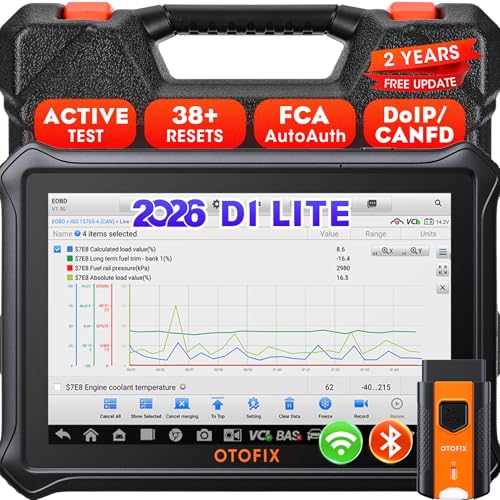
- 【2026 OTOFIX D1 Lite Gives the Best Value for Money】OTOFIX D1 Lite bidirectional scan tool is more FASTER and SMARTER with 2026 Enhanced Hardwares & New Functions! 👍Alternative Bluetooth +USB connect 👍2G+64GB 👍4x ARM Cortex-A35 (1.5GHz) Processor (5X Faster CPU) 👍Android 9.0 OS 👍5G GHz WiFi 👍CANFD&DOIP 👍 FCA AutoAuth 👍38+ Services 👍3K+ Bi-Directional Control 👍Full Systems Diagnose 👍2 Years Update 👍150+ Vehicle Coverage.
- 👍【Active Tests】 OTOFIX D1 Lite is a bi-directional scan tool that can send commands to, and also receive information from vehicle control modules. This way, you can quickly locate and repair faulty auto parts. For Example: send direct commands to ask the vehicle to turn on/off the radiator fan, lights, sound horn, fuel pump, modulate throttle, open/close windows, operate mirrors and more. *Note that only available tests will be displayed in the menu.
- 👍【38+ Service Functions】 OTOFIX D1 Lite scan tool offers 38+ of the hottest service functions that are commonly used for car repairs. That include Oil reset/SAS/EPB/BMS/Throttle/ABS bleeding, and 2065-new SUS/ADBLUE/NOX/Headlamp resets (and more) to help restore your car status after repairs are done. Compared to other diagnostic scanners for cars, the OTOFIX D1 Lite scanner is much more fully-featured. *Note that specific functions available depend on the make/model/year of your car.
- 👍【All System Diagnostics + Cloud Report Management】 This 2026 car scanner OTOFIX D1 Lite provides troubleshooting and data for all ECUs: read/clear DTCs, view graphic live data/VIN, and locate system faults for safe driving. With Cloud Report Management, you can save detailed reports to cloud servers and easily shared them with others via QR codes/emails/text messages. Others can access these reports from any device (smartphones/tablets/PCs …) anytime, and you can better manage repair work.
- 👍【99% Car Coverage】 This one-station car scanner diagnostic for all cars works on 150+ major car brands across the world. 1) It supports CAN-FD/DoIP protocols: compatible with GMCAVALIER/TRAX/Encore/Envision/GL8(LSY)/CT4/CT5 after 2019; Volvo after 2018; Land Rover/Jaguar after 2017; and BM.W F/G all chassis. 2) For models equipped with security modules (such as Renault & 2018+ FCA SGW), its built-in AutoAuth allows you to easily break diagnostic barriers after registration.
This product presentation was made with AAWP plugin.
Last update on 2026-05-12 / Affiliate links / Images from Amazon Product Advertising API