
NHTSA ID Number: 10069581
Manufacturer Communication Number: 23N7
TSB/Document Date: 2016-06-09
Summary
SUMMARY TO BE PROVIDED ON A FUTURE DATE.
UPDATE Technical Bulletin
October 15, 2014
23N7 UPDATE - TDI Battery Management Software (FED_EMS)
NOTE:
Perform this UPDATE on all applicable vehicles within the Federal Emissions Warranty.
It is MANDATORY to perform UPDATES on all applicable vehicles in dealer inventory PRIOR TO
RETAIL SALE.
Inform customers that this UPDATE will be available free of charge as long as their vehicle is within
the Warranty parameters outlined in this UPDATE.
NOTE:
Required DMS Wording/Programming Text (SAGA claim comments): UPDATE Code 23N7 TDI
Battery Management Software (FED_EMS)
Model(s)
Year
Engine Code
Trans. Code
Passat
2015
2.0L TDI (CVCA)
All
Jetta
2015
2.0L TDI (CVCA)
All
Golf
2015
2.0L TDI (CRUA)
All
Beetle, Beetle Convertible
2015
2.0L TDI (CVCA)
All
REVISION HISTORY
Revision
Date
Purpose
1
October 1, 2014
Original publication
2
October 15, 2014
Added tip to Inspect operation of air conditioning system after the
flash.
Condition
This update has been proactively released to prevent the battery from becoming discharged due to a
unique set of circumstances during the CAN bus diagnostic phase, leading to excessive parasitic draw
and a discharged battery while the vehicle is parked.
Page 1 of 9
© 2014 Volkswagen Group of America, Inc.
All rights reserved. Information contained in this document is based on the latest information available at the time of printing and is subject to the copyright and other intellectual property rights of
Volkswagen Group of America, Inc., its affiliated companies and its licensors. All rights are reserved to make changes at any time without notice. No part of this document may be reproduced,
stored in a retrieval system, or transmitted in any form or by any means, electronic, mechanical, photocopying, recording, or otherwise, nor may these materials be modified or reposted to other
sites, without the prior expressed written permission of the publisher.
UPDATE Technical Bulletin
This UPDATE is in effect until removed.
Vehicle must meet all of the following criteria:
Procedure is valid only for vehicles that show the 23N7 code in Elsa, Campaign/Action Information
screen on the day of repair.
If the vehicle is sold it must be within the Federal Emissions Warranty.
Procedure must be performed within the allotted time frame stated in this UPDATE.
Procedure must be performed on applicable vehicles in dealer inventory prior to sale.
Technical Background
The battery can become discharged when the ECM “wakes-up” the CAN bus to do a diagnostic (~9
hours after vehicle shut-off). During that diagnostic time-window, if the door is opened or the ignition
is switched ON, the ECM goes into a mode that can continuously wake-up the CAN bus, leading to
excessive parasitic draw and a discharged battery while the vehicle is parked.
Production Solution
New software implemented into production CW37.
Service
NOTE:
Elsa is the only valid inquiry/verification source. Check Elsa on the day this vehicle UPDATE will be
performed to verify vehicle eligibility for the UPDATE. Status must show “open”. Attach an Elsa
printout showing the “open” status to the repair order.
If this UPDATE appears to have already been performed but the code still shows open in Elsa,
contact Warranty before proceeding further. Another dealer may have recently performed this
UPDATE but not yet entered a claim for it in the system.
Elsa may also show additional open action(s); if so, inform your customer - this work can be done
while the vehicle is in for this UPDATE.
Contact the Warranty Helpline (U.S.) or the Warranty Campaign Specialist (Canada) if you have any
questions.
Page 2 of 9
© 2014 Volkswagen Group of America, Inc.
All rights reserved. Information contained in this document is based on the latest information available at the time of printing and is subject to the copyright and other intellectual property rights of
Volkswagen Group of America, Inc., its affiliated companies and its licensors. All rights are reserved to make changes at any time without notice. No part of this document may be reproduced,
stored in a retrieval system, or transmitted in any form or by any means, electronic, mechanical, photocopying, recording, or otherwise, nor may these materials be modified or reposted to other
sites, without the prior expressed written permission of the publisher.
UPDATE Technical Bulletin
Step 1:
Enter the VIN in Elsa and proceed to the
“Campaign/Action” screen
Tip: On the date of repair, print this
screen and keep a copy with the
repair order
Ensure that the Status is “Open”
Note the Applicable Criteria ID
for use in determining the
correct work to be done and
corresponding parts associated
Step 2:
According to the table below, check and
if necessary, update software:
ODIS – enter Start Diagnosis=> Special
Functions=> Adapt Software test plan.
Page 3 of 9
© 2014 Volkswagen Group of America, Inc.
All rights reserved. Information contained in this document is based on the latest information available at the time of printing and is subject to the copyright and other intellectual property rights of
Volkswagen Group of America, Inc., its affiliated companies and its licensors. All rights are reserved to make changes at any time without notice. No part of this document may be reproduced,
stored in a retrieval system, or transmitted in any form or by any means, electronic, mechanical, photocopying, recording, or otherwise, nor may these materials be modified or reposted to other
sites, without the prior expressed written permission of the publisher.
UPDATE Technical Bulletin
Update Programming Procedure
Tip:
To Update-Programming using SVM, review and follow instructions in Technical Bulletin
Instance 2014603 “Software Version Management”.
The SVM Process must be completed in its entirety so the database receives the update
confirmation response. A warranty claim may not be reimbursed if there is no confirmation
response to support the claim.
Note:
Prior to launching VAS Diagnostic Device application and starting control module update process,
confirm tester screen saver and power settings in accordance with Special Tools and Equipment Service Information Circular # VSE-08-18.
Failure to do so may result in the tester entering power save mode during data transfer, and
subsequent control module failure.
When using any tester in conjunction with a VAS 5054A wireless transmitter head for a flash
procedure, please connect a USB cable between the transmitter head and the tester. Failure to
do so may lead to errors during the flash procedure. Also, ensure that the tester is not
communicating via Bluetooth as the Bluetooth protocol is not a robust data transfer
environment for the flash process. Control module failures caused by flashing via
Bluetooth will not be covered.
All Volkswagen scan tool devices must only be used with their power adapters plugged in. Under
no circumstances should they be used on battery power alone during the programming
procedure.
Critical Warning: The Midtronics Battery Charger must be connected to the vehicle battery for
the duration of the programming, to ensure the battery state of charge remains above 12.5 volts
during the update process. If the battery drops below 12.5 volts, the programming could fail which
may result in damage to the control module.
Control modules damaged by insufficient voltage will not be covered.
The technician should verify the vehicle voltage prior to starting the update process, and should
monitor the voltage for the duration of the update.
WARNING:
Radiator Fan(s) may cycle ON high speed during the Update Process! There is a serious risk
that personal injury may result if contact is made with spinning fan blades. Keep hands and all
objects away from Radiator Fan(s) during Update Process!
Page 4 of 9
© 2014 Volkswagen Group of America, Inc.
All rights reserved. Information contained in this document is based on the latest information available at the time of printing and is subject to the copyright and other intellectual property rights of
Volkswagen Group of America, Inc., its affiliated companies and its licensors. All rights are reserved to make changes at any time without notice. No part of this document may be reproduced,
stored in a retrieval system, or transmitted in any form or by any means, electronic, mechanical, photocopying, recording, or otherwise, nor may these materials be modified or reposted to other
sites, without the prior expressed written permission of the publisher.
UPDATE Technical Bulletin
1. Connect battery charger and scan tool to vehicle and navigate to Guided Fault Finding=>
Diagnosis=>Special Functions=>Adapting Software=>Perform Test.
2. Update the Engine Control Module using the SVM Unit code as listed in the table below:
3. If necessary, refer to instructions in TB, 2014603: 00 Software Version Management (SVM),
operating instructions.
Model
Engine
Old Software
Part No.
Old
Software
Version
04L906016AF
Passat
Jetta
New
Software Part
No.
New
Software
Version
(or higher)
04L906016AF
8275
04L906016AE
04L906016AE
8272
04L906016AJ
04L906016AJ
8273
04L906016AK
8276
CVCA
SVM
Action
Code
All
CVCA
All
04L906016AK
3B57
04L906021D
Golf
Beetle,
Beetle
Convertible
04L906021D
8278
04L906021C
04L906021C
8277
04L906016AG
04L906016AG
8271
04L906016AH
8274
CRUA
All
CVCA
All
04L906016AH
Tip: Once the software update is complete, inspect the operation of the air conditioning (A/C)
system. It is possible that the A/C system will not produce cold air due to lost calibration
of the ambient temperature sensor. If A/C system is not operational, perform a brief test
drive for approximately 1 or 2 miles. This test drive will recalibrate the ambient
temperature sensor and allow the A/C system to operate correctly.
Tip: After the software update, when the ignition is switched on, it is possible that the TPMS
light may flash and/or remain illuminated and DTC 01325 tire pressure monitoring control
module no signal/communication may be present. If this condition occurs, clear the fault
codes in the ABS control module to correct the condition.
Page 5 of 9
© 2014 Volkswagen Group of America, Inc.
All rights reserved. Information contained in this document is based on the latest information available at the time of printing and is subject to the copyright and other intellectual property rights of
Volkswagen Group of America, Inc., its affiliated companies and its licensors. All rights are reserved to make changes at any time without notice. No part of this document may be reproduced,
stored in a retrieval system, or transmitted in any form or by any means, electronic, mechanical, photocopying, recording, or otherwise, nor may these materials be modified or reposted to other
sites, without the prior expressed written permission of the publisher.
UPDATE Technical Bulletin
Warranty
Claim Entry
Procedure
Enter your claim immediately upon completion of the UPDATE. Claims will only be paid
for vehicles that show this UPDATE code open in Elsa on the day of repair. To help
ensure prompt and proper payment, attach the screen print to the repair order.
Claim Help
U.S. dealers - Contact the Warranty Helpline toll-free at 1-866-306-8447 for help with
claim entry.
Canadian dealers - Contact your Warranty Campaign Specialist. For contact
information, please proceed to “ServiceNet – Warranty/Contact Information/Campaigns
– “Warranty Campaign Specialist.”
Required Customer Ensure customers are aware of all work performed on the vehicle by recording the
Notification
information on the repair order.
Attach a copy of the Vehicle UPDATE Fact Sheet to the customer’s copy of the repair
order and take the time to explain this UPDATE to your customer.
SAGA Code 23N7 Claim Entry Procedure
Check Elsa to confirm that this UPDATE code is open on the day of repair.
Service No.: 23N7
Damage Code: 0099
Parts Manufacturer/Vendor Code: WWO
Claim Type
Sold vehicle = 7 10
Unsold vehicle = 7 90
Accounting Instructions
Criteria I.D. 01
Check/UPDATE present. No further work required.
Repair operation:
0183 00 99
10 TU
-- OR -Check software, new software available. Install new ECM software.
Repair operation:
2360 25 99
40 TU
There is NO reimbursement for wash or loaner vehicle!
Page 6 of 9
© 2014 Volkswagen Group of America, Inc.
All rights reserved. Information contained in this document is based on the latest information available at the time of printing and is subject to the copyright and other intellectual property rights of
Volkswagen Group of America, Inc., its affiliated companies and its licensors. All rights are reserved to make changes at any time without notice. No part of this document may be reproduced,
stored in a retrieval system, or transmitted in any form or by any means, electronic, mechanical, photocopying, recording, or otherwise, nor may these materials be modified or reposted to other
sites, without the prior expressed written permission of the publisher.
UPDATE Technical Bulletin
If the vehicle is outside of the specified warranty period OR if customer refused repairs.
U.S. dealers: Submit the request through WISE under the Campaigns/Update/Recall Closure option.
Canadian dealers: Fax the Repair Order to Warranty at (905) 428-4811 and provide VIN, applicable
Service Number, Customer Information, Dealer Number and Date.
Page 7 of 9
© 2014 Volkswagen Group of America, Inc.
All rights reserved. Information contained in this document is based on the latest information available at the time of printing and is subject to the copyright and other intellectual property rights of
Volkswagen Group of America, Inc., its affiliated companies and its licensors. All rights are reserved to make changes at any time without notice. No part of this document may be reproduced,
stored in a retrieval system, or transmitted in any form or by any means, electronic, mechanical, photocopying, recording, or otherwise, nor may these materials be modified or reposted to other
sites, without the prior expressed written permission of the publisher.
UPDATE Technical Bulletin
Required Parts and Tools
Tool Description
Tool No:
Always ensure the ODIS Service application and brand
diagnostic data versions are up-to-date prior to performing SVM.
VAS Diagnostic Device
Additional Information
All part and service references provided in this Technical Bulletin are subject to change and/or
removal. Always check Elsa for the most current version of this document.
Page 8 of 9
© 2014 Volkswagen Group of America, Inc.
All rights reserved. Information contained in this document is based on the latest information available at the time of printing and is subject to the copyright and other intellectual property rights of
Volkswagen Group of America, Inc., its affiliated companies and its licensors. All rights are reserved to make changes at any time without notice. No part of this document may be reproduced,
stored in a retrieval system, or transmitted in any form or by any means, electronic, mechanical, photocopying, recording, or otherwise, nor may these materials be modified or reposted to other
sites, without the prior expressed written permission of the publisher.
UPDATE Technical Bulletin
UPDATE FACT SHEET – UPDATE Code 23N7
Dear Volkswagen Customer,
Today we performed UPDATE code 23N7 on your vehicle. This UPDATE ensures the latest
software is present in your vehicle, and was performed for you free of charge.
Volkswagen periodically makes updates like this available in order to ensure our customer’s
continued satisfaction with the quality of their Volkswagen vehicles.
We at Volkswagen are committed to providing our customers with reliable, quality products
that are a pleasure to drive and own. If you should ever have any questions or vehicle
concerns, your authorized Volkswagen dealer will be pleased to assist you.
Thank you for driving a Volkswagen!

- 💯【Conta.ct us for Support Directly】If you met any...
- 🔥🔥🔥【2026 AUTEL FLAGSHIP MK900BT MK900-BT, NEW...
- 🚗【3000+ ACTIVE TESTS (50➡3000+), SAME AS MS...
- 🚗【40+ HOT SERVICES FOR 150 MAKES (28+➡40+)】Full...
- 🚗【OE ALL SYSTEM DIAGNOSE, AUTO SCAN 2.0: SCAN LICENSE...


- 【TURN OFF CEL】 This AL319 car scanner diagnostic tool...
- 【EXTENSIVE APPLICATION】 Autel AL319 Compatible with...
- 【FOR END USER & DIYERS】 This error code reader AL319 is...
- 【USER-FRIENDLY DESIGN】 This OBD2 scanner and check...
- 【HIGH-QUALITY SERVICES】 12 months war.ranty from the...
This product presentation was made with AAWP plugin.
If the PDF is very large, it may not load in the preview below.
Some older TSBs had multiple PDFs — visit the NHTSA Website to view all PDFs.
If the TSB PDF does not show, download or view it on the NHTSA Website.
Click on the (+) Plus Sign
Then Click on Associated Document(s)
Search NHTSA Database for Recalls
Search NHTSA Database for Vehicle Investigations
View Latest Vehicle Investigations
Search NHTSA Database for Vehicle Complaints
View Latest Vehicle Complaints
TSB/Document ID: 23N7
Replacement Service Bulletin Number:
MFR Communication Date: 2014-10-15
MFR Internal Campaign ID/Software Version:
Communication Type: Service Bulletin/Repair Instructions
NHTSA Components: ELECTRICAL SYSTEM:SOFTWARE
MFR Component System:
MFR Component Subsystem:
Previous TSB | Next TSB |

- 【OE-Level Full System Diagnostics-Lifetime F*REE Software Updates】The VDIAGTOOL D200 OBD2 Scanner for cars is a all system bidirectional scan tool that enjoy lifetime f*ree software updates, delivers complete system coverage. reading/clearing codes across engine, transmission, ABS, SAS, EPB, TPMS plus full access to body, chassis, powertrain and all control modules. This D200 Bidirectional car scanner works with most 1996+ OBD2 gasoline and hybrid
 cars and light trucks. It does NOT support pure electric and heavy-duty trucks. PLEASE CHECK COMPATIBILITY BEFORE ORDERING or Contact us with VIN to confirm compatibility.
 - 【Supports OBD2 Full Functions-ZERO Subscription Fees】D200 Bidirectional OBD2 Scanner is a upgarde of universal car code reader. It supports OBD2 full functions to help you turn off the annoying instrument fault indicator, such as read/clear codes, O2 sensor test, I/M readiness, on-board monitor test, datastream, freeze frame, E-VAP system test, and retrieve vehicle information. This professional obd2 scanner diagnostic tool can full access to diagnostics, reset tools and maintenance features with a single payment. NOTE: The fault code can only be cleared after the vehicle's malfunction has been repaired; please ensure the vehicle issue is fixed before clearing the code.
- 【D200 Hidden 2 Advantages: 1. $169 Expandable 49+ Advanced Resets. 2. $199 Get J2534 P*a*s*s-Thru Programming】Your core car diagnostics and 26 reset remain lifetime f*ree for everyday maintenance. When you need deeper repair capability, upgrade with 3-year access for $169 in Store on VDIAGTOOL App, gaining 49+ advanced resets. D200 configured with J2534 hardware, upgrade only when you need without replacing the entire device. You also can Lifetime Unlock for $199 in Store one-time, perform module programming, software re~flashing and ECU data updates directly. Supports 17+ major brands, including for BMW, for Audi, for GM, for Ford and more. Note:D200 does‘t provide any OE software.
- 【Full Bidirectional Control / Active Tests】The D200 car scanner diagnostic tool is a true bidirectional scan tool that lets you send commands directly to the vehicle’s ECU for active tests. Quickly test fuel pumps, relays, solenoids, injectors, cooling fans, windows, sunroofs and more to verify operation instantly. Get dealership-level diagnostic control at a fraction of the cost (ofter $100-200$ per diagnostic visit), reduce guessworkand confirm repairs faster, avoid unnecessary parts replacement, towing fees and wait times.
- 【26 F*ree Essential Reset & Relearn Functions – Everyday Maintenance Made Easy】Handle common maintenance and repair jobs without visiting the shop. The D200 code readers & scan tools includes 26 f*ree high-demand reset functions, including Oil Reset, EPB Service, SAS Calibration, ABS Brake Bleeding, Throttle Relearn, Injector Coding, Headlight Adjustment, Tire Size Reset and more. Perfect for home car owners, mechanics and DIYers – just plug and diagnose anytime, anywhere! Note: Service functions vary by vehicle model—please confirm compatibility.
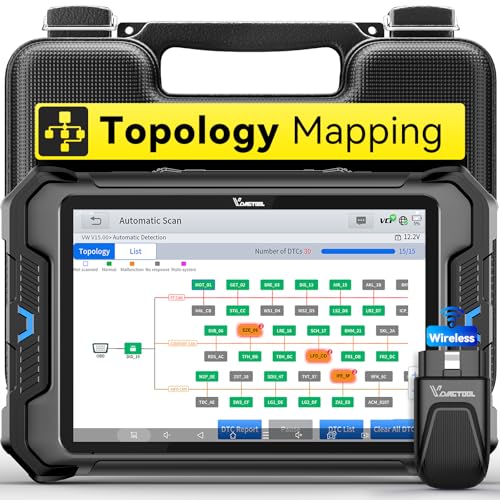
- Smarter Diagnostics, Broader Coverage, Greater Value Than $1,000+ Tools: The game-changing VD80BT OBD2 scanner delivers 4000+ active tests, 42+ hot services, advanced ECU coding, PMI & V.A.G Guided—all in one scanner for car. With OE-level full system scan and intelligent topology mapping that cuts diagnostic time by up to 50%, you'll work smarter and faster. Supporting FCA AutoAuth, CAN FD & DoIP protocols, this car scanner covers over 10,000 vehicle models worldwide. Built for serious pros and DIYers, it features 8" HD screen & 4+64GB storage, 7.3V fast charging with long-lasting battery, and 33–66ft stable wireless connection—making it the most complete diagnostic solution you’ll ever own
- Intuitive Topology Map, Fast Locate Faults: Why waste time clicking module by module? VD80BT car diagnostic scanner takes diagnostics to the next level with its intuitive Topology Map—a premium feature usually found in $1000+ obd scanner. With one tap, it performs all system scan and presents all modules and DTCs in a clear, color-coded layout, boosting diagnostic efficiency by up to 200% and helping you locate issues instantly and reduce repair time and costs. Whether you're a pro boosting efficiency or a beginner learning diagnostics, this obd2 scanner diagnostic tool makes fault-finding faster and smarter for you. Note: varies by vehicle model, please check compatibility before purchase
- Wireless Connectivity Simplifies Bi-Directional Control: With 4000+ active tests, including throttle reset, window calibration and solenoid check, VD80BT bidirectional scan tool lets you diagnose and verify functions faster, smarter, and more efficiently. This scanner for car redefines flexibility in bi-directional control through a fully wireless connection, freeing you from the constraints of wired car diagnostic tool in the workshop. Imagine actively controlling components like the A/C clutch, fuel injector, ABS pump, or radiator fan within a wireless range of 33–66ft around the vehicle—all while enjoying stable, high-speed wireless diagnostic and real-time data monitoring
- 42+ Hot Services, One Powerful Scanner for Car: Why pay a shop $100 just to reset a light? VD80BT car scanner diagnostic tool gives you 42+ hot services from basic resets to advanced maintenance tasks like Crank Sensor Relearn, Injector Coding, ABS Bleeding, Oil Reset, Throttle Relearn, EPB, BMS Reset, Tire Size Reset and more. Plus, it offers 100+ vehicle-specific features including Idle Relearn, VIN Write, Brake Fluid Replacement, Fuel Trim Reset, ABS Initialization and more. Whether you’re resetting TPMS or fixing a stubborn SAS, this car computer diagnostic reader delivers shop-grade precision at a fraction of the cost. Varies by model. Send VIN to verify compatibility before purchase
- OE-Level Full System Diagnostics in Your Hands: Dominate diagnostics like a dealership with VD80BT scan tool for all vehicles, delivering factory-grade scanning for aLL systems—including ABS, SRS, ECM, TCM and more. View up to 8 PID graphs simultaneously to quickly catch intermittent issues and troubleshoot with confidence. Easily read and clear DTCs, retrieve freeze frame data, and run active tests for faster, more accurate repairs. It’s like having a dealership-grade scan tool in your pocket, complete with data playback and CSV export for in-depth analysis. Stop guessing and start fixing with surgical precision—professional diagnostics made simple and portable. Check compatibility Please

- Affordable Solution for Professional-grade Car Diagnostics & Repair: As the budget-friendly OBD2 scanner under $300, the VD70 Lite car diagnostic tool offers 31+ hot resets, full bi-directional controls with 4000+ active tests, all system diagnostics, 8-in-One live data graphing (export as CSV Export/Recording/Playback), CAN FD & DoIP protocols, and long-term free update. Additional features include Auto VIN & Auto Scan, diagnostic report sharing/printing, with coverage for over 10,000 vehicle models worldwide, suitable for DIYers, Car Owners, Technicians, and Mechanics on car repairs and maintenance tasks.
- OBD2 Scanner with Full Bi-directional Control: The Bidirectional scan tool VIDAGTOOL VD70 Lite performs 4000+ active tests that can send execution commands to the ECU module and identify the repair status, covering for windows, doors, ABS, valves, wipers, headlights, rear mirrors, sunroof,and more in-vehicle components. This bidirectional OBD2 scanner is a must-have diagnostic tool for auto technicians and mechanics on a budget! The available function tests vary by model—please check compatibility via vdiagtool2 @ outlook . c o m before purchase.
- OE All Systems Diagnostics & 8-IN-One Data Graphing: VD70 Lite is a dealer-level car scanner diagnostic tool with Auto VIN that can do in-depth diagnostics for 100+ modern car brands, covering all systems including engine, transmission, airbag, ABS, ESP, TPMS, radio, etc, to read/clear code, view live data, freeze frame, and read ECU info. This advanced OBD2 Scanner with 8-in-one data graphing and detailed diagnostic reports makes data viewing more intuitive, ensures quickly accurate repairs by identifying issues, and easily masters the car situation.
- Stay Ahead with 31+ Reset for Faster & Easier Repairs: VDIAGTOOL VD70 Lite scanner for car meets almost all daily maintenance needs for both home mechanics and workshops as a professional automotive scan tool. It can perform Oil Reset, ABS Bleed, Crank Sensor Relearn, Idle Relearn, Injector Coding, Window Initialization, HVAC Calibration, Suspension Calibration, Throttle Matching, etc, ensuring efficient repairs and complete maintenance. Besides, long-term free updates keep its functionality and broad vehicle compatibility up to date. Functions vary by model, please send us the Vehicle Model, Year, VIN for compatibility before purchase.
- 150+ Models, 10000+ Car Coverage & 22 Languages:As a powerful car computer diagnostic tool, VD70 Lite helps you to quickly troubleshoot issues for 95% of US, European, and Asian vehicles. Supporting 22 languages makes it a global car diagnostic scanner for auto mechanics worldwide without language barriers. Note: Simply provide your tool’s S/N and reach out to vdiagtool2 @ outlook . c o m to change the menu language.
This product presentation was made with AAWP plugin.
Last update on 2026-06-05 / Affiliate links / Images from Amazon Product Advertising API