
NHTSA ID Number: 10065904
Manufacturer Communication Number: 13-BE-001
TSB/Document Date: 2016-05-19
Summary
SUMMARY TO BE PROVIDED ON A FUTURE DATE.
~ HYUnDRl l
GROUP
nEW THlnKlnG.
nEW POSSIBILITIES.
Technical Service Bulletin
SUBJECT:
NUMBER
13-BE-001
Electrical
DATE
JANUARY 2013
MODEL(S)
ALL 2010 - 2013MY
MULTI-MEDIA INTERFACE TESTER (MIT)
DESCRIPTION:
The MIT is used to confirm functionality of an Audio or NAV unit's ability to successfully do the following :
1) Connect to a Bluetooth enabled device.
2) Bluetooth streaming Audio (if supported by the head-unit)
3) Play USB music files through the USB port.
4) Play audio files via the AUX jack.
To confirm head-unit functionality , the MIT device plays an audio file corresponding to one of the
connection verifications that has been successfully completed. If an audio playback is heard
corresponding to the test attempted, the head-unit has passed the test.
Refer to the user manual stored on the MIT's internal memory for exact operational pass/fail.
Applicable Vehicles: 2010 - 2013MY vehicles equipped with Bluetooth hands-free head-unit, a USB jack
and/or an AUX jack.
J-50570
*NOTE
All instructions are stored in the MIT.
To read the instructions for language change , troubleshooting and
tech support, connect the USB cable to a PC and open the PDF file
stored within .
To order replacement tools, please call Bosch Automotive
Solutions Kent Moore at 1-800-345-2233.
Year
2010
Model
RadioT
e
Santa Fe, Tucson , Genesis
Coupe, Genesis Sedan
Base Audio , Touch Screen Navigation ,
Jog Dial (DIS)
2011
All
Base Audio, Touch Screen Navigation ,
Jog Dial (DIS)
2012
All
Base Audio ,AV, Touch Screen Navigation,
Jog Dial (DIS)
2013
All
Base Audio ,AV, Touch Screen Navigation,
Jog Dial (DIS)
Circulate To : General Manager, Service Manager, Parts Manager, Warranty Manager, Service
Advisors , Technicians, Body Shop Manager, Fleet Repair
MULTI-MEDIA INTERFACE TESTER (MIT)
PHONE PAIRING USING THE MIT
1
Disable all Bluetooth devices near or in the
vehicle.
2
Connect the USB of the MIT device to the
USB in the vehicle .
*Do not connect the AUX connector.
3
Press the test selector button until the LED
indicating Bluetooth is illuminated .
*This selects the Bluetooth connection test
4
Press and release the PAIR/CALL
button.
The LED will blink slowly while requesting to pair
to the vehicle.
5
6
Enter phone pairing mode on the headunit.
Once the head-unit recognizes the MIT, it
will display a 4 digit code on its' display
and the three LED indicator lights on the
MIT will blink.
7
Next enter the head-unit code with the
MIT keypad and press the ENTER button
on the MIT
8
The LED will blink slowly while pairing is
in progress and change to a quick flash
once pairing is successful.
*NOTE
A Touch Screen head-unit will be
shown as an example.
*The test outlined in this TSB applies
equally to an Audio only system.
TSB #: 13-BE-001
Page 2 of 4
MULTI-MEDIA INTERFACE TESTER
9
If Bluetooth pairing was successful using
the MIT, the head-unit will display its
normal connection pass/fail message .
1O
*Use the normal paired phone browse
method to vie w the MIT device
shown/registered in the head-unit as a paired
device.
MIT
*NOTE
If MIT is shown as illustrated in the
image, this is a Pass .
*De vices are able to pair to the head
unit.
AUDIO STREAMING USING THE MIT
(Not applicable for 2009-2012 Genesis Sedan and 2011-2013 Equus
equipped with Jog Dial (DIS) Audio System)
11
To confirm audio streaming is functional or
supported by the head-unit.
Complete steps 1-10.
12
13
Press the appropriate button to enable
streaming music playback (example , pressing
the MEDIA button on the head-unit will
change the audio source to phone streaming)
If the streaming audio test is successful , the
display on the head unit will change to
"PHONE" and the following audio
confirmation will be played back "The
Bluetooth pairing test using the streaming
audio profile is working correctly"
*NOTE
If audio playback is heard , this is a
Pass .
*Devices are able to pair then stream
music data to the head unit.
TSB # : 13-BE-001
Page 3 of 4
. .
MULTI-MEDIA INTERFACE TESTER (MIT)
USB PORT CONFIRMAITON USING THE MIT
14
To verify that the USB port is working
correctly.
Connect the MITs' USB to the vehicle USB
receptacle.
15
Press the appropriate button to initiate a
source change (example , pressing the
MEDIA button on the head-unit will change
the audio source to USB audio).
16
Audio playback will begin after the head-unit
changes source to USB audio.
*NOTE
If audio playback "The USB Audio
test using the MIT tester is working
correctly" is heard , this is a Pass .
* The USB port is working correctly.
AUX JACK CONFIRMATION USING THE M.l.T.
17
To verify that the AUX jack is working
correctly.
Connect the M.l.T.s' USB and AUX jack to
the vehicle 's receptacles.
18
Press the appropriate button to initiate a
source change (example , pressing the
MEDIA button on the head-unit will change
the audio source to AUX mode) .
*NOTE
If au
10 pay ac "The Audio Input
Jack test using the M.l.T tester is
working correctly" is heard , this is a
Pass .
* The USB port is working correctly.
TSB #: 13-BE-001
Page 4 of 4

- 💯【Conta.ct us for Support Directly】If you met any...
- 🔥🔥🔥【2026 AUTEL FLAGSHIP MK900BT MK900-BT, NEW...
- 🚗【3000+ ACTIVE TESTS (50➡3000+), SAME AS MS...
- 🚗【40+ HOT SERVICES FOR 150 MAKES (28+➡40+)】Full...
- 🚗【OE ALL SYSTEM DIAGNOSE, AUTO SCAN 2.0: SCAN LICENSE...


- 【TURN OFF CEL】 This AL319 car scanner diagnostic tool...
- 【EXTENSIVE APPLICATION】 Autel AL319 Compatible with...
- 【FOR END USER & DIYERS】 This error code reader AL319 is...
- 【USER-FRIENDLY DESIGN】 This OBD2 scanner and check...
- 【HIGH-QUALITY SERVICES】 12 months war.ranty from the...
Last update on 2026-06-21 / Affiliate links / Images from Amazon Product Advertising API
If the PDF is very large, it may not load in the preview below.
Some older TSBs had multiple PDFs — visit the NHTSA Website to view all PDFs.
If the TSB PDF does not show, download or view it on the NHTSA Website.
Click on the (+) Plus Sign
Then Click on Associated Document(s)
Search NHTSA Database for Recalls
Search NHTSA Database for Vehicle Investigations
View Latest Vehicle Investigations
Search NHTSA Database for Vehicle Complaints
View Latest Vehicle Complaints
TSB/Document ID: 13-BE-001
Replacement Service Bulletin Number:
MFR Communication Date: 2013-01-01
MFR Internal Campaign ID/Software Version:
Communication Type: Service Bulletin/Repair Instructions
NHTSA Components: ELECTRICAL SYSTEM
MFR Component System:
MFR Component Subsystem:
Previous TSB | Next TSB |

- Obd2 Bluetooth Scanner Lifetime Update: Ediag Elite offers revolutionary Advantage Lifetime Updates with unlimited access to the superior 15 reset service, bidirectional testing and full system diagnostics.The Ediag Elite is an excellent Bluetooth obd2 scanner diagnostic tool ideal for diy's and private car owners
- Bidirectional Control for Quickly Locating Problems: The Bidirectional Scan tool allows you to send commands directly from your smartphone to your vehicle for active testing. This feature helps to quickly narrow down problems such as air conditioning clutches, windows, doors, sunroofs, etc., reducing diagnostic time for mechanics and helping Diy users locate faults more easily. In addition, Ediag Elite provides fault analysis and repair guidance to help you solve problems efficiently.
- 15 Maintenance Resets: The current version introduces 15 popular special features: Oil Reset, Headlight Matching, Bleeding Reset, TPMS Reset, BMS Reset, Gear Box Relearn, Throttle Learning, Injector Coding, SAS Reset and more special functions in system diagnose menu. These functions make it easy for owners to carry out the necessary maintenance and servicing, ensuring that your vehicle stays in top condition, prolonging its service life and preventing common problems and breakdowns. Note: The Special function vary by model& year, Reach us check compatibility.
- Wide Compatibility CANFD & FCA
 Autoauth: Compatible with GM, Ford, Toyota, Chrysler, Honda, Mazda, Nissan, Mitsubishi, Hyundai, KIA with standard OBD2 port from 1996 to newer. More car brands and features will be released gradually. Newest Ediag Elite scanner supports CANFD Protocol and FCA cars. Note: Coverage may vary on different vehicle by model& year ,Please contact us to confirm compatibility before purchase.
 - Perfect for Monitoring The Health of Your Vehicle: Ediag Elite is designed to make vehicle maintenance simple and efficient. With intelligent AutoVIN quick recognition, it is easy to connect to your car without the need for manual input. Real-time data is visualized in a variety of formats, including graphs, numeric, meter displays and clear 4-in-1 data charts, allowing you to effortlessly monitor real-time data. Data logging/reporting is available for playback and further analysis.
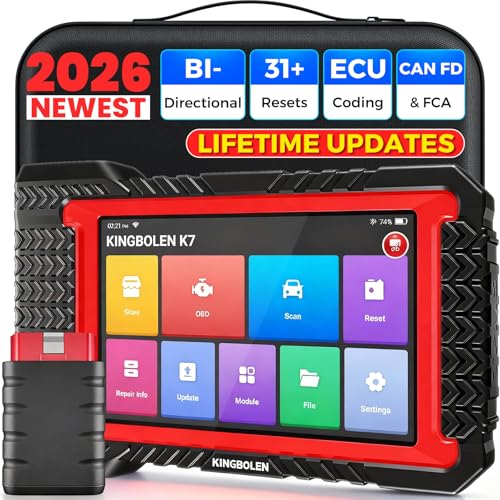
- No Annual Fees & 2026 Upgraded CAN FD: Why pay $199/year or more for updates? The 2026 newest Kingbolen K7 obd2 scanner features have been upgraded to Lifetime Updates without subscription fees, saving you significant costs in the long run. K7 scan tool also adds the CAN FD protocol for the latest GM models (2019+), enabling faster data transfer, reducing the risk of undetected errors
- 2026 Newest Top-tier Car Scanner: Kingbolen K7 diagnostic scan tool is equipped with most capabilities for daily repair/maintenance: Wireless diagnosis via Bluetooth, Bidirectional Test, ECU Online/Offline Code, 31+ Resets, PMI for Ford, Lincoln, Mazda, Global version for 100+ brand vehicles and 17 languages, no area limit, FCA AutoAuth
- OE-Level Full Systems Scan Tool: K7 professional diagnostic scanner with Auto Vin can do one-click to scan ECUs on most of vehicles, like pcm, ecm, eps, bcm, tpms, sas, a/c system... to read/clear code, view live data, freeze frame, read ecu info. 4-in-1 data stream graphics can make data viewing more intuitive. Detailed diagnostic reports will help you easily master the car situation as it can be shared by bluetooth or email! Adding workshop information can help your customers to know more
- Bidirectional Test/Active Test & ECU Code: Stop guessing and start fixing. Bidirectional scan tool Kingbolen K7 can perform real active test that can send commands to the vehicle's ECU to drive the actuators to work, like window, rear mirrors, sunroof, door, solenoids, wipers, headlamp, etc, helping you quickly find out bad parts and pinpoint faulty issues. K7 bidirectional scanner will be a good choice to save money and time on car repairs when performing complex maintenance and repair
- 31 Reset Functions: Avoid expensive dealership visits for simple services. Experience tells us that just a small repair service may cost a lot of money. Kingbolen K7 is a professional diagnostic scanner with 31 common maintenance services like Oil /SAS/EPB/TPMS Reset, Battery Matching, ABS Bleeding, Injector Code, etc. It effectively handles most of the car reset and relearning jobs, perfect for experienced DIYers and mechanics. Note: Functions in the menu vary across vehicles. Kindly check the compatibility before purchase
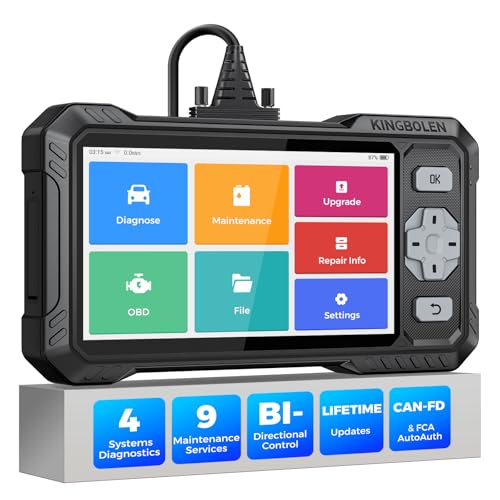
- WHY S608 STANDS OUT:2026 Kingbolen S608 is the only scanner <200 bucks that offers powerful active tests on Engine, ABS, SRS, and Transmission systems. Offers 9 resets,Covers 110+ global brands with a 6.2'' larger touchscreen
- KINGBOLEN'S NEW BIDIRECTIONAL SCAN TOOL: As the 2026 upgraded version of S600, our Newest S608 obd2 scanner has the powerful Bi-directional Control on Engine, ABS, SRS, and Transmission systems. It can send commands to the ECUs of actuators for functional tests and work status checks, such as ABS, fuel injectors, adjusting throttle, coolant pumps, EVAP test, fuel trim reset, etc. No more Guesswork. Quickly identify problem components without teardown, get fuss-free results in seconds.
- 【9 HOT RESET SERVICES CAR SCANNER】Tired of costly mechanic trips for common resets? The Kingbolen S608 obd2 scanner lets you do it yourself, even for beginners—quickly and effortlessly! It offers 9 hot reset functions: Oil/EPB Reset, ABS Bleeding, SAS Calibration, DPF Regeneration, Injector Coding, BMS Matching, Throttle Adaptation, Gear Learning. Stop paying mechanics for 5-minute jobs. Save hundreds per year! 🚗*Function vary from vehicle models. reach us to check compatibility firstly!
- 【4 SYSTEM DIAGNOSTIC TOOL + FULL OBDII FUNCTIONS】Kingbolen S608 is an OBDII scanner and 4 systems diagnostic tool made for home mechanics, DIYers, and professionals. You can access Engine, ABS, SRS, Transmission fault codes, track live data in graphs, and onboard DTC library lookup to find the right troubleshooting procedure, and diagnose with full 10 OBD2 test modes to fix most of emission issues. Give your aging cars routine maintenance to avoid costly repairs, a breakdown, or even a crash.
- 【NEW CAN FD, FCA/RENAULT SGW, 140+ BRANDS】Kingbolen S608 scanner for car supports 140+ vehicle brands, 100,000+ models, 28 languages and can be used worldwide. S608 stays up-to-date with modern vehicles, allows secure access to 2017+ FCA cars and 2015+ Renault cars (📢*Need to purchase an AutoAuth/Renault account by yourself), and supports the latest CAN-FD protocol for 2019+ GM/Chrysler, enabling 2X faster data transfer and more precise diagnostics. 🚗*Check compatibility before purchase.
Last update on 2026-06-21 / Affiliate links / Images from Amazon Product Advertising API
This product presentation was made with AAWP plugin.