
NHTSA ID Number: 10065381
Manufacturer Communication Number: 2027718/3
TSB/Document Date: 2016-05-19
Summary
SUMMARY TO BE PROVIDED ON A FUTURE DATE.
If the PDF is very large, it may not load in the preview below.
Some older TSBs had multiple PDFs — visit the NHTSA Website to view all PDFs.
If the TSB PDF does not show, download or view it on the NHTSA Website.
Click on the (+) Plus Sign
Then Click on Associated Document(s)

- 💝【Questions? We’re Here Anytime】MK808S is a...
- 🔥🔥🔥【2026 NEWLY RELEASED BI-DIRECTIONAL...
- 【28+ MOST POPULAR RESET SERVICE FOR 150 MAKES】Autel...
- 【ALL SYSTEM DIAGNOSTICS, FACTORY-LEVEL SCANNER】The...
- 【AUT0 SCAN & AUT0V1N, 10X FASTER】How much have you spent...


- 💯【Conta.ct us for Support Directly】If you met any...
- 🔥🔥🔥【2026 AUTEL FLAGSHIP MK900BT MK900-BT, NEW...
- 🚗【3000+ ACTIVE TESTS (50➡3000+), SAME AS MS...
- 🚗【40+ HOT SERVICES FOR 150 MAKES (28+➡40+)】Full...
- 🚗【OE ALL SYSTEM DIAGNOSE, AUTO SCAN 2.0: SCAN LICENSE...
This product presentation was made with AAWP plugin.
Search NHTSA Database for Recalls
Search NHTSA Database for Vehicle Investigations
View Latest Vehicle Investigations
Search NHTSA Database for Vehicle Complaints
View Latest Vehicle Complaints
TSB/Document ID: 2027718/3
Replacement Service Bulletin Number:
MFR Communication Date: 2012-11-12
MFR Internal Campaign ID/Software Version:
Communication Type: Service Bulletin/Repair Instructions
NHTSA Components: ELECTRICAL SYSTEM
MFR Component System:
MFR Component Subsystem:
Previous TSB | Next TSB |
Technical Service Bulletin
91 Bluetooth call quality issues for caller on other end of call
91 12 68 2027718/3 November 12, 2012. Supersedes Technical Service Bulletin Group 91 number 12-53 dated
August 6, 2012 for reasons listed below.
Model(s)
Year
2011-2013
A6/A7
2011-2013
A5 CAB
2011-2013
TT
VIN Range
Vehicle-Specific Equipment
N/A
Bluetooth Hands-Free Calling
Condition
REVISION HISTORY
Revision
Date
Purpose
3
-
Revised Warranty (Adjusted TUs)
2
8/6/2012
Revised Service
1
10/25/2011
Original publication
The driver’ s voice is difficult to clearly understand by the caller on the other end of the call when using the
Bluetooth hands-free telephone system. The driver’ s voice sounds muffled, as if you are hearing them while
under water.
Technical Background
The microphone seal is damaged during installation in to the roof module.
Production Solution
Improved microphone installation procedure and optimized microphone seal staring with January 2012 vehicle
production. Microphones with improved seals are at the 03S level or greater.
Page 1 of 10
© 2012 Audi of America, Inc.
All rights reserved. Information contained in this document is based on the latest information available at the time of printing and is subject to the copyright and other intellectual property rights
of Audi of America, Inc., its affiliated companies and its licensors. All rights are reserved to make changes at any time without notice. No part of this document may be reproduced, stored in a
retrieval system, or transmitted in any form or by any means, electronic, mechanical, photocopying, recording, or otherwise, nor may these materials be modified or reposted to other sites, without
the prior expressed written permission of the publisher.
Technical Service Bulletin
Service
1.
Ensure the customer’ s phone is listed in the Audi Bluetooth approved list located on the
www.audiusa.com/bluetooth website. Not all Bluetooth call quality issues can be attributed to the
microphone. OEM phone manufacturers use different types of Bluetooth chipsets and software which
have different characteristics (i.e. timing of timeouts) and as a result these differences can also affect the
Bluetooth connection stability and call quality.
For TT/A5 Cabriolet only: Road test the vehicle prior to repairs. Drive with the top and windows up and at
a speed of 45mph or greater if possible. Make a Bluetooth call to someone back at the workshop to verify
the call quality issue. Make sure the same person will be available for you to call back the next day once
the repairs are completed to verify the call quality improvement.
2.
Remove the roof module from the vehicle according to the instructions in the ElsaWeb Repair Manual.
Repair Manual>>Electrical System>>Electrical Equipment>>96 Interior Lights, Switches>>Removal and
Installation>>Roof Trim Lamps and Switches
3
Do Not Remove the microphone from the roof module at this step! The next step is to remove the
decorative trim plate from the roof module. This will allow you to inspect the seal of the microphone as it
was installed at the factory.
a
For the A6 and A7 vehicles, first attempt to use your fingers to pry the decorative trim from the
base plate. If this does not work then gently use a trim stick/bone tool to pry the decorative trim
from the base plate and finish it with your fingers. There are a different number of clips holding
the trim plate on to the base plate depending on the trim level of the vehicle (i.e. high-line roof
module vs. low-line roof module; see Figure 1 & 2).
Page 2 of 10
© 2012 Audi of America, Inc.
All rights reserved. Information contained in this document is based on the latest information available at the time of printing and is subject to the copyright and other intellectual property rights
of Audi of America, Inc., its affiliated companies and its licensors. All rights are reserved to make changes at any time without notice. No part of this document may be reproduced, stored in a
retrieval system, or transmitted in any form or by any means, electronic, mechanical, photocopying, recording, or otherwise, nor may these materials be modified or reposted to other sites, without
the prior expressed written permission of the publisher.
Technical Service Bulletin
Figure 1. A6, A7 High line roof module.
Figure 2. A6, A7 Mid line roof module.
Page 3 of 10
© 2012 Audi of America, Inc.
All rights reserved. Information contained in this document is based on the latest information available at the time of printing and is subject to the copyright and other intellectual property rights
of Audi of America, Inc., its affiliated companies and its licensors. All rights are reserved to make changes at any time without notice. No part of this document may be reproduced, stored in a
retrieval system, or transmitted in any form or by any means, electronic, mechanical, photocopying, recording, or otherwise, nor may these materials be modified or reposted to other sites, without
the prior expressed written permission of the publisher.
Technical Service Bulletin
b
For the TT/A5 Cabriolet vehicles, the decorative
trim plate should only be pried from the base plate
after the LED circuit boards are removed from the
plastic LED jewels. If this is not done prior to
removing the trim, the plastic LED jewels can break
and cause a rattle once the roof module is
reassembled. As seen in Figure 3, first pry up on
the top of the small circuit-board in direction
indicated by arrow 1 (away from LED Jewel). It will Figure 3. Prying the LED circuit-board of the jewel.
only need to be lifted about 1-2mm, then pull up on
the circuit-board in the direction indicated by arrow
2. This will release the circuit-board from the clear
LED jewel. Repeat for the other side. Figure 4
shows the three attachment points of the LED
Circuit board to the LED jewel.
Figure 4. LED jewel attachment points.
Page 4 of 10
© 2012 Audi of America, Inc.
All rights reserved. Information contained in this document is based on the latest information available at the time of printing and is subject to the copyright and other intellectual property rights
of Audi of America, Inc., its affiliated companies and its licensors. All rights are reserved to make changes at any time without notice. No part of this document may be reproduced, stored in a
retrieval system, or transmitted in any form or by any means, electronic, mechanical, photocopying, recording, or otherwise, nor may these materials be modified or reposted to other sites, without
the prior expressed written permission of the publisher.
Technical Service Bulletin
c
Once the LED jewels are free from the circuitboards, the decorative trim plate can now be pried
apart from the base plate. This can be
accomplished by using your fingers and slowly
prying the two pieces apart. There are many clip
points along the edge holding the two halves
together, thus slowly sliding your finger all the way
around the perimeter between the trim plate and
base plate is the easiest and most effective way to
separate the two parts without damaging them.
Note:
The use of a bone tool or screw driver is not
recommended for this roof module assembly
because it can damage the soft touch paint on the
edge of the decorative trim. Damage to paint on
the sides of the trim can be visible once the part is
Figure 5. Prying the trim plate from the base plate.
reinstalled in the headliner.
4.
Inspect the seal of the microphone for damage.
There are two normal splits in the rubber seal. This
is normal as long as the two halves of the seal are
touching each other. If they are loose and move
freely then this indicates damage to the seal.
Figure 6 illustrates an undamaged seal and Figures
7 and 8 illustrate damaged seals.
Figure 6. Undamaged seal.
Page 5 of 10
© 2012 Audi of America, Inc.
All rights reserved. Information contained in this document is based on the latest information available at the time of printing and is subject to the copyright and other intellectual property rights
of Audi of America, Inc., its affiliated companies and its licensors. All rights are reserved to make changes at any time without notice. No part of this document may be reproduced, stored in a
retrieval system, or transmitted in any form or by any means, electronic, mechanical, photocopying, recording, or otherwise, nor may these materials be modified or reposted to other sites, without
the prior expressed written permission of the publisher.
Technical Service Bulletin
Figure 8. Damaged seal, example 2.
Figure 7. Damaged seal, example 1.
5.
If any seals are damaged, replace the microphone
set. Install the replacement microphone with the
decorative trim removed from the base plate. This
will allow you to inspect the new microphone seal
after it has been snapped in to place. Take care
when doing so to prevent any damage to the new
microphone’ s rubber seal. Installing it
perpendicular to the base plate, and doing so
slowly, will help prevent any damage to the seal.
Figure 9 illustrates the proper installation technique
and Figures 10 and 11 illustrate the improper
installation of a microphone. Figure 12 shows the
resultant damage of improper installation.
Figure 9. Proper installation.
Page 6 of 10
© 2012 Audi of America, Inc.
All rights reserved. Information contained in this document is based on the latest information available at the time of printing and is subject to the copyright and other intellectual property rights
of Audi of America, Inc., its affiliated companies and its licensors. All rights are reserved to make changes at any time without notice. No part of this document may be reproduced, stored in a
retrieval system, or transmitted in any form or by any means, electronic, mechanical, photocopying, recording, or otherwise, nor may these materials be modified or reposted to other sites, without
the prior expressed written permission of the publisher.
Technical Service Bulletin
Figure 10. Installing microphone at an angle.
Figure 11. Seal may be pinched.
Figure 12. Damage caused by pinched seal.
6.
If the seals are not damaged, ensure the microphones are firmly seated. There should be a loud snap
heard and felt when the microphone is fully seated.
Page 7 of 10
© 2012 Audi of America, Inc.
All rights reserved. Information contained in this document is based on the latest information available at the time of printing and is subject to the copyright and other intellectual property rights
of Audi of America, Inc., its affiliated companies and its licensors. All rights are reserved to make changes at any time without notice. No part of this document may be reproduced, stored in a
retrieval system, or transmitted in any form or by any means, electronic, mechanical, photocopying, recording, or otherwise, nor may these materials be modified or reposted to other sites, without
the prior expressed written permission of the publisher.
Technical Service Bulletin
7.
For TT/A5 Cabriolet only: Visually inspect the
round felt material on the underside of the
decorative trim (Figure 13). This felt material
pushes against the microphone’ s rubber seal and
forms a barrier. If the material is bunched up and
off center it can potentially cause an issue with the
call quality by allowing unwanted noise to reach the
Figure 13. Felt on backside of decorative trim.
microphone. Replace the decorative trim
according to ETKA if damage is found with the felt
material or if the felt is not centered perfectly.
8.
For TT/A5 Cabriolet only: Before installing the new
microphone, partially pull out the foam which is
inserted inside the microphone (Figure 14). This
will allow for a better seal against the felt material.
Figure 14. Foam is partially pulled out of the
microphone.
9.
For TT/A5 Cabriolet only: Road test the vehicle with the top up at a speed greater than 45mph if
possible. Call the same person back at the workshop so they can verify the improved sound quality. If
you still feel the sound quality is poor please contact the Technician’ s Assistance Center helpline.
Page 8 of 10
© 2012 Audi of America, Inc.
All rights reserved. Information contained in this document is based on the latest information available at the time of printing and is subject to the copyright and other intellectual property rights
of Audi of America, Inc., its affiliated companies and its licensors. All rights are reserved to make changes at any time without notice. No part of this document may be reproduced, stored in a
retrieval system, or transmitted in any form or by any means, electronic, mechanical, photocopying, recording, or otherwise, nor may these materials be modified or reposted to other sites, without
the prior expressed written permission of the publisher.
Technical Service Bulletin
10. If the seals and microphones are installed properly, continue with diagnosis.
Refer to TSB 2026895, 91 Microphone testing tips and TSB 2026888, 91 Bluetooth Phone: Poor call
quality.
Warranty
Claim Type:
Use applicable claim type. If vehicle is outside any warranty, this Technical Service
Bulletin is informational only.
Service Number:
9157
Damage Code:
0010
Labor Operations:
Remove and install interior light.
9620 1900
See Elsa Web for
TUs
Remove and install telephone microphones.
9157 1950
10 TU
Extended Road Test before and after repair
9157 9999
A-Time (Not to
exceed 40 TU)
Diagnostic Time:
GFF
No allowance
0 TU
Road test prior to service procedure
No allowance
10 TU
Road test after service procedure
No allowance
10 TU
Technical diagnosis at dealer’ s discretion
(Refer to Section 2.2.1.2 and Audi Warranty Online for DADP allowance details)
Claim Comment:
As per TSB # 2027718/3
All warranty claims submitted for payment must be in accordance with the Audi Warranty Policies and Procedures
Manual. Claims are subject to review or audit by Audi Warranty.
Page 9 of 10
© 2012 Audi of America, Inc.
All rights reserved. Information contained in this document is based on the latest information available at the time of printing and is subject to the copyright and other intellectual property rights
of Audi of America, Inc., its affiliated companies and its licensors. All rights are reserved to make changes at any time without notice. No part of this document may be reproduced, stored in a
retrieval system, or transmitted in any form or by any means, electronic, mechanical, photocopying, recording, or otherwise, nor may these materials be modified or reposted to other sites, without
the prior expressed written permission of the publisher.
Technical Service Bulletin
Required Parts and Tools
Part Number
Part Description
Quantity
See ETKA
Microphone
1
Additional Information
The following Technical Service Bulletin(s) may be necessary to complete this procedure:
•
TSB 2026895, 91 Microphone testing tips
•
TSB 2026888, 91 Bluetooth Phone: Poor call quality
All parts and service references provided in this TSB are subject to change and/or removal. Always check with
your Parts Department and service manuals for the latest information.
Page 10 of 10
© 2012 Audi of America, Inc.
All rights reserved. Information contained in this document is based on the latest information available at the time of printing and is subject to the copyright and other intellectual property rights
of Audi of America, Inc., its affiliated companies and its licensors. All rights are reserved to make changes at any time without notice. No part of this document may be reproduced, stored in a
retrieval system, or transmitted in any form or by any means, electronic, mechanical, photocopying, recording, or otherwise, nor may these materials be modified or reposted to other sites, without
the prior expressed written permission of the publisher.

- 🎉[OTOFIX D1 Lite, Perfect Cost-effective Diagnostic Tool]: OTOFIX D1 Lite, a newest bidirectional scan tool from OTOFIX company, is a great choice for DIYers and repair shops. 👉This obd2 scanner diagnostic tool packs all practical functions: OE level all systems diagnoses, Bi-Directional Control, 38+ reset services fixing 99% of common problems, support DoIP & CANDF protocols and FCA
 AutoAuth, high-end hardware configuration. Worldwide vehicles and 🔥2 Years Free Updating🔥 covered.
 - 🎉[Bi-Directional Scan Tool, Active Test]: OTOFIX D1 Lite bluetooth obd2 scanner can also command ECUs and monitor the operation of the actuators to track down the problems of certain parts, like windows, sunroof, wipers, fuel pumps, etc., saving repair time & trouble. This makes OTOFIX D1 Lite the most cost-effective bidirectional scan tool.
- 🎉[2026 Newest, 38+ Hot Reset Functions]: Equipped with 38+ reset functions in one, the OTOFIX D1 lite automotive scanner diagnostic tool allows you to troubleshoot 99% of common vehicle problems. You can use this car diagnostic scanner holding enough functions to easily repair common vehicle models in your repair shops. Including Oil Reset, Injector Coding, Throttle, DPF Reset, SCR Reset, Gear Learning, Clutch Learning, Suspension, etc. Note* Reset functions vary by model.
- 🎉[OE Level Full Systems Diagnostics]: Unlike the 2-system and 4-system diagnostic tools, the OTOFIX auto scan tool can complete comprehensive system diagnostics within 5 minutes. It accesses and scans all available onboard systems like for Engine /AT /ABS /EPB /BMS /TPMS /SRS /SAS /Audio System /BCM /Air Conditioning / etc., to read & clear codes, view live data, and check ECU information. Note: Active test is not involved.
- 🎉[Powerful Hardware Configuration]: Designed with a fashion appearance & a 7” touchscreen and a weight of 463g, this OTOFIX D1 Lite OBD2 diagnostic scanner scan tool is convenient for everywhere and easy to use & store. Android9.0 OS and 2+64GB memory enhance multi-task smoothness and diagnostic operation, no more wasting too much time. 5800mAh battery allows hours-lasting use. WiFi & VCI1 also bring faster communication for your diagnostics.

- 🏆【2026 TOP OBD2 Scanner Diagnostic Tool】OTOFIX D1 Lite wireless obd2 scanner has upgraded hardware configuration and car coverage. The newly upgraded D1 Lite with 🔥OS Android 9.0🔥1.5Ghz 4 core high efficiency processor🔥2GB RAM+64GB ROM large storage🔥5800mAh large battery, more stable and longer lasting diagnostics🔥 38+ Reset🔥action tests🔥full system diagnostic🔥Supports MV105 endoscope🔥21+ Language Supports🔥100000+ vehicle coverage to meet all your daily maintenance needs.
- 👍【Bi-Directional Control / Active Test】D1 Lite obd2 scanner has bidirectional control(worth $300+), which is the most beloved feature among mechanic. If your headlights or car windows are broken, going to a repair shop will cost a lot of money. You can use D1 Lite to send execution commands to the ECU module and identify the repair status. Such as ABS, car windows, doors, valves, wipers, headlights, etc., effectively shorten diagnostic time and reduce diagnostic costs.
- 🔥【All Systems Diagnostics, In-depth Checking】This advanced OBD2 Scanner D1 Lite can perform OE-level diagnosis of all systems including engine, transmission, airbag, ABS, ESP, TPMS, gateway, steering, radio, and air conditioning for more than 100 brands. This diagnostic scanner supports essential functions, such as reading ECU version info, reading and clearing fault codes, and reading data streams.With just a simple click, it provides you with accurate and in-depth diagnostics.
- 🏆【38+ Reset Hot Functions】For repair workshops, holding an OTOFIX D1 Lite Auto scanner is a strong advantage over others. Its 38+ maintenance functions provide various solutions for all module repairs, including Oil Reset, TPMS Reset, Injector Coding, Suspension, Throttle Matching, etc., which will usher your repair business to a new pinnacle. Continuously updating will never make the functionality & compatibility out-of-date.
- 🏆【150+ Models, 10000+ Car Coverage & 16 Languages】D1 Lite is a comprehensive car diagnostic scan tool, help you to troubleshoot car issues fast for 95% US, European, Asian auto makes. ✅ With frequent updates and optimizations allow D1 Lite to cover more vehicles to meet your needs. ✅ Multilingual menu allows auto mechanics around the world to use it without language barriers. 🚩Note: Kindly send us the S/N of the device to authorize new language updates before changing the menu language.
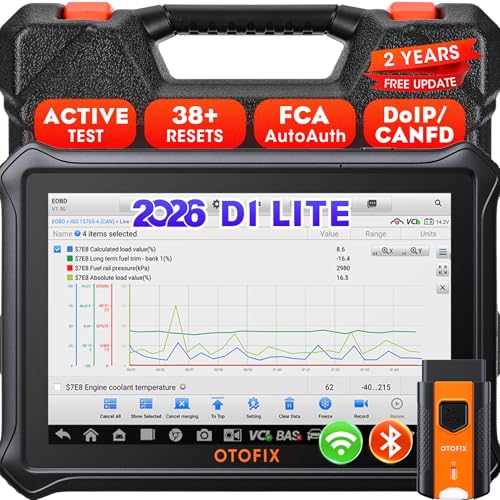
- 【2026 OTOFIX D1 Lite Gives the Best Value for Money】OTOFIX D1 Lite bidirectional scan tool is more FASTER and SMARTER with 2026 Enhanced Hardwares & New Functions! 👍Alternative Bluetooth +USB connect 👍2G+64GB 👍4x ARM Cortex-A35 (1.5GHz) Processor (5X Faster CPU) 👍Android 9.0 OS 👍5G GHz WiFi 👍CANFD&DOIP 👍 FCA AutoAuth 👍38+ Services 👍3K+ Bi-Directional Control 👍Full Systems Diagnose 👍2 Years Update 👍150+ Vehicle Coverage.
- 👍【Active Tests】 OTOFIX D1 Lite is a bi-directional scan tool that can send commands to, and also receive information from vehicle control modules. This way, you can quickly locate and repair faulty auto parts. For Example: send direct commands to ask the vehicle to turn on/off the radiator fan, lights, sound horn, fuel pump, modulate throttle, open/close windows, operate mirrors and more. *Note that only available tests will be displayed in the menu.
- 👍【38+ Service Functions】 OTOFIX D1 Lite scan tool offers 38+ of the hottest service functions that are commonly used for car repairs. That include Oil reset/SAS/EPB/BMS/Throttle/ABS bleeding, and 2065-new SUS/ADBLUE/NOX/Headlamp resets (and more) to help restore your car status after repairs are done. Compared to other diagnostic scanners for cars, the OTOFIX D1 Lite scanner is much more fully-featured. *Note that specific functions available depend on the make/model/year of your car.
- 👍【All System Diagnostics + Cloud Report Management】 This 2026 car scanner OTOFIX D1 Lite provides troubleshooting and data for all ECUs: read/clear DTCs, view graphic live data/VIN, and locate system faults for safe driving. With Cloud Report Management, you can save detailed reports to cloud servers and easily shared them with others via QR codes/emails/text messages. Others can access these reports from any device (smartphones/tablets/PCs …) anytime, and you can better manage repair work.
- 👍【99% Car Coverage】 This one-station car scanner diagnostic for all cars works on 150+ major car brands across the world. 1) It supports CAN-FD/DoIP protocols: compatible with GMCAVALIER/TRAX/Encore/Envision/GL8(LSY)/CT4/CT5 after 2019; Volvo after 2018; Land Rover/Jaguar after 2017; and BM.W F/G all chassis. 2) For models equipped with security modules (such as Renault & 2018+ FCA SGW), its built-in AutoAuth allows you to easily break diagnostic barriers after registration.
This product presentation was made with AAWP plugin.
Last update on 2026-05-13 / Affiliate links / Images from Amazon Product Advertising API