
NHTSA ID Number: 10065321
Manufacturer Communication Number: DVD139-02-V185J
TSB/Document Date: 2016-05-13
Summary
SUMMARY TO BE PROVIDED ON A FUTURE DATE.
If the PDF is very large, it may not load in the preview below.
Some older TSBs had multiple PDFs — visit the NHTSA Website to view all PDFs.
If the TSB PDF does not show, download or view it on the NHTSA Website.
Click on the (+) Plus Sign
Then Click on Associated Document(s)

- 💝【Questions? We’re Here Anytime】MK808S is a...
- 🔥🔥🔥【2026 NEWLY RELEASED BI-DIRECTIONAL...
- 【28+ MOST POPULAR RESET SERVICE FOR 150 MAKES】Autel...
- 【ALL SYSTEM DIAGNOSTICS, FACTORY-LEVEL SCANNER】The...
- 【AUT0 SCAN & AUT0V1N, 10X FASTER】How much have you spent...


- 💯【Conta.ct us for Support Directly】If you met any...
- 🔥🔥🔥【2026 AUTEL FLAGSHIP MK900BT MK900-BT, NEW...
- 🚗【3000+ ACTIVE TESTS (50➡3000+), SAME AS MS...
- 🚗【40+ HOT SERVICES FOR 150 MAKES (28+➡40+)】Full...
- 🚗【OE ALL SYSTEM DIAGNOSE, AUTO SCAN 2.0: SCAN LICENSE...
This product presentation was made with AAWP plugin.
Search NHTSA Database for Recalls
Search NHTSA Database for Vehicle Investigations
View Latest Vehicle Investigations
Search NHTSA Database for Vehicle Complaints
View Latest Vehicle Complaints
TSB/Document ID: DVD139-02-V185J
Replacement Service Bulletin Number:
MFR Communication Date: 2014-09-01
MFR Internal Campaign ID/Software Version:
Communication Type: Service Bulletin/Repair Instructions
NHTSA Components: ELECTRICAL SYSTEM:SOFTWARE
MFR Component System:
MFR Component Subsystem:
Previous TSB | Next TSB |
SDD SOFTWARE
UPDATE
REF: DVD 139 – 02 CALIBRATION FILE V.185
BRASIL
Use a lista adjacente para selecionar o idioma desejado
简体中文
使用此列表选择您需要的语言
NEDERLANDS
Gebruik de lijst om de gewenste taal te selecteren.
ENGLISH
Use the list to select the language you require
FRANÇAIS
Sélectionnez dans la liste la langue souhaitée.
DEUTSCH
Wählen Sie die gewünschte Sprache aus der Liste aus.
ITALIANO
Utilizzare la lista per selezionare la lingua desiderata
日本語
リストを使用し、必要な言語を選択してください。
한국어
다음 목록을 사용하여 원하는 언어를 선택하십시오.
PORTUGUÊS
Use a lista ao lado para seleccionar a língua que necessita
РУССКИЙ
ESPAÑOL
Используйте прилагаемый список для выбора требуемого языка.
Seleccione en la lista el idioma que desee
Page 1 of 15
SDD SOFTWARE
UPDATE
REF: DVD 139 – 02 CALIBRATION FILE V. 185
DATE: 8/2014
USE GUIDANCE:
ALL SDD USERS MUST INSTALL THESE UPDATES
Updates consist of SDD Software Updates (Patches/DVDs) and Calibration File releases.
The number after the DVD reference in the header indicates the software update level - 00, 01, 02 etc.
The Calibration File version indicates the current release of the vehicle calibration file databases.
Current Installed Software levels can be checked via Settings – System information.
Updates can be triggered via Settings – System Utilities
For further information on keeping your software updated please refer to the information on TOPIx.
FAILURE TO FOLLOW THESE INSTRUCTIONS MAY RESULT IN COMPROMISE OF WARRANTY
CLAIMS AND CUSTOMER SATISFACTION
Introduction:
This document contains important information, as it describes the content of the DVD software update
referenced in the header; please ensure that all users of the SDD diagnostic platform are made aware of its
content.
SIZE:
02: 106 MB
NOTE: Before you install Software update 02, the updates listed below must be
installed:
DVD 139
Software update 01
SDD Updates
This release also includes the latest SDD mapping
Page 2 of 15
ATUALIZAÇÃO DE
SOFTWARE DE SDD
REF: DVD 139 – 02 ARQUIVO DE CALIBRAGEM V.185 DATA: 8/2014
DIRETRIZES DE USO:
TODOS OS USUÁRIOS DO SDD DEVEM INSTALAR ESTAS ATUALIZAÇÕES
As atualizações envolvem versões do software SDD (patches/DVDs) e do Arquivo de Calibragem.
O número depois da referência do DVD no cabeçalho indica o nível de atualização do software: 00, 01,
02, etc.
A versão do Arquivo de Calibragem indica a versão atual dos bancos de dados dos arquivos de
calibragem do veículo.
A versão do software atualmente instalado pode ser verificada no caminho Configurações
– Informações do Sistema.
As atualizações podem ser executadas no caminho Configurações – Utilitários do Sistema
Para mais informações sobre como manter o software atualizado, consulte o Topix.
A NÃO OBSERVÂNCIA DESTAS INSTRUÇÕES PODE COMPROMETER AS SOLICITAÇÕES DE
GARANTIA E A SATISFAÇÃO DO CLIENTE
Introdução:
Este documento contém informações importantes, descrevendo o conteúdo da atualização do software no DVD
mostrado no cabeçalho; certifique-se de que todos os usuários da plataforma de diagnóstico SDD tenham
ciência do seu conteúdo.
SIZE:
02: 106 MB
OBSERVAÇÃO: antes de instalar a atualização 02 do software, as atualizações
listadas abaixo devem estar instaladas:
DVD 139
Atualização de software 01.
Atualizações do SDD
Esta versão também inclui o mapeamento do SDD mais recente
3/15
SDD 软件更新
主题: DVD 139 – 02 校验文件 V. 185
日期: 2014 年 8 月
使用指南:
所有 SDD 用户都必须安装这些更新内容
更新内容包含 SDD 软件更新(补丁文件/DVD)和校验文件版本。
关于 DVD 之后的序号,请参考顶部指示的软件更新级别 — 00、01、02 等等。
校验文件版本指示了车辆校验文件数据库的当前版本。
当前安装的软件级别可通过设置 – 系统信息来确认。
可通过设置 – 系统实用程序来触发启用更新。
关于软件持续更新的更多信息,请参考 Topix 上的相关信息。
不遵守这些说明可能导致您的保修索赔失败和客户满意度下降
简介:
此文档包含了重要信息,其描述了首页所引用的 DVD 软件更新的内容;请确保 SDD 诊断平台的所有用户都
熟悉其内容。
SIZE:
02: 106 MB
注意:在安装软件更新 02 前,必须先安装以下更新:
DVD 139
软件更新 01
SDD 更新
此版本还包含最新的 SDD 链接
4/15
UPDATE
SDD-SOFTWARE
BETREFT: DVD 139 – 02 KALIBRATIEBESTAND V. 185
Datum: 8/2014
AANWIJZINGEN VOOR GEBRUIK:
ALLE SDD-GEBRUIKERS MOETEN DEZE BIJWERKBESTANDEN INSTALLEREN
Het bijwerken omvat
kalibratiebestanden.
bijgewerkte
SDD-software
(bijwerkbestanden/dvd’s)
en
uitgaven
van
Het getal achter de DVD-referentie in de kop geeft het softwarebijwerkniveau, 00, 01, 02 enz., aan.
De versie van het kalibratiebestand geeft de huidige uitgave van de kalibratiebestand-databases voor het
voertuig aan.
U kunt de op dat moment geïnstalleerde software-niveau’s controleren via Instellingen –
Systeeminformatie.
U kunt de bijwerkbestanden activeren via Instellingen – Systeemhulpprogramma’s
Raadpleeg voor verdere informatie over hoe u uw software op het nieuwste niveau bijgewerkt kunt
houden, de informatie op Topix.
HET NIET IN ACHT NEMEN VAN DEZE AANWIJZINGEN KAN DE GARANTIECLAIMS TENIET DOEN
EN DE TEVREDENHEID VAN DE KLANT NADELIG BEÏNVLOEDEN
Inleiding:
Dit document bevat belangrijke informatie, aangezien het de inhoud beschrijft van de bijgewerkte dvdsoftware waarnaar in de kop verwezen wordt; wij verzoeken u te zorgen dat alle gebruikers van het SDDdiagnosesysteem van de inhoud op de hoogte worden gesteld.
SIZE:
02: 106 MB
OPMERKING: Voordat u software-update 02 installeert, moet u onderstaande
updates installeren:
DVD 139
Software-update 01
SDD-updates
Deze versie bevat ook de meest recente SDD-verwijzingsinformatie
Pagina 5 van 15
MISE A JOUR
LOGICIEL SDD
REF: DVD 139 – 02 FICHIER D’ETALONNAGE V.
185
DATE : 8/2014
MODE D’EMPLOI :
TOUS LES UTILISATEURS DU SYSTEME SDD DOIVENT INSTALLER CES MISES A JOUR.
Les mises à jour concernent la version du logiciel du système SDD (fichiers correctifs/DVD) et des
fichiers d’étalonnage.
Les numéros qui suivent la référence du DVD en en-tête indiquent le niveau de mise à jour du logiciel – 00,
01, 02 etc.
La version du Fichier d’étalonnage reflète la version actuelle des bases de données du fichier
d’étalonnage du véhicule.
Vous pouvez contrôler les versions de logiciel actuellement installées dans Paramètres –
Informations système.
Vous pouvez lancer les mises à jour dans Paramètres - Utilitaires système.
Pour plus d’informations sur la façon de mettre à jour votre logiciel, veuillez consulter les informations
publiées sur la Topix.
LE NON-RESPECT DES PRESENTES INSTRUCTIONS PEUT ENTRAINER LE REJET DES
RECLAMATIONS AU TITRE DE LA GARANTIE ET UNE INSATISFACTION DE LA PART DU CLIENT
Introduction :
Ce document contient des informations importantes car il détaille la mise à jour de la version du logiciel du
DVD auquel il est fait référence en en-tête ; veuillez vous assurer que tous les utilisateurs du système de
diagnostic SDD ont pris connaissance de son contenu.
SIZE:
02: 106 MB
REMARQUE : avant d'installer la mise à jour logicielle 02, les mises à jour
indiquées ci-dessous doivent être installées :
DVD 139
Mise à jour logicielle 01
Mises à jour SDD
Cette publication contient également la dernière cartographie SDD.
Page 6 de 15
SDD
SOFTWAREUPDATE
BEZUG: DVD 139 – 02 KALIBRIERUNGSDATEI V.
185
DATUM: 8/2014
BITTE BEFOLGEN SIE DIE ANWEISUNGEN:
DIESE AKTUALISIERUNGEN MÜSSEN VON ALLEN SDD-BENUTZERN INSTALLIERT WERDEN
Die Aktualisierungen
Kalibrierungsdateien.
umfassen
SDD-Softwareaktualisierungen (Patch-Dateien/DVDs)
und neue
Die Zahl nach der DVD-Nummer in der Kopfzeile kennzeichnet die Version der Softwareaktualisierung –
00, 01, 02 usw.
Die Version der Kalibrierungsdatei weist auf die aktuelle Version der FahrzeugkalibierungsdateiDatenbanken hin:
Die aktuell installierte Softwareversion lässt sich über Einstellungen – Systeminformationen
ermitteln.
Aktualisierungen werden über Einstellungen – System-Dienstprogramme gestartet.
Für weitere Informationen zur Aktualisierung der Software siehe Topix.
DIE NICHTBEACHTUNG DIESER ANWEISUNGEN KANN ZUM VERLUST VON
GARANTIEANSPRÜCHEN UND KUNDENZUFRIEDENHEIT FÜHREN.
Einführung:
Dieses Dokument enthält wichtige Informationen, da es den Inhalt der in der Kopfzeile angegebenen DVDSoftwareaktualisierungen beschreibt. Sämtliche Benutzer der SDD-Diagnoseplattform müssen über den
Inhalt dieses Dokuments informiert sein.
SIZE:
02: 106 MB
HINWEIS: Vor der Installation der Softwareaktualisierung 02 müssen die
folgenden Aktualisierungen installiert sein:
DVD 139
Softwareaktualisierung 01
SDD-Aktualisierungen
Diese Version enthält außerdem die neuesten SDD-Zuordnungen
Seite 7 von 15
AGGIORNAMENTO
SOFTWARE SDD
RIF: DVD 139 – 02 FILE DI TARATURA V. 185
DATA: 8/2014
CONSIGLI PER L'UTILIZZO:
QUESTI AGGIORNAMENTI DEVONO ESSERE INSTALLATI DA TUTTI GLI UTENTI DEL SISTEMA
SDD
Gli aggiornamenti comprendono aggiornamenti al software SDD (file di correzione/DVD) e nuove versioni
dei file di taratura.
Il numero che segue il riferimento del DVD nell'intestazione indica il livello di aggiornamento del software 00, 01, 02 ecc.
La versione dei File di taratura indica la versione corrente dei database dei file di taratura del veicolo.
È possibile controllare la versione corrente del software installato selezionando su Impostazioni –
Informazioni sul sistema.
Per attivare gli aggiornamenti, andare su Impostazioni – Utilità di sistema
Per ulteriori informazioni su come tenere aggiornato il software, consultare le informazioni sul Topix.
IL MANCATO RISPETTO DI QUESTE ISTRUZIONI PUÒ INVALIDARE LE RICHIESTE DI RIMBORSO IN
GARANZIA E COMPROMETTERE LA QUALITÀ DEL SERVIZIO OFFERTO AL CLIENTE
Introduzione:
Il presente documento contiene informazioni importanti, dal momento che descrive il contenuto
dell'aggiornamento del software del DVD indicato nell'intestazione; assicurarsi che il suo contenuto
venga segnalato a tutti gli utenti della piattaforma diagnostica SDD.
SIZE:
02: 106 MB
NOTA: prima di installare l'aggiornamento software 02, installare gli
aggiornamenti elencati di seguito:
DVD 139
Aggiornamento software 01
Aggiornamenti dell'SDD
La presente versione include anche le ultime mappature SDD
Seite 8 von 15
SDD キャリブレーショ
ン ファイル
参照: DVD 139 – 02 キャリブレーション ファイル V. 185
日付: 2014 年 8 月
使用ガイド:
すべての SDD ユーザーはこれらのアップデートをインストールすること
アップデートの内容は、SDD ソフトウェア アップデート (パッチ/DVD) およびキャリブレーション フ
ァイルのリリースである。
ヘッダの DVD 参照番号の後にある数字はソフトウェア アップデート レベル (00、01、02 等) を示して
いる。
キャリブレーション ファイルのバージョンは、車両キャリブレーション ファイル データベースの現行
リリースを示している。
現在インストールされているソフトウェア レベルは [設定] - [システム情報] によって確認できる。
アップデートは [設定] - [システム ユーティリティ] によって実行できる。
ソフトウェアをアップデート状態に維持するための追加情報は、Topix の情報を参照のこと。
これらの指示を順守しない場合は、保証請求ができなくなり顧客満足を失う結果となる場合がある。
序文:
この文書には、ヘッダに参照されている DVD ソフトウェア アップデートの内容が説明されており、
重要な情報が記載されている。「SDD」診断プラットホームのすべてのユーザーは、この内容につい
て認識していること。
SIZE:
02: 106 MB
注: ソフトウェア アップデート 02 をインストールする前に以下に記載されているア
ップデートをインストールする必要があります。
DVD 139
ソフトウェア アップデート 01
9/15
SDD キャリブレーショ
ン ファイル
参照: DVD 139 – 02 キャリブレーション ファイル V. 185
日付: 2014 年 8 月
SDD アップデート
このリリースには、最新「SDD」マッピングも含まれています。
10/15
SDD소프트웨어
업데이트
참조: DVD 139 – 02 보정 파일 버전V. 185
날짜: 2014/8
사용 가이드:
SDD 사용자는 반드시 이 업데이트를 설치하십시오
업데이트는 SDD 소프트웨어 업데이트(패치/DVD) 및 보정 파일 릴리즈로 구성되어 있습니다.
머리글의 DVD 참조 뒤에 오는 번호는 소프트웨어 업데이트 버전(00, 01, 02 등)을 나타냅니다.
보정 파일 버전은 차량 보정 파일 데이터베이스의 현재 릴리즈를 나타냅니다.
현재 설치된 소프트웨어 버전 확인: 설정 - 시스템 정보
업데이트 실행: 설정 – 시스템 유틸리티
소프트웨어를 최신 업데이트 상태로 유지하는 방법에 대한 자세한 내용은 TOPIx 를 참조하십시오.
지침을 따르지 않을 경우 보증 요청 및 고객 만족에 불이익이 따를 수 있습니다.
소개
이 문서에는 중요 정보가 포함되어 있으며, DVD 소프트웨어 업데이트 내용에 대해 설명하고 있습니다. 모든
SDD 진단 플랫폼 사용자가 이 내용을 이미 숙지하고 있는지 확인하십시오.
SIZE:
02: 106 MB
참고: 소프트웨어 업데이트 02 를 설치하기 전에 아래에 나열된 업데이트를 먼저
설치해야 합니다.
DVD 139
소프트웨어 업데이트 01
11/15
SDD소프트웨어
업데이트
참조: DVD 139 – 02 보정 파일 버전V. 185
날짜: 2014/8
SDD 업데이트
이 업데이트는 또한 최신 SDD 매핑을 포함합니다.
12/15
SDD
SOFTWAREUPDATE
REF: DVD 139 – 02 FICHEIRO DE CALIBRAGEM V. 185
DATA: 8/2014
DIRECTRIZES DE UTILIZAÇÃO:
TODOS OS UTILIZADORES DO SDD DEVEM INSTALAR ESTAS ACTUALIZAÇÕES
As actualizações consistem em actualizações do software do SDD (Correcções/DVDs) e ficheiros de
calibragem.
O número após a referência DVD no cabeçalho indica o nível de actualização de software – 00, 01, 02,
etc.
A versão do Ficheiro de calibragem indica a versão actual das bases de dados do ficheiro de calibragem
do veículo.
Os níveis do software actualmente instalado podem ser verificados através de Definições –
Informação do sistema.
As actualizações podem ser activadas através de Definições – Utilitários do sistema
Para obter mais informações sobre como manter o software actualizado, consulte a informação na Topix.
A NÃO OBSERVÂNCIA DESTAS INSTRUÇÕES PODERÁ RESULTAR NO COMPROMETIMENTO DE
RECLAMAÇÕES AO ABRIGO DA GARANTIA E DA SATISFAÇÃO DO CLIENTE
Introdução:
Este documento contém informação importante, uma vez que descreve o conteúdo da actualização de
software de DVD referenciada no cabeçalho; certifique-se de que todos os utilizadores da plataforma de
diagnóstico SDD têm conhecimento deste conteúdo.
SIZE:
02: 106 MB
NOTA: Antes de instalar a actualização de software 02, devem ser instaladas
as actualizações listadas abaixo:
DVD 139
Actualização de software 01
Actualizações SDD
Esta edição inclui também o mais recente mapeamento SDD
13/15
ПРОГРАММНОЕ
ОБНОВЛЕНИЕ SDD
СПРАВОЧНЫЙ №:
DVD 139 – 02 КАЛИБРОВОЧНЫЙ ФАЙЛ V 185
ДАТА: 8/2014
РУКОВОДСТВО ПО ИСПОЛЬЗОВАНИЮ:
ВСЕ ПОЛЬЗОВАТЕЛИ SDD ДОЛЖНЫ УСТАНОВИТЬ ЭТИ ОБНОВЛЕНИЯ
Обновления включают обновления ПО SDD (исправления/DVD) и выпуски калибровочных файлов.
Номер после DVD в заголовке указывает уровень обновления ПО - 00, 01, 02 и пр.
Версия калибровочного файла обозначает текущий выпуск базы данных калибровочных файлов
автомобиля.
Текущий уровень установленного ПО можно проверить в меню Настройки – Сведения о
системе.
Запуск обновлений производится в меню Настройки – Системные утилиты
Для получения дополнительной информации по обновлению ПО см. в Topix.
НЕСОБЛЮДЕНИЕ
ДАННЫХ
ИНСТРУКЦИЙ
МОЖЕТ
ПРИВЕСТИ
К
ОТКЛОНЕНИЮ
ГАРАНТИЙНЫХ РЕКЛАМАЦИЙ И СНИЖЕНИЮ УРОВНЯ УДОВЛЕТВОРЕННОСТИ КЛИЕНТОВ
Введение:
В этом документе содержится важная информация, описывающая содержимое обновления ПО
DVD, указанное в заголовке; убедитесь, что все пользователи диагностической платформы
SDD ознакомлены с содержанием документа.
SIZE:
02: 106 MB
ПРИМЕЧАНИЕ: перед установкой обновления программного обеспечения
версии 02 необходимо установить следующие обновления:
DVD 139
Обновление программного обеспечения 01
Обновления SDD
В этот выпуск входят также новейшие индексы данных SDD
Página 14 de 15
ACTUALIZACIÓN DE
SOFTWARE DE SDD
REF: DVD 139 – 02 ARCHIVO DE CALIBRACIÓN V.
185
FECHA: 8/2014
GUÍA DE UTILIZACIÓN:
TODOS LOS USUARIOS DE EQUIPOS SDD DEBERÁN INSTALAR ESTAS ACTUALIZACIONES
Las actualizaciones constan de software actualizado para el SDD (archivos de revisión/DVD) y
publicaciones de archivos de calibración.
El número que aparece después de la referencia del DVD como parte de su título, indica la versión de
actualización de software, p. ej. 00, 01, 02, etc.
La versión del Archivo de calibración indica la versión actual de las bases de datos de los archivos de
calibración de vehículos.
Será posible comprobar la versión de software actualmente instalada utilizando la siguiente
secuencia de opciones: Configuración - Información del sistema.
Las actualizaciones podrán implementarse mediante la siguiente secuencia de opciones:
Configuración - Utilidades del sistema
Si desea obtener información complementaria sobre cómo mantener actualizado su software, consulte la
información presente en la Topix.
EL INCUMPLIMIENTO DE ESTAS INSTRUCCIONES PUEDE AFECTAR NEGATIVAMENTE A LAS
RECLAMACIONES EN GARANTÍA Y A LA SATISFACCIÓN DE LOS CLIENTES.
INTRODUCCIÓN:
Este documento incluye información importante, ya que describe el contenido de la actualización de
software del DVD cuya referencia se indica en su título. Asegúrese de que todos los usuarios de
plataformas de diagnóstico SDD tienen conociminento de su contenido.
SIZE:
02: 106 MB
NOTA: Antes de instalar la actualización de software 02, deben instalarse las
siguientes actualizaciones:
DVD 139
Actualización de software 01
Actualizaciones del SDD
Esta versión también incluye la última asignación del SDD
Página 15 de 15

- OBD2 Bluetooth Scanner Lifetime Update: Ediag Elite offers revolutionary Advantage Lifetime Updates with unlimited access to the superior 15+ reset service, bidirectional testing and full system diagnostics.The Ediag Elite is an excellent Bluetooth OBD2 scanner diagnostic tool ideal for DIY's and private car owners.
- Bidirectional Test for Quickly Locating Problems: The Bidirectional Scan tool allows you to send commands directly from your smartphone to your vehicle for active testing. This feature helps to quickly narrow down problems such as air conditioning clutches, windows, doors, sunroofs, etc., reducing diagnostic time for mechanics and helping DIY users locate faults more easily. In addition, Ediag Elite provides fault analysis and repair guidance to help you solve problems efficiently.
- 15+ Maintenance Resets: The current version introduces 15+ popular special features: Oil Reset, Headlight Matching, Bleeding Reset, TPMS Reset, BMS Reset, Gear Box Relearn, Throttle Learning, Injector Coding, SAS Reset and more special functions in system diagnose menu. These functions make it easy for owners to carry out the necessary maintenance and servicing, ensuring that your vehicle stays in top condition, prolonging its service life and preventing common problems and breakdowns. Note: The Special function vary by model& year, Reach us check compatibility.
- Wide Compatibility CANFD & FCA
 Autoauth: Compatible with GM, Ford, Toyota, Chrysler, Honda, Mazda, Nissan, Mitsubishi, Hyundai, KIA with standard OBD2 port from 1996 to newer. More car brands and features will be released gradually. Newest Ediag Elite scanner supports CANFD Protocol and FCA cars. Note: Coverage may vary on different vehicle by model& year ,Please contact us to confirm compatibility before purchase.
 - Perfect for Monitoring The Health of Your Vehicle: Ediag Elite is designed to make vehicle maintenance simple and efficient. With intelligent Auto VIN quick recognition, it is easy to connect to your car without the need for manual input. Real-time data is visualized in a variety of formats, including graphs, numeric, meter displays and clear 4-in-1 data charts, allowing you to effortlessly monitor real-time data. Data logging/reporting is available for playback and further analysis
 Autoauth: Compatible with GM,
- No Annual Fees & 2026 Upgraded CAN FD: Why pay $199/year or more for updates? The 2026 newest Kingbolen K7 obd2 scanner features have been upgraded to Lifetime Updates without subscription fees, saving you significant costs in the long run. K7 scan tool also adds the CAN FD protocol for the latest GM models (2019+), enabling faster data transfer, reducing the risk of undetected errors
- 2026 Newest Top-tier Car Scanner: Kingbolen K7 diagnostic scan tool is equipped with most capabilities for daily repair/maintenance: Wireless diagnosis via Bluetooth, Bidirectional Test, ECU Online/Offline Code, 31+ Resets, PMI for Ford, Lincoln, Mazda, Global version for 100+ brand vehicles and 17 languages, no area limit, FCA AutoAuth
- OE-Level Full Systems Scan Tool: K7 professional diagnostic scanner with Auto Vin can do one-click to scan ECUs on most of vehicles, like pcm, ecm, eps, bcm, tpms, sas, a/c system... to read/clear code, view live data, freeze frame, read ecu info. 4-in-1 data stream graphics can make data viewing more intuitive. Detailed diagnostic reports will help you easily master the car situation as it can be shared by bluetooth or email! Adding workshop information can help your customers to know more
- Bidirectional Test/Active Test & ECU Code: Stop guessing and start fixing. Bidirectional scan tool Kingbolen K7 can perform real active test that can send commands to the vehicle's ECU to drive the actuators to work, like window, rear mirrors, sunroof, door, solenoids, wipers, headlamp, etc, helping you quickly find out bad parts and pinpoint faulty issues. K7 bidirectional scanner will be a good choice to save money and time on car repairs when performing complex maintenance and repair
- 31 Reset Functions: Avoid expensive dealership visits for simple services. Experience tells us that just a small repair service may cost a lot of money. Kingbolen K7 is a professional diagnostic scanner with 31 common maintenance services like Oil /SAS/EPB/TPMS Reset, Battery Matching, ABS Bleeding, Injector Code, etc. It effectively handles most of the car reset and relearning jobs, perfect for experienced DIYers and mechanics. Note: Functions in the menu vary across vehicles. Kindly check the compatibility before purchase
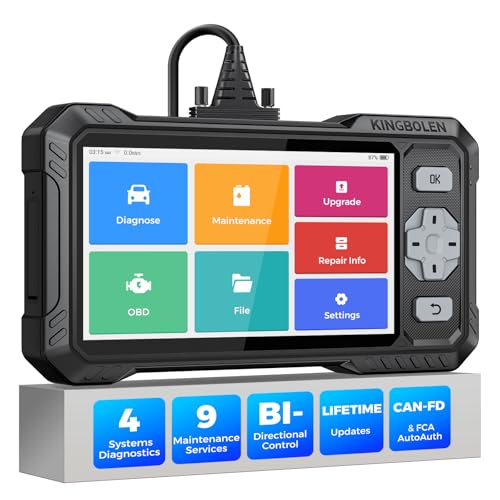
- WHY S608 STANDS OUT:2026 Kingbolen S608 is the only scanner <200 bucks that offers powerful active tests on Engine, ABS, SRS, and Transmission systems. Offers 9 resets,Covers 110+ global brands with a 6.2'' larger touchscreen
- KINGBOLEN'S NEW BIDIRECTIONAL SCAN TOOL: As the 2026 upgraded version of S600, our Newest S608 obd2 scanner has the powerful Bi-directional Control on Engine, ABS, SRS, and Transmission systems. It can send commands to the ECUs of actuators for functional tests and work status checks, such as ABS, fuel injectors, adjusting throttle, coolant pumps, EVAP test, fuel trim reset, etc. No more Guesswork. Quickly identify problem components without teardown, get fuss-free results in seconds.
- 【9 HOT RESET SERVICES CAR SCANNER】Tired of costly mechanic trips for common resets? The Kingbolen S608 obd2 scanner lets you do it yourself, even for beginners—quickly and effortlessly! It offers 9 hot reset functions: Oil/EPB Reset, ABS Bleeding, SAS Calibration, DPF Regeneration, Injector Coding, BMS Matching, Throttle Adaptation, Gear Learning. Stop paying mechanics for 5-minute jobs. Save hundreds per year! 🚗*Function vary from vehicle models. reach us to check compatibility firstly!
- 【4 SYSTEM DIAGNOSTIC TOOL + FULL OBDII FUNCTIONS】Kingbolen S608 is an OBDII scanner and 4 systems diagnostic tool made for home mechanics, DIYers, and professionals. You can access Engine, ABS, SRS, Transmission fault codes, track live data in graphs, and onboard DTC library lookup to find the right troubleshooting procedure, and diagnose with full 10 OBD2 test modes to fix most of emission issues. Give your aging cars routine maintenance to avoid costly repairs, a breakdown, or even a crash.
- 【NEW CAN FD, FCA/RENAULT SGW, 140+ BRANDS】Kingbolen S608 scanner for car supports 140+ vehicle brands, 100,000+ models, 28 languages and can be used worldwide. S608 stays up-to-date with modern vehicles, allows secure access to 2017+ FCA cars and 2015+ Renault cars (📢*Need to purchase an AutoAuth/Renault account by yourself), and supports the latest CAN-FD protocol for 2019+ GM/Chrysler, enabling 2X faster data transfer and more precise diagnostics. 🚗*Check compatibility before purchase.
This product presentation was made with AAWP plugin.
Last update on 2026-05-12 / Affiliate links / Images from Amazon Product Advertising API