
NHTSA ID Number: 10065310
Manufacturer Communication Number: DVD138-02-V175J
TSB/Document Date: 2016-05-13
Summary
SUMMARY TO BE PROVIDED ON A FUTURE DATE.
If the PDF is very large, it may not load in the preview below.
Some older TSBs had multiple PDFs — visit the NHTSA Website to view all PDFs.
If the TSB PDF does not show, download or view it on the NHTSA Website.
Click on the (+) Plus Sign
Then Click on Associated Document(s)

- 💝【Questions? We’re Here Anytime】MK808S is a...
- 🔥🔥🔥【2026 NEWLY RELEASED BI-DIRECTIONAL...
- 【28+ MOST POPULAR RESET SERVICE FOR 150 MAKES】Autel...
- 【ALL SYSTEM DIAGNOSTICS, FACTORY-LEVEL SCANNER】The...
- 【AUT0 SCAN & AUT0V1N, 10X FASTER】How much have you spent...


- 💯【Conta.ct us for Support Directly】If you met any...
- 🔥🔥🔥【2026 AUTEL FLAGSHIP MK900BT MK900-BT, NEW...
- 🚗【3000+ ACTIVE TESTS (50➡3000+), SAME AS MS...
- 🚗【40+ HOT SERVICES FOR 150 MAKES (28+➡40+)】Full...
- 🚗【OE ALL SYSTEM DIAGNOSE, AUTO SCAN 2.0: SCAN LICENSE...
This product presentation was made with AAWP plugin.
Search NHTSA Database for Recalls
Search NHTSA Database for Vehicle Investigations
View Latest Vehicle Investigations
Search NHTSA Database for Vehicle Complaints
View Latest Vehicle Complaints
TSB/Document ID: DVD138-02-V175J
Replacement Service Bulletin Number:
MFR Communication Date: 2014-05-01
MFR Internal Campaign ID/Software Version:
Communication Type: Service Bulletin/Repair Instructions
NHTSA Components: ELECTRICAL SYSTEM:SOFTWARE
MFR Component System:
MFR Component Subsystem:
Previous TSB | Next TSB |
SDD SOFTWARE
UPDATE
REF: DVD 138 – 02 CALIBRATION FILE V.175
BRASIL
Use a lista adjacente para selecionar o idioma desejado
简体中文
使用此列表选择您需要的语言
NEDERLANDS
Gebruik de lijst om de gewenste taal te selecteren.
ENGLISH
Use the list to select the language you require
FRANÇAIS
Sélectionnez dans la liste la langue souhaitée.
DEUTSCH
Wählen Sie die gewünschte Sprache aus der Liste aus.
ITALIANO
Utilizzare la lista per selezionare la lingua desiderata
日本語
リストを使用し、必要な言語を選択してください。
한국어
다음 목록을 사용하여 원하는 언어를 선택하십시오.
PORTUGUÊS
Use a lista ao lado para seleccionar a língua que necessita
РУССКИЙ
ESPAÑOL
Используйте прилагаемый список для выбора требуемого языка.
Seleccione en la lista el idioma que desee
Page 1 of 24
SDD SOFTWARE
UPDATE
REF: DVD 138 – 02 CALIBRATION FILE V. 175
DATE: 05/2014
USE GUIDANCE:
ALL SDD USERS MUST INSTALL THESE UPDATES
Updates consist of SDD Software Updates (Patches/DVDs) and Calibration File releases.
The number after the DVD reference in the header indicates the software update level - 00, 01, 02 etc.
The Calibration File version indicates the current release of the vehicle calibration file databases.
Current Installed Software levels can be checked via Settings – System information.
Updates can be triggered via Settings – System Utilities
For further information on keeping your software updated please refer to the information on TOPIx.
FAILURE TO FOLLOW THESE INSTRUCTIONS MAY RESULT IN COMPROMISE OF WARRANTY
CLAIMS AND CUSTOMER SATISFACTION
Introduction:
This document contains important information, as it describes the content of the DVD software update
referenced in the header; please ensure that all users of the SDD diagnostic platform are made aware of its
content.
NOTE: This is an intermediate Software Management Pack.
Before you install Software Management Pack 175, the update listed below
must be installed:
DVD 138
To apply this update, complete the instructions below:
1.
2.
3.
4.
5.
6.
7.
8.
9.
Launch and login in to SDD
Do not connect SDD to a vehicle
Continue to VIN entry page
Select ‘Manual VIN Read’
Select ‘Settings’ Tab
Select ‘System Utilities’ Tab
Select ‘Combined As-Built and Calibration file update’
The software management wizard will inform you of missing files
You must select ‘Yes’ to complete the software management pack
update
10. This will update SDD to Software Management Pack version number
175
Page 2 of 24
ATUALIZAÇÃO DE
SOFTWARE DE SDD
REF: DVD 138 – 02 ARQUIVO DE CALIBRAGEM V.175 DATA: 05/2014
DIRETRIZES DE USO:
TODOS OS USUÁRIOS DO SDD DEVEM INSTALAR ESTAS ATUALIZAÇÕES
As atualizações envolvem versões do software SDD (patches/DVDs) e do Arquivo de Calibragem.
O número depois da referência do DVD no cabeçalho indica o nível de atualização do software: 00, 01,
02, etc.
A versão do Arquivo de Calibragem indica a versão atual dos bancos de dados dos arquivos de
calibragem do veículo.
A versão do software atualmente instalado pode ser verificada no caminho Configurações
– Informações do Sistema.
As atualizações podem ser executadas no caminho Configurações – Utilitários do Sistema
Para mais informações sobre como manter o software atualizado, consulte o Topix.
A NÃO OBSERVÂNCIA DESTAS INSTRUÇÕES PODE COMPROMETER AS SOLICITAÇÕES DE
GARANTIA E A SATISFAÇÃO DO CLIENTE
Introdução:
Este documento contém informações importantes, descrevendo o conteúdo da atualização do software no DVD
mostrado no cabeçalho; certifique-se de que todos os usuários da plataforma de diagnóstico SDD tenham
ciência do seu conteúdo.
OBS: Este é um pacote intermediário de gerenciamento de software.
Antes de instalar o Pacote de gerenciamento de software 175, as atualizações
abaixo deverão estar instaladas:
DVD 138
Para aplicar esta atualização, atenda às instruções abaixo:
1. Entre e faça login no SDD
2.Não conecte o SDD a nenhum veículo
3.Continue até a tela de entrada do VIN
4.Selecione "Leitura manual do VIN".
5.Selecione a guia "Configurações".
3/24
ATUALIZAÇÃO DE
SOFTWARE DE SDD
REF: DVD 138 – 02 ARQUIVO DE CALIBRAGEM V.175 DATA: 05/2014
6.Selecione a guia "Utilitários do sistema".
7.Selecione "Atualização combinada de arquivos de fábrica e de
calibragem".
8.O assistente de gerenciamento do software irá informá-lo de arquivos
ausentes
9.Você deve selecionar "Sim" para concluir a atualização do pacote de
gerenciamento de software.
10. Isso atualizará o SDD para o pacote de gerenciamento de software 175
4/24
SDD 软件更新
主题: DVD 138 – 02 校验文件 V. 175
日期: 2014 年 05 月
使用指南:
所有 SDD 用户都必须安装这些更新内容
更新内容包含 SDD 软件更新(补丁文件/DVD)和校验文件版本。
关于 DVD 之后的序号,请参考顶部指示的软件更新级别 — 00、01、02 等等。
校验文件版本指示了车辆校验文件数据库的当前版本。
当前安装的软件级别可通过设置 – 系统信息来确认。
可通过设置 – 系统实用程序来触发启用更新。
关于软件持续更新的更多信息,请参考 Topix 上的相关信息。
不遵守这些说明可能导致您的保修索赔失败和客户满意度下降
简介:
此文档包含了重要信息,其描述了首页所引用的 DVD 软件更新的内容;请确保 SDD 诊断平台的所有用户都
熟悉其内容。
注意:这是一个中间软件管理包。
在您安装软件管理包 175 之前,必须安装以下所列的更新:
DVD 138
应用此更新,请完成以下说明:
1. 启动并登录 SDD
2.请勿将 SDD 连接到车辆
5/24
SDD 软件更新
主题: DVD 138 – 02 校验文件 V. 175
日期: 2014 年 05 月
3.继续前往 VIN 入口页面
4.选择“手动读取 VIN”
5.选择“设置”选项卡
6.选择“系统实用程序”选项卡
7.选择“编译文件和校准文件组合更新”
8.软件管理向导将通知您文件缺失
9.您必须选择“是”以完成软件管理包更新
10. 这可将 SDD 更新至软件管理包 175 版
6/24
UPDATE
SDD-SOFTWARE
BETREFT: DVD 138 – 02 KALIBRATIEBESTAND V. 175
Datum: 05/2014
AANWIJZINGEN VOOR GEBRUIK:
ALLE SDD-GEBRUIKERS MOETEN DEZE BIJWERKBESTANDEN INSTALLEREN
Het bijwerken omvat
kalibratiebestanden.
bijgewerkte
SDD-software
(bijwerkbestanden/dvd’s)
en
uitgaven
van
Het getal achter de DVD-referentie in de kop geeft het softwarebijwerkniveau, 00, 01, 02 enz., aan.
De versie van het kalibratiebestand geeft de huidige uitgave van de kalibratiebestand-databases voor het
voertuig aan.
U kunt de op dat moment geïnstalleerde software-niveau’s controleren via Instellingen –
Systeeminformatie.
U kunt de bijwerkbestanden activeren via Instellingen – Systeemhulpprogramma’s
Raadpleeg voor verdere informatie over hoe u uw software op het nieuwste niveau bijgewerkt kunt
houden, de informatie op Topix.
HET NIET IN ACHT NEMEN VAN DEZE AANWIJZINGEN KAN DE GARANTIECLAIMS TENIET DOEN
EN DE TEVREDENHEID VAN DE KLANT NADELIG BEÏNVLOEDEN
Inleiding:
Dit document bevat belangrijke informatie, aangezien het de inhoud beschrijft van de bijgewerkte dvdsoftware waarnaar in de kop verwezen wordt; wij verzoeken u te zorgen dat alle gebruikers van het SDDdiagnosesysteem van de inhoud op de hoogte worden gesteld.
OPMERKING: Dit is een tussentijdse Software Management Pack.
Voordat u Software Management Pack 175 installeert, moet u de onderstaande
update installeren:
DVD 138
Volg de onderstaande instructies om deze update toe te passen:
1. Start het SDD-systeem en meld u aan
2.Sluit SDD niet aan op een voertuig
3.Gaat naar de pagina voor het invoeren van het VIN
4.Selecteer 'VIN handmatig uitlezen'
5.Selecteer tabblad 'Instellingen'
6.Selecteer tabblad 'Systeemhulpprogramma's'
Pagina 7 van 24
UPDATE
SDD-SOFTWARE
BETREFT: DVD 138 – 02 KALIBRATIEBESTAND V. 175
Datum: 05/2014
7.Selecteer 'Gecombineerd af-fabriek en kalibratiebestanden bijwerken'
8.De wizard softwaremanagement zal melding maken van ontbrekende
bestanden
9.U moet Ja kiezen om de update van het software management pack te
voltooien
10. Dit zal SDD updaten naar Software Management Pack versienummer 175
Pagina 8 van 24
MISE A JOUR
LOGICIEL SDD
REF: DVD 138 – 02 FICHIER D’ETALONNAGE V.
175
DATE : 05/2014
MODE D’EMPLOI :
TOUS LES UTILISATEURS DU SYSTEME SDD DOIVENT INSTALLER CES MISES A JOUR.
Les mises à jour concernent la version du logiciel du système SDD (fichiers correctifs/DVD) et des
fichiers d’étalonnage.
Les numéros qui suivent la référence du DVD en en-tête indiquent le niveau de mise à jour du logiciel – 00,
01, 02 etc.
La version du Fichier d’étalonnage reflète la version actuelle des bases de données du fichier
d’étalonnage du véhicule.
Vous pouvez contrôler les versions de logiciel actuellement installées dans Paramètres –
Informations système.
Vous pouvez lancer les mises à jour dans Paramètres - Utilitaires système.
Pour plus d’informations sur la façon de mettre à jour votre logiciel, veuillez consulter les informations
publiées sur la Topix.
LE NON-RESPECT DES PRESENTES INSTRUCTIONS PEUT ENTRAINER LE REJET DES
RECLAMATIONS AU TITRE DE LA GARANTIE ET UNE INSATISFACTION DE LA PART DU CLIENT
Introduction :
Ce document contient des informations importantes car il détaille la mise à jour de la version du logiciel du
DVD auquel il est fait référence en en-tête ; veuillez vous assurer que tous les utilisateurs du système de
diagnostic SDD ont pris connaissance de son contenu.
REMARQUE : Ceci est un pack de gestion logicielle intermédiaire.
Avant d'installer le pack de gestion logicielle 175, la mise à jour indiquée cidessous doit être installée :
DVD 138
Pour appliquer cette mise à jour, suivez les instructions ci-dessous :
1. Lancez le SDD et ouvrez une session
2.Ne connectez pas le SDD à un véhicule
3.Continuez jusqu'à la page de saisie du VIN
4.Sélectionnez "Lecture manuelle du VIN"
5.Sélectionnez l'onglet "Paramètres"
6.Sélectionnez l'onglet "Utilitaires système"
Page 9 de 24
MISE A JOUR
LOGICIEL SDD
REF: DVD 138 – 02 FICHIER D’ETALONNAGE V.
175
DATE : 05/2014
7.Sélectionnez "Mise à jour combinée des fichiers d'origine et
d'étalonnage"
8.L'assistant de gestion logicielle vous indiquera si des fichiers sont
manquants
9.Vous devez sélectionner "Oui" pour terminer la mise à jour du pack de
gestion logicielle
10. Le SDD sera mis à jour vers la version du pack de gestion logicielle
numéro 175
Page 10 de 24
SDD
SOFTWAREUPDATE
BEZUG: DVD 138 – 02 KALIBRIERUNGSDATEI V.
175
DATUM: 05/2014
BITTE BEFOLGEN SIE DIE ANWEISUNGEN:
DIESE AKTUALISIERUNGEN MÜSSEN VON ALLEN SDD-BENUTZERN INSTALLIERT WERDEN
Die Aktualisierungen
Kalibrierungsdateien.
umfassen
SDD-Softwareaktualisierungen (Patch-Dateien/DVDs)
und neue
Die Zahl nach der DVD-Nummer in der Kopfzeile kennzeichnet die Version der Softwareaktualisierung –
00, 01, 02 usw.
Die Version der Kalibrierungsdatei weist auf die aktuelle Version der FahrzeugkalibierungsdateiDatenbanken hin:
Die aktuell installierte Softwareversion lässt sich über Einstellungen – Systeminformationen
ermitteln.
Aktualisierungen werden über Einstellungen – System-Dienstprogramme gestartet.
Für weitere Informationen zur Aktualisierung der Software siehe Topix.
DIE NICHTBEACHTUNG DIESER ANWEISUNGEN KANN ZUM VERLUST VON
GARANTIEANSPRÜCHEN UND KUNDENZUFRIEDENHEIT FÜHREN.
Einführung:
Dieses Dokument enthält wichtige Informationen, da es den Inhalt der in der Kopfzeile angegebenen DVDSoftwareaktualisierungen beschreibt. Sämtliche Benutzer der SDD-Diagnoseplattform müssen über den
Inhalt dieses Dokuments informiert sein.
HINWEIS: Dies ist ein vorläufiges Softwaremanagement-Paket.
Vor der Installation des Softwaremanagement-Pakets 175 muss die unten
aufgeführte Aktualisierung installiert werden:
DVD 138
Zur Ausführung dieser Aktualisierung den folgenden Anweisungen folgen:
1. SDD ausführen und anmelden
2.Verbinden Sie SDD NICHT mit einem Fahrzeug
3.Zur VIN-Eingabeseite fortfahren
4.Wählen Sie „VIN manuell auslesen“
Seite 11 von 24
SDD
SOFTWAREUPDATE

- 🎉[OTOFIX D1 Lite, Perfect Cost-effective Diagnostic Tool]: OTOFIX D1 Lite, a newest bidirectional scan tool from OTOFIX company, is a great choice for DIYers and repair shops. 👉This obd2 scanner diagnostic tool packs all practical functions: OE level all systems diagnoses, Bi-Directional Control, 38+ reset services fixing 99% of common problems, support DoIP & CANDF protocols and FCA
 AutoAuth, high-end hardware configuration. Worldwide vehicles and 🔥2 Years Free Updating🔥 covered.
 - 🎉[Bi-Directional Scan Tool, Active Test]: OTOFIX D1 Lite bluetooth obd2 scanner can also command ECUs and monitor the operation of the actuators to track down the problems of certain parts, like windows, sunroof, wipers, fuel pumps, etc., saving repair time & trouble. This makes OTOFIX D1 Lite the most cost-effective bidirectional scan tool.
- 🎉[2026 Newest, 38+ Hot Reset Functions]: Equipped with 38+ reset functions in one, the OTOFIX D1 lite automotive scanner diagnostic tool allows you to troubleshoot 99% of common vehicle problems. You can use this car diagnostic scanner holding enough functions to easily repair common vehicle models in your repair shops. Including Oil Reset, Injector Coding, Throttle, DPF Reset, SCR Reset, Gear Learning, Clutch Learning, Suspension, etc. Note* Reset functions vary by model.
- 🎉[OE Level Full Systems Diagnostics]: Unlike the 2-system and 4-system diagnostic tools, the OTOFIX auto scan tool can complete comprehensive system diagnostics within 5 minutes. It accesses and scans all available onboard systems like for Engine /AT /ABS /EPB /BMS /TPMS /SRS /SAS /Audio System /BCM /Air Conditioning / etc., to read & clear codes, view live data, and check ECU information. Note: Active test is not involved.
- 🎉[Powerful Hardware Configuration]: Designed with a fashion appearance & a 7” touchscreen and a weight of 463g, this OTOFIX D1 Lite OBD2 diagnostic scanner scan tool is convenient for everywhere and easy to use & store. Android9.0 OS and 2+64GB memory enhance multi-task smoothness and diagnostic operation, no more wasting too much time. 5800mAh battery allows hours-lasting use. WiFi & VCI1 also bring faster communication for your diagnostics.
 AutoAuth, high-end hardware configuration. Worldwide vehicles and 🔥2 Years Free Updating🔥 covered.
- 🏆【2026 TOP OBD2 Scanner Diagnostic Tool】OTOFIX D1 Lite wireless obd2 scanner has upgraded hardware configuration and car coverage. The newly upgraded D1 Lite with 🔥OS Android 9.0🔥1.5Ghz 4 core high efficiency processor🔥2GB RAM+64GB ROM large storage🔥5800mAh large battery, more stable and longer lasting diagnostics🔥 38+ Reset🔥action tests🔥full system diagnostic🔥Supports MV105 endoscope🔥21+ Language Supports🔥100000+ vehicle coverage to meet all your daily maintenance needs.
- 👍【Bi-Directional Control / Active Test】D1 Lite obd2 scanner has bidirectional control(worth $300+), which is the most beloved feature among mechanic. If your headlights or car windows are broken, going to a repair shop will cost a lot of money. You can use D1 Lite to send execution commands to the ECU module and identify the repair status. Such as ABS, car windows, doors, valves, wipers, headlights, etc., effectively shorten diagnostic time and reduce diagnostic costs.
- 🔥【All Systems Diagnostics, In-depth Checking】This advanced OBD2 Scanner D1 Lite can perform OE-level diagnosis of all systems including engine, transmission, airbag, ABS, ESP, TPMS, gateway, steering, radio, and air conditioning for more than 100 brands. This diagnostic scanner supports essential functions, such as reading ECU version info, reading and clearing fault codes, and reading data streams.With just a simple click, it provides you with accurate and in-depth diagnostics.
- 🏆【38+ Reset Hot Functions】For repair workshops, holding an OTOFIX D1 Lite Auto scanner is a strong advantage over others. Its 38+ maintenance functions provide various solutions for all module repairs, including Oil Reset, TPMS Reset, Injector Coding, Suspension, Throttle Matching, etc., which will usher your repair business to a new pinnacle. Continuously updating will never make the functionality & compatibility out-of-date.
- 🏆【150+ Models, 10000+ Car Coverage & 16 Languages】D1 Lite is a comprehensive car diagnostic scan tool, help you to troubleshoot car issues fast for 95% US, European, Asian auto makes. ✅ With frequent updates and optimizations allow D1 Lite to cover more vehicles to meet your needs. ✅ Multilingual menu allows auto mechanics around the world to use it without language barriers. 🚩Note: Kindly send us the S/N of the device to authorize new language updates before changing the menu language.
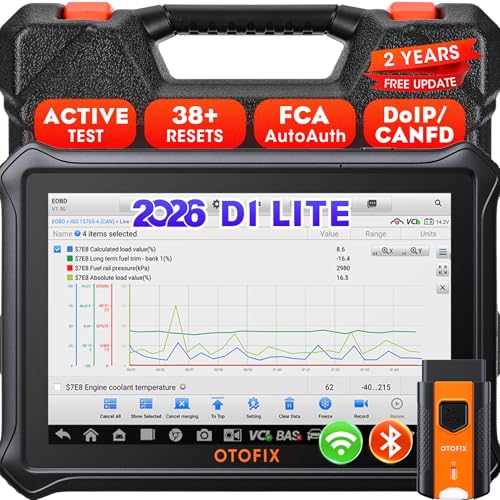
- 【2026 OTOFIX D1 Lite Gives the Best Value for Money】OTOFIX D1 Lite bidirectional scan tool is more FASTER and SMARTER with 2026 Enhanced Hardwares & New Functions! 👍Alternative Bluetooth +USB connect 👍2G+64GB 👍4x ARM Cortex-A35 (1.5GHz) Processor (5X Faster CPU) 👍Android 9.0 OS 👍5G GHz WiFi 👍CANFD&DOIP 👍 FCA AutoAuth 👍38+ Services 👍3K+ Bi-Directional Control 👍Full Systems Diagnose 👍2 Years Update 👍150+ Vehicle Coverage.
- 👍【Active Tests】 OTOFIX D1 Lite is a bi-directional scan tool that can send commands to, and also receive information from vehicle control modules. This way, you can quickly locate and repair faulty auto parts. For Example: send direct commands to ask the vehicle to turn on/off the radiator fan, lights, sound horn, fuel pump, modulate throttle, open/close windows, operate mirrors and more. *Note that only available tests will be displayed in the menu.
- 👍【38+ Service Functions】 OTOFIX D1 Lite scan tool offers 38+ of the hottest service functions that are commonly used for car repairs. That include Oil reset/SAS/EPB/BMS/Throttle/ABS bleeding, and 2065-new SUS/ADBLUE/NOX/Headlamp resets (and more) to help restore your car status after repairs are done. Compared to other diagnostic scanners for cars, the OTOFIX D1 Lite scanner is much more fully-featured. *Note that specific functions available depend on the make/model/year of your car.
- 👍【All System Diagnostics + Cloud Report Management】 This 2026 car scanner OTOFIX D1 Lite provides troubleshooting and data for all ECUs: read/clear DTCs, view graphic live data/VIN, and locate system faults for safe driving. With Cloud Report Management, you can save detailed reports to cloud servers and easily shared them with others via QR codes/emails/text messages. Others can access these reports from any device (smartphones/tablets/PCs …) anytime, and you can better manage repair work.
- 👍【99% Car Coverage】 This one-station car scanner diagnostic for all cars works on 150+ major car brands across the world. 1) It supports CAN-FD/DoIP protocols: compatible with GMCAVALIER/TRAX/Encore/Envision/GL8(LSY)/CT4/CT5 after 2019; Volvo after 2018; Land Rover/Jaguar after 2017; and BM.W F/G all chassis. 2) For models equipped with security modules (such as Renault & 2018+ FCA SGW), its built-in AutoAuth allows you to easily break diagnostic barriers after registration.
This product presentation was made with AAWP plugin.
Last update on 2026-05-13 / Affiliate links / Images from Amazon Product Advertising API