
NHTSA ID Number: 10064992
Manufacturer Communication Number: DVD 131 08
TSB/Document Date: 2016-05-13
Summary
SUMMARY TO BE PROVIDED ON A FUTURE DATE.
If the PDF is very large, it may not load in the preview below.
Some older TSBs had multiple PDFs — visit the NHTSA Website to view all PDFs.
If the TSB PDF does not show, download or view it on the NHTSA Website.
Click on the (+) Plus Sign
Then Click on Associated Document(s)

- 💝【Questions? We’re Here Anytime】MK808S is a...
- 🔥🔥🔥【2026 NEWLY RELEASED BI-DIRECTIONAL...
- 【28+ MOST POPULAR RESET SERVICE FOR 150 MAKES】Autel...
- 【ALL SYSTEM DIAGNOSTICS, FACTORY-LEVEL SCANNER】The...
- 【AUT0 SCAN & AUT0V1N, 10X FASTER】How much have you spent...


- 💯【Conta.ct us for Support Directly】If you met any...
- 🔥🔥🔥【2026 AUTEL FLAGSHIP MK900BT MK900-BT, NEW...
- 🚗【3000+ ACTIVE TESTS (50➡3000+), SAME AS MS...
- 🚗【40+ HOT SERVICES FOR 150 MAKES (28+➡40+)】Full...
- 🚗【OE ALL SYSTEM DIAGNOSE, AUTO SCAN 2.0: SCAN LICENSE...
This product presentation was made with AAWP plugin.
Search NHTSA Database for Recalls
Search NHTSA Database for Vehicle Investigations
View Latest Vehicle Investigations
Search NHTSA Database for Vehicle Complaints
View Latest Vehicle Complaints
TSB/Document ID: DVD 131 08
Replacement Service Bulletin Number:
MFR Communication Date: 2012-10-01
MFR Internal Campaign ID/Software Version:
Communication Type: Service Bulletin/Repair Instructions
NHTSA Components: ELECTRICAL SYSTEM:SOFTWARE
MFR Component System:
MFR Component Subsystem:
Previous TSB | Next TSB |
SDD SOFTWARE
UPDATE
REF: DVD 131 – 08 CALIBRATION FILE V.119
CHINESE
使⽤此列表选择您需要的语⾔
DUTCH
Gebruik de lijst om de gewenste taal te selecteren.
ENGLISH
Use the list to select the language you require
FRENCH
Sélectionnez dans la liste la langue souhaitée.
GERMAN
Wählen Sie die gewünschte Sprache aus der Liste aus.
ITALIAN
Utilizzare la lista per selezionare la lingua desiderata
JAPANESE
リストを使⽤し、必要な⾔語を選択してください。
PORTUGUESE
Use a lista ao lado para seleccionar a língua que necessita
RUSSIAN
Используйте прилагаемый список для выбора требуемого языка.
SPANISH
Seleccione en la lista el idioma que desee
Page 1 of 16
SDD SOFTWARE
UPDATE
REF: DVD 131 – 08 CALIBRATION FILE V. 119
DATE: 10/2012
USE GUIDANCE:
ALL SDD USERS MUST INSTALL THESE UPDATES
Updates consist of SDD Software Updates (Patches/DVDs) and Calibration File releases.
The number after the DVD reference in the header indicates the software update level - 00, 01, 02 etc.
The Calibration File version indicates the current release of the vehicle calibration file databases.
Current Installed Software levels can be checked via Settings – System information.
Updates can be triggered via Settings – System Utilities
For further information on keeping your software updated please refer to the information on TOPIx.
FAILURE TO FOLLOW THESE INSTRUCTIONS MAY RESULT IN COMPROMISE OF WARRANTY
CLAIMS AND CUSTOMER SATISFACTION
Introduction:
This document contains important information, as it describes the content of the DVD software update
referenced in the header; please ensure that all users of the SDD diagnostic platform are made aware of its
content.
SIZE:
08: 375 MB
NOTE: Please ensure you have Installed DVD 131 Patch 01 & Patch 04 prior to
installing Software update 08.
Dealer database Updates
As part of this release the very latest dealer information has been included.
SDD Updates
This release also includes the latest TSB, SDD mapping and SSM information to support SDD
This update contains an enhancement to SDD this will enable Technical documentation directly from
TOPIx
Page 2 of 16
SDD 软件更新
主题: DVD 131 – 08 校验文件 V. 119
日期: 2012 年 10 月
使用指南:
所有 SDD 用户都必须安装这些更新内容
更新内容包含 SDD 软件更新(补丁文件/DVD)和校验文件版本。
关于 DVD 之后的序号,请参考顶部指示的软件更新级别 — 00、01、02 等等。
校验文件版本指示了车辆校验文件数据库的当前版本。
当前安装的软件级别可通过设置 – 系统信息来确认。
可通过设置 – 系统实用程序来触发启用更新。
关于软件持续更新的更多信息,请参考 Topix 上的相关信息。
不遵守这些说明可能导致您的保修索赔失败和客户满意度下降
简介:
此⽂档包含了重要信息,其描述了⾸页所引用的 DVD 软件更新的内容;请确保 SDD 诊断平台的所有用户都
熟悉其内容。
SIZE:
08: 375 MB
注意:安装软件更新 08 前,请确保您已安装 DVD 131、补丁 01 和补丁 04。
经销商数据库更新
最新的经销商信息已经作为此次发布的一部分包含在内。
SDD 更新
此版本还包含最新的 TSB、SDD 映射和 SSM 信息,以便支持 SDD
此更新包含对 SDD 的增强功能,这样将允许从 TOPIx 内直接起用技术文档
第 3/16 页
SDD 软件更新
主题: DVD 131 – 08 校验文件 V. 119
日期: 2012 年 10 月
第 4/16 页
UPDATE
SDD-SOFTWARE
BETREFT: DVD 131 – 08 KALIBRATIEBESTAND V. 119
Datum: 10/2012
AANWIJZINGEN VOOR GEBRUIK:
ALLE SDD-GEBRUIKERS MOETEN DEZE BIJWERKBESTANDEN INSTALLEREN
Het bijwerken omvat
kalibratiebestanden.
bijgewerkte
SDD-software
(bijwerkbestanden/dvd’s)
en
uitgaven
van
Het getal achter de DVD-referentie in de kop geeft het softwarebijwerkniveau, 00, 01, 02 enz., aan.
De versie van het kalibratiebestand geeft de huidige uitgave van de kalibratiebestand-databases voor het
voertuig aan.
U kunt de op dat moment geïnstalleerde software-niveau’s controleren via Instellingen –
Systeeminformatie.
U kunt de bijwerkbestanden activeren via Instellingen – Systeemhulpprogramma’s
Raadpleeg voor verdere informatie over hoe u uw software op het nieuwste niveau bijgewerkt kunt
houden, de informatie op Topix.
HET NIET IN ACHT NEMEN VAN DEZE AANWIJZINGEN KAN DE GARANTIECLAIMS TENIET DOEN
EN DE TEVREDENHEID VAN DE KLANT NADELIG BEÏNVLOEDEN
Inleiding:
Dit document bevat belangrijke informatie, aangezien het de inhoud beschrijft van de bijgewerkte dvdsoftware waarnaar in de kop verwezen wordt; wij verzoeken u te zorgen dat alle gebruikers van het SDDdiagnosesysteem van de inhoud op de hoogte worden gesteld.
SIZE:
08: 375 MB
N.B.: Zorg dat u dvd 131 en patches 01 en 04 hebt geïnstalleerd voordat u
update 08 installeert.
Updates van de dealerdatabase
Onderdeel van deze update is de meest recente dealerinformatie.
SDD-updates
Deze versie bevat ook de meest recente TSB's, SDD-verwijzingsinformatie en SSM's ter
ondersteuning van SDD
Deze update bevat een uitbreiding van het SDD-systeem waarmee technische documentatie
rechtstreeks vanuit TOPIx kan worden weergegeven
Pagina 5 van 16
UPDATE
SDD-SOFTWARE
BETREFT: DVD 131 – 08 KALIBRATIEBESTAND V. 119
Datum: 10/2012
Pagina 6 van 16
MISE A JOUR
LOGICIEL SDD
REF: DVD 131 – 08 FICHIER D’ETALONNAGE V.
119
DATE : 10/2012
MODE D’EMPLOI :
TOUS LES UTILISATEURS DU SYSTEME SDD DOIVENT INSTALLER CES MISES A JOUR.
Les mises à jour concernent la version du logiciel du système SDD (fichiers correctifs/DVD) et des
fichiers d’étalonnage.
Les numéros qui suivent la référence du DVD en en-tête indiquent le niveau de mise à jour du logiciel – 00,
01, 02 etc.
La version du Fichier d’étalonnage reflète la version actuelle des bases de données du fichier
d’étalonnage du véhicule.
Vous pouvez contrôler les versions de logiciel actuellement installées dans Paramètres –
Vous pouvez lancer les mises à jour dans Paramètres - Utilitaires système.
Informations système.
Pour plus d’informations sur la façon de mettre à jour votre logiciel, veuillez consulter les informations
publiées sur la Topix.
LE NON-RESPECT DES PRESENTES INSTRUCTIONS PEUT ENTRAINER LE REJET DES
RECLAMATIONS AU TITRE DE LA GARANTIE ET UNE INSATISFACTION DE LA PART DU CLIENT
Introduction :
Ce document contient des informations importantes car il détaille la mise à jour de la version du logiciel du
DVD auquel il est fait référence en en-tête ; veuillez vous assurer que tous les utilisateurs du système de
diagnostic SDD ont pris connaissance de son contenu.
SIZE:
08: 375 MB
REMARQUE : s'assurer d'avoir installé les correctifs 01 et 04 du DVD 131 avant
d'installer la mise à jour logicielle 08.
Mises à jour de la base de données des concessionnaires
Cette version inclut les informations les plus récentes sur les concessionnaires.
Mises à jour SDD
Cette publication contient également les derniers bulletins techniques, la cartographie SDD et des
informations SSM pour assurer la fonctionnalité du SDD.
Cette mise à jour contient une amélioration apportée au SDD ; elle permettra d'accéder à la
documentation technique directement depuis TOPIx
Page 7 de 16
SDD
SOFTWAREUPDATE
BEZUG: DVD 131 – 08 KALIBRIERUNGSDATEI V.
119
DATUM: 10/2012
BITTE BEFOLGEN SIE DIE ANWEISUNGEN:
DIESE AKTUALISIERUNGEN MÜSSEN VON ALLEN SDD-BENUTZERN INSTALLIERT WERDEN
Die Aktualisierungen umfassen SDD-Softwareaktualisierungen (Patch-Dateien/DVDs) und neue
Kalibrierungsdateien.
Die Zahl nach der DVD-Nummer in der Kopfzeile kennzeichnet die Version der Softwareaktualisierung –
00, 01, 02 usw.
Die Version der Kalibrierungsdatei weist auf die aktuelle Version der FahrzeugkalibierungsdateiDatenbanken hin:
Die aktuell installierte Softwareversion lässt sich über Einstellungen – Systeminformationen
ermitteln.
Aktualisierungen werden über Einstellungen – System-Dienstprogramme gestartet.
Für weitere Informationen zur Aktualisierung der Software siehe Topix.
DIE NICHTBEACHTUNG DIESER ANWEISUNGEN KANN ZUM VERLUST VON
GARANTIEANSPRÜCHEN UND KUNDENZUFRIEDENHEIT FÜHREN.
Einführung:
Dieses Dokument enthält wichtige Informationen, da es den Inhalt der in der Kopfzeile angegebenen DVDSoftwareaktualisierungen beschreibt. Sämtliche Benutzer der SDD-Diagnoseplattform müssen über den
Inhalt dieses Dokuments informiert sein.
SIZE:
08: 375 MB
HINWEIS: Stellen Sie sicher, dass die DVD 131, Patch 01 und Patch 04
installiert wurden, bevor Sie mit der Installation der Softwareaktualisierung 08
beginnen.
Aktualisierungen Händlerdatenbank
Die neuesten Händlerinformationen sind Bestandteil dieser Ausgabe.
SDD-Aktualisierungen
Diese Version enthält außerdem die neuesten Technischen Serviceinformationen, SDD-Zuordnungen
sowie SSM-Informationen zur Unterstützung des SDD-Systems.
Diese Aktualisierung enthält eine Verbesserung von SDD. Sie ermöglicht den Zugriff auf technische
Dokumente direkt über TOPIx.
Seite 8 von 16
SDD
SOFTWAREUPDATE
BEZUG: DVD 131 – 08 KALIBRIERUNGSDATEI V.
119
DATUM: 10/2012
Seite 9 von 16
AGGIORNAMENTO
SOFTWARE SDD
RIF: DVD 131 – 08 FILE DI TARATURA V. 119
DATA: 10/2012
CONSIGLI PER L'UTILIZZO:
QUESTI AGGIORNAMENTI DEVONO ESSERE INSTALLATI DA TUTTI GLI UTENTI DEL SISTEMA
SDD
Gli aggiornamenti comprendono aggiornamenti al software SDD (file di correzione/DVD) e nuove versioni
dei file di taratura.
Il numero che segue il riferimento del DVD nell'intestazione indica il livello di aggiornamento del software 00, 01, 02 ecc.
La versione dei File di taratura indica la versione corrente dei database dei file di taratura del veicolo.
È possibile controllare la versione corrente del software installato selezionando su Impostazioni –
Informazioni sul sistema.
Per attivare gli aggiornamenti, andare su Impostazioni – Utilità di sistema
Per ulteriori informazioni su come tenere aggiornato il software, consultare le informazioni sul Topix.
IL MANCATO RISPETTO DI QUESTE ISTRUZIONI PUÒ INVALIDARE LE RICHIESTE DI RIMBORSO IN
GARANZIA E COMPROMETTERE LA QUALITÀ DEL SERVIZIO OFFERTO AL CLIENTE
Introduzione:
Il presente documento contiene informazioni importanti, dal momento che descrive il contenuto
dell'aggiornamento del software del DVD indicato nell'intestazione; assicurarsi che il suo contenuto
venga segnalato a tutti gli utenti della piattaforma diagnostica SDD.
SIZE:
08: 375 MB
NOTA: prima di installare l'aggiornamento software 08, assicurarsi di aver
installato il DVD 131, patch 01 e patch 04.
Aggiornamenti del database concessionari
In questa release sono state incluse le ultime informazioni sui concessionari.
Aggiornamenti dell'SDD
La presente versione include anche le ultime informazioni sui TSB, sulla mappatura dell'SDD e sugli
SSM a supporto dell'SDD.
Il presente aggiornamento contiene un miglioramento all'SDD che consentirà di consultare
direttamente la documentazione tecnica da TOPIx
Seite 10 von 16
SDD キャリブレーショ
ン ファイル
参照: DVD 131 – 08 キャリブレーション ファイル V. 119
⽇付: 2012 年 10 ⽉
使⽤ガイド:
すべての SDD ユーザーはこれらのアップデートをインストールすること
アップデートの内容は、SDD ソフトウェア アップデート (パッチ/DVD) およびキャリブレーション フ
ァイルのリリースである。
ヘッダの DVD 参照番号の後にある数字はソフトウェア アップデート レベル (00、01、02 等) を⽰して
いる。
キャリブレーション ファイルのバージョンは、⾞両キャリブレーション ファイル データベースの現⾏
リリースを⽰している。
現在インストールされているソフトウェア レベルは [設定] - [システム情報] によって確認できる。
アップデートは [設定] - [システム ユーティリティ] によって実⾏できる。
ソフトウェアをアップデート状態に維持するための追加情報は、Topix の情報を参照のこと。
これらの指⽰を順守しない場合は、保証請求ができなくなり顧客満⾜を失う結果となる場合がある。
序⽂:
この⽂書には、ヘッダに参照されている DVD ソフトウェア アップデートの内容が説明されており、
重要な情報が記載されている。「SDD」診断プラットホームのすべてのユーザーは、この内容につい
て認識していること。
SIZE:
08: 375 MB
注: ソフトウェア アップデート 08 をインストールする前に、DVD 131 パッチ 01
およびパッチ 04 がすでにインストール済みであることを確認してください。
ディーラー データベースの更新
ページ 11/16
SDD キャリブレーショ
ン ファイル
参照: DVD 131 – 08 キャリブレーション ファイル V. 119
⽇付: 2012 年 10 ⽉
本リリースの一部には、最新のディーラー情報が含まれています。
SDD アップデート
本リリースには、「SDD」をサポートするための、最新
TSB、「SDD」マッピングおよび
SSM
情報が含まれています。
このアップデートには、SDD
のエンハンスメンとが含まれています。これにより、TOPIx
から技術ドキュメントへ直接アクセスできます。
ページ 12/16
SDD
SOFTWAREUPDATE
REF: DVD 131 – 08 FICHEIRO DE CALIBRAGEM V. 119
DATA: 10/2012
DIRECTRIZES DE UTILIZAÇÃO:
TODOS OS UTILIZADORES DO SDD DEVEM INSTALAR ESTAS ACTUALIZAÇÕES
As actualizações consistem em actualizações do software do SDD (Correcções/DVDs) e ficheiros de
calibragem.
O número após a referência DVD no cabeçalho indica o nível de actualização de software – 00, 01, 02,
etc.
A versão do Ficheiro de calibragem indica a versão actual das bases de dados do ficheiro de calibragem
do veículo.
Os níveis do software actualmente instalado podem ser verificados através de Definições –
Informação do sistema.
As actualizações podem ser activadas através de Definições – Utilitários do sistema
Para obter mais informações sobre como manter o software actualizado, consulte a informação na Topix.
A NÃO OBSERVÂNCIA DESTAS INSTRUÇÕES PODERÁ RESULTAR NO COMPROMETIMENTO DE
RECLAMAÇÕES AO ABRIGO DA GARANTIA E DA SATISFAÇÃO DO CLIENTE
Introdução:
Este documento contém informação importante, uma vez que descreve o conteúdo da actualização de
software de DVD referenciada no cabeçalho; certifique-se de que todos os utilizadores da plataforma de
diagnóstico SDD têm conhecimento deste conteúdo.
SIZE:
08: 375 MB
NOTA: Certifique-se de que Instalou a Correcção 01 e a Correcção 04 do DVD
131 antes de instalar a actualização 08 do Software.
Actualizações da base de dados do concessionário
Foi incluída a informação de concessionário mais recente neste lançamento.
Actualizações SDD
Esta edição inclui também as informações mais recentes para TSB, mapeamento SDD e SSM de
apoio ao SDD
Esta actualização contém uma melhoria do SDD o que irá disponibilizar documentação técnica
directamente do TOPIx
ページ 13/16
ПРОГРАММНОЕ
ОБНОВЛЕНИЕ SDD
СПРАВОЧНЫЙ №:
DVD 131 – 08 КАЛИБРОВОЧНЫЙ ФАЙЛ V 119
ДАТА: 10/2012
РУКОВОДСТВО ПО ИСПОЛЬЗОВАНИЮ:
ВСЕ ПОЛЬЗОВАТЕЛИ SDD ДОЛЖНЫ УСТАНОВИТЬ ЭТИ ОБНОВЛЕНИЯ
Обновления включают обновления ПО SDD (исправления/DVD) и выпуски калибровочных файлов.
Номер после DVD в заголовке указывает уровень обновления ПО - 00, 01, 02 и пр.
Версия калибровочного файла обозначает текущий выпуск базы данных калибровочных файлов
автомобиля.
Текущий уровень установленного ПО можно проверить в меню Настройки – Сведения о
Запуск обновлений производится в меню Настройки – Системные утилиты
системе.
Для получения дополнительной информации по обновлению ПО см. в Topix.
НЕСОБЛЮДЕНИЕ
ДАННЫХ
ИНСТРУКЦИЙ
МОЖЕТ
ПРИВЕСТИ
К
ОТКЛОНЕНИЮ
ГАРАНТИЙНЫХ РЕКЛАМАЦИЙ И СНИЖЕНИЮ УРОВНЯ УДОВЛЕТВОРЕННОСТИ КЛИЕНТОВ
Введение:
В этом документе содержится важная информация, описывающая содержимое обновления ПО
DVD, указанное в заголовке; убедитесь, что все пользователи диагностической платформы
SDD ознакомлены с содержанием документа.
SIZE:
08: 375 MB
ПРИМЕЧАНИЕ: перед установкой обновления программного обеспечения
08 убедитесь, что установлена версия DVD 131 и пакеты обновлений 01 и
04.
Обновления базы данных дилеров
В данный выпуск включена новейшая информация о дилерах.
Обновления SDD
В этот выпуск входят также новейшие TSB, система индексации SDD и информация SSM для
поддержки SDD
Данный выпуск содержит обновление SDD для доступа к технической документации напрямую
из TOPIx
Página 14 de 16
ACTUALIZACIÓN DE
SOFTWARE DE SDD
REF: DVD 131 – 08 ARCHIVO DE CALIBRACIÓN V.
119
FECHA: 10/2012
GUÍA DE UTILIZACIÓN:
TODOS LOS USUARIOS DE EQUIPOS SDD DEBERÁN INSTALAR ESTAS ACTUALIZACIONES
Las actualizaciones constan de software actualizado para el SDD (archivos de revisión/DVD) y
publicaciones de archivos de calibración.
El número que aparece después de la referencia del DVD como parte de su título, indica la versión de
actualización de software, p. ej. 00, 01, 02, etc.
La versión del Archivo de calibración indica la versión actual de las bases de datos de los archivos de
calibración de vehículos.
Será posible comprobar la versión de software actualmente instalada utilizando la siguiente
secuencia de opciones: Configuración - Información del sistema.
Las actualizaciones podrán implementarse mediante la siguiente secuencia de opciones:
Configuración - Utilidades del sistema
Si desea obtener información complementaria sobre cómo mantener actualizado su software, consulte la
información presente en la Topix.
EL INCUMPLIMIENTO DE ESTAS INSTRUCCIONES PUEDE AFECTAR NEGATIVAMENTE A LAS
RECLAMACIONES EN GARANTÍA Y A LA SATISFACCIÓN DE LOS CLIENTES.
INTRODUCCIÓN:
Este documento incluye información importante, ya que describe el contenido de la actualización de
software del DVD cuya referencia se indica en su título. Asegúrese de que todos los usuarios de
plataformas de diagnóstico SDD tienen conociminento de su contenido.
SIZE:
08: 375 MB
NOTA: Asegúrese de instalar las revisiones 01 y 04 del DVD 131 antes que la
actualización de software 08.
Actualizaciones de la base de datos de concesionarios
Como parte de esta actualización, se ha incluido la información más reciente sobre concesionarios.
Actualizaciones del SDD
Esta versión también incluye la información más reciente de boletines técnicos de servicio,
asignación del SDD y mensajes especiales de servicio relativa a las funciones del equipo SDD.
Esta actualización incluye una mejora en el SDD que permitirá acceder a la documentación técnica
directamente desde TOPIx
Página 15 de 16
ACTUALIZACIÓN DE
SOFTWARE DE SDD
REF: DVD 131 – 08 ARCHIVO DE CALIBRACIÓN V.
119
FECHA: 10/2012
Página 16 de 16

- [Notice] When you receive a used device, it may be a customer return resold by Amazon without inspection. You can exchange it for a new one through Amazon. As this situation is unavoidable, we sincerely apologize. For any issues, contacting us via Amazon's "Messages" is the best way, and we’ll provide a solution within 24 hours. THINKSCAN 689BT Can Be Used Immediately After It is Turned On, Without Complicated Registration Process, Which is More Convenient & Quick.
- [Good News] THINKSCAN 689BT is the most competitive automotive scan tool to date, offering wireless updates with no subscription fees(valued 500Buc.ks) . With all the features of THINKTOOL PD8,PRO, built on Android 10 platform with 4-core CPU, 4GB RAM
 and 64GB ROM, serving up to 5X faster than older MAX/MINI/PLUS vehicle scanners, no more slow and delayed feedbacks, it's time to update your garage tool.
 - [Big Money Saver] Premium THINKSCAN 689BT Wireless Diagnostic Scanner, save up to 400USD per year, includes all useful features: Full bi-directional controls, ECU coding, 34+ services, OEM all system diagnostics, Worldwide vehicles coverage, CAN FD & DoIP, FCA AutoAuth(The 689BT only provides a login and purchase portal, and users are required to register for an FCA account and pay a membership fee in order to perform the relevant automotive diagnostics)
- [3000+ Active Tests]Active testing is one of the most useful features in automotive maintenance and greatly improves mechanic efficiency. THINKCAR 689BT bidirectional scanner can send action commends to vehicle sub-systems or components for active test without using vehicle controls. It can perform various tests such as: EVAP Test, Fuel Trim Reset, Injector Buzz Test, Window/ Mirror/ Door Lock Test, Pump and Value Tests, etc. Get functions from "Diagnose>Car Model>System>Active Test".
- [Hot Advanced Features] 689BT bidirectional tool newly adds ECU Coding, Power Balance, Flash Hidden Functions, Reset Adaptive Data, Match Replaced Components, Customize OE-Settings. Such as: 1. changing the color of interior lights 2. switching on/off the auto hold, 3. customizing dash kits 4. activating the auto side mirror folding function 5. disables auto start-stop. Note: Coding functions vary by model&year.
 and 64GB ROM, serving up to 5X faster than older MAX/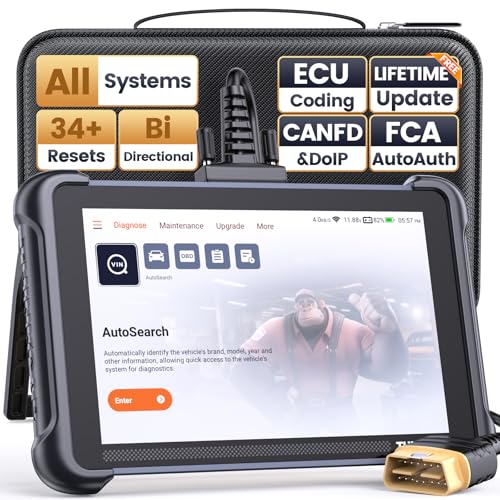
- 【Warm Tips】Wired THINKSCAN 689 is connected through a detachable OBDII cable, and we also have added OBD2 Extension Cable (about 60 cm/2 feet) as g ift, enabling customers handling vehicle repairs with ease. Just click "Bundles Item" above to get it.
- 【Professional Car Diagnostic Tool】Tired of renew fees? Thinkscan 689 scanner provides dealer-level advanced functions for lifetime f.r.e.e update for auto mechanics and repair shops. 34+ Services, 3000+ Active Test, ECU Coding, 140+ Brands Coverage, FCA AutoAuth, CANFD&DOIP Protocol, Component Matching, Power Balance, V.A.G Guided, Compatible with Google Chrome integration, etc. With strong hardware backing, 64G Memory, Android 10, 4-core processors, and 4150mAh battery. Thinkscan 689 brings you the best as your daily business helper and never lets you drop the ball!
- 【Over 34 Reset Service, Adaptation + Relearn + Calibration + Initialization + Matching】Made for workshops, Thinkscan 689 scanner provides 34+ services for worldwide vehicles: such as Gear/SAS/EPB/TPMS/D.P.F/I.M.M.O/BMS/ETS/Oil/Brake/AFS/GEARBOX/SUNROOF/SUS Reset, ABS Bleed, Injector coding, etc. Warm tips: Compatibility may vary on vehicles' model and year, please contact seller before purchase to make sure it works well on your cars.
- 【Real Active Test】Thinkscan 689 scan tool features over 3000+ full bi-directional control ability, to send commands to vehicle’s systems/components, to verify system input/output without using the vehicle's controls, e.g. turn on the radiator fan, modulate the throttle, open/close windows, operate mirrors, Injector Buz Test, turn on interior&exterior lights, sound horn, test door lock actuators, turn on/off front/rear side ACM Solenoid, Vehicle level position calibration, Wheel Speed Sensor Supply.
- 【Comprehensive Solutions with Advanced Features】Take your vehicle customization to the next level with the Thinkscan 689's advanced ECU coding capabilities. This scan tool provides power balance, PMI, unlock more new features and enhance performance by activating dormant functions, customizing OE settings, matching replaced components, and reprogramming adaptive data to elevate your driving experience. Note: Compatibility varies by car models, please check before order.
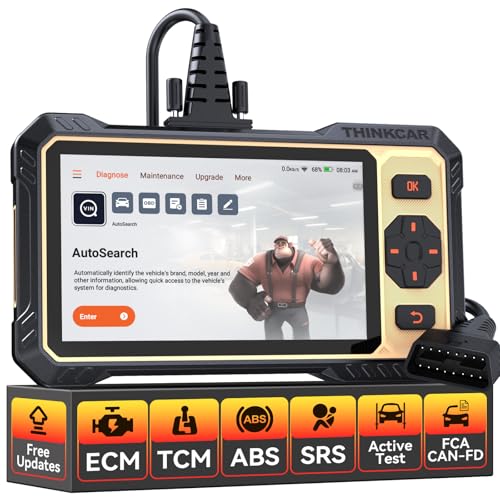
- 【Powerful Bidirectional Control -- Active Test】Good News! The THINKSCAN 662 obd2 scanner has bidirectional control function,which is the most popular feature among mechanics.This function is mainly used to test whether the executing components in the electronic control system can work normally,By requesting information from the vehicle's ECU or sending commands to the ECU module to execute commands and identify maintenance status,quickly locate the cause of the fault.Such as ABS,Fuel Injectors,Adjusting Throttle,Coolant Fans,Radiator Fans,Coolant Pumps,EV.AP Test, Fuel Trim Reset,Injector Buzz Test,Pump/ Value Test,etc. Effectively shorten diagnosis time and reduce diagnosis costs.
- 【Unlock Pro-Level Diagnostics With Half Costs】 THINKSCAN 662 obd2 scanner diagnostic tool Delivers Premium Scanning Power for Half the Price! The OBD2 scanner can handle common issues with ECM,TCM,ABS,SRS. It can easily read and clear fault codes, analyze data streams, and ensure quick identification of problems. THINKSCAN 662 bidirectional scan tool has 12 practical reset functions, including Airbag Reset,ABS Bleeding,BMS,Brake Reset, D.P.F,Throttle Adaptation,Injector Coding,OIL Reset,steering angle Reset,Gearbox,TPMS,and more. The car scanner diagnostic tool very suitable for DIY enthusiasts, car repair technicians, and small and medium-sized repair shops.
- 【Multi Functional Intelligent Car Scanner Diagnostic Tool】 Automatic VIN + Real-time Data + DTC Lookup + Historical Diagnostic Records: This OBD2 scanner features auto serch technology, allowing for car recognition without the need for manual input. The real-time data of the car ECU is read and displayed in the form of text or a 4-in-1 merged waveform chart. You can save, share, print or send the entire inspection report via email for analysis. Historical diagnostic reports help you quickly identify vehicle issues and understand the condition of the vehicle. The built-in 'feedback' module provides customized repair Operation recommendations from our certified professionals.
- 【Upgraded Hardware + Ergonomically Engineered】 THINKSCAN 662 OBD2 scanner has a friendly combination of touch screen and physical buttons with an ergonomic appearance for comfortable use.Experience 2x faster scans and 50% longer lifespan vs standard models.This scanner para autos boast a 4-core 1.8GHz CPU,6.2-inch HD touch screen,2GB RAM + 32GB ROM storage capacity,a long-lasting 4150mAh battery,Android 8 ensures lightning-fast bootup and processing.The scanner is robust with rubberized protection that you can store and use in the trunk or garage.Whether you are engaged in Home car maintenance or road rescue car repair,this car scanner can help you perfectly solve car problems.
- 【Effortless Setup & Scanning - Intuitive for All Skill Levels】No More Complicated Scanners! The User Interface is as User-Friendly as THINKCAR 689BT! Truly Plug-and-Play,The downward sliding setup shortcut portal and drawer function shortcut portal make you use this scan tool as easy as using your own cell phone.The car scanner supports setup screenshot,screen recording,volume adjustment,this scan tool includes product e-manuals,instructional videos,and fault code libraries,users can check the usage guide,perfect for DIY car owners,Maintenance technician.If your father,husband,brother,boyfriend enjoys car repairs,THINKSCAN 662 is a great gift choice, and it has amazing family value.
This product presentation was made with AAWP plugin.
Last update on 2026-05-12 / Affiliate links / Images from Amazon Product Advertising API