
NHTSA ID Number: 10064386
Manufacturer Communication Number: 03-00-89-006K
TSB/Document Date: 2016-05-13
Summary
SUMMARY TO BE PROVIDED ON A FUTURE DATE.
If the PDF is very large, it may not load in the preview below.
Some older TSBs had multiple PDFs — visit the NHTSA Website to view all PDFs.
If the TSB PDF does not show, download or view it on the NHTSA Website.
Click on the (+) Plus Sign
Then Click on Associated Document(s)

- 💝【Questions? We’re Here Anytime】MK808S is a...
- 🔥🔥🔥【2026 NEWLY RELEASED BI-DIRECTIONAL...
- 【28+ MOST POPULAR RESET SERVICE FOR 150 MAKES】Autel...
- 【ALL SYSTEM DIAGNOSTICS, FACTORY-LEVEL SCANNER】The...
- 【AUT0 SCAN & AUT0V1N, 10X FASTER】How much have you spent...


- 💯【Conta.ct us for Support Directly】If you met any...
- 🔥🔥🔥【2026 AUTEL FLAGSHIP MK900BT MK900-BT, NEW...
- 🚗【3000+ ACTIVE TESTS (50➡3000+), SAME AS MS...
- 🚗【40+ HOT SERVICES FOR 150 MAKES (28+➡40+)】Full...
- 🚗【OE ALL SYSTEM DIAGNOSE, AUTO SCAN 2.0: SCAN LICENSE...
This product presentation was made with AAWP plugin.
Search NHTSA Database for Recalls
Search NHTSA Database for Vehicle Investigations
View Latest Vehicle Investigations
Search NHTSA Database for Vehicle Complaints
View Latest Vehicle Complaints
TSB/Document ID: 03-00-89-006K
Replacement Service Bulletin Number:
MFR Communication Date: 2014-06-01
MFR Internal Campaign ID/Software Version:
Communication Type: Service Bulletin/Repair Instructions
NHTSA Components: EQUIPMENT:OTHER:OWNERS/SERVICE/OTHER MANUAL
MFR Component System:
MFR Component Subsystem:
Previous TSB | Next TSB |
File in Section:
Service Bulletin
Bulletin No.:
Date:
00 - General Information
03-00-89-006K
June, 2014
INFORMATION
Subject:
New Vehicle Pre-Delivery Inspection (PDI) – Delivering Quality Vehicles and Generating
Higher CSi Scores
Models:
2015 and Prior GM Passenger Cars and Light Duty Trucks
Attention: It is recommended that this bulletin be reviewed by the Vehicle Prep Department,
Service Manager and Sales Manager. Please note the section on Steering Wheel
Protective Covering Removal. Damage to the steering wheel. steering column wiring,
or components resulting from improper removal of the protective covering is not
warrantable.
This bulletin has been revised to add the 2015 model year, update information under the
Compass and Steering Wheel: Plastic Protective Covering sections and add information on
Transit Blocks. Please discard Corporate Bulletin Number 03-00-89-006J.
PDI Process
Pre-Delivery Inspection forms are available through GM GlobalConnect under the Service Workbench on the
Pre-Delivery Inspection Form link (in Canada, GM GlobalConnect under Library/Service/Vehicle Information).
Technicians will need to print the blank forms from the site and complete them with pen or pencil. The blue form
fields can be filled out with the PC prior to printing. The Completely Satisfied New Vehicle Delivery Sales (CSDS)
form is the second of two forms and prints with the PDI form. The CSDS form should be provided to the Sales
department for use during the new vehicle delivery process.
Important: The electronic PDI forms contain a section titled “Special Inspection Items”, which changes periodically.
The CSDS form contains a new section titled "Vehicle Features and Controls - Customer Tips," which also changes
periodically. Always use the most current form when performing a PDI.
The majority of the PDI/CSDS content is the same for all vehicles and does not change on a regular basis. However,
a small portion of the PDI form, titled “Special Inspection Items”, and the CSDS form, titled "Vehicle Features and
Controls - Customer Tips", is model-specific and changes periodically. The “Special Inspection Items” are issues
needing extra attention and the "Customer Tips" are helpful hints regarding features, which allow you to deliver the
highest possible quality vehicle experience to your customer.
Delivery Concerns
Most customers consider the condition of a vehicle during delivery as a direct reflection on your dealership and the
amount of care and quality your service department delivers. Therefore, providing a vehicle at its best can increase
your CSi ratings, and ultimately the number of customers in your showroom and service department. Many times,
the pre-delivery process is overlooked as an ordinary task, but it is one of the most important functions performed for
the customer. Customers who are delivered vehicles with damage may question the dealership's attention to detail.
For vehicles that may remain in storage for an extended period of time, refer to the latest version of Corporate
Bulletin Number 09-00-89-002 Preventing Damage on Dealers Lots During Long Periods in Dealer Inventory and
Maintaining Higher CSi Scores.
The following identifies areas important to a quality PDI that can help improve a customer's perception of your
dealership and increase his/her satisfaction.
Transport Mode
Many vehicles are shipped from the factory in Transport Mode. Certain vehicle functions may not be available or may
be altered while in transport mode. Refer to the latest version of Bulletin Number 11-08-49-001; Transport Mode On
Message Displayed in Driver Information Center (DIC) and/or Battery Light is flashing, for details.
Tire Pressure
Important: Tires MUST be set to the recommended inflation pressure during the PRE-DELIVERY INSPECTION
(including the spare tire if equipped).
Improper tire pressures may result in ride, handling and/or noise concerns. Verify and adjust the tire pressures,
including the spare tire, during PDI to the requested PSI (or kPa) as found on the tire placard, NOT the pressure
indicated on the sidewall of the tire. The recommended tire pressure placard may be located on the front door jamb,
the rear door jamb, the inner trunk lid or the inside of the I/P compartment door depending on the model. Vehicles
may not be shipped with the tires inflated to recommended pressures. Tire pressures may be set higher at the
assembly plants to assure proper tire bead seating. Changes in temperature can also affect the tire pressure.
Always verify the tires are at the correct pressure just prior to delivering the vehicle to the customer.
Battery Check and Charge
Check and, if necessary, charge the battery. Testing and maintenance ensures the dealer will begin storage of the
stock vehicle with a fully charged battery. It is then the dealer's responsibility to maintain the battery at a full state of
charge until delivery to the customer. Refer to General Motors Service Policies and Procedures Manual Article
2.2.2b for information on battery care. Vehicles stored with partially charged batteries are more likely to result in
“walk home” failures during the warranty period. For important information regarding maintaining batteries on
Hybrids and the Volt, refer to the latest version of Corporate Bulletin Number 09-00-89-002, Properly Maintaining
Vehicles in Dealer Inventory.
Interior Glass Cleaning
The interior glass should be cleaned with plain, clean water only applied with a clean terry cloth towel. Water only
cleaning eliminates any film or haze on the window and helps prevent fogging, which is a major customer dissatisfier
in JD Powers IQS results. Tests indicate that glass cleaners are ineffective at removing the film and can make the
situation worse. New vehicles have a tendency to deposit a film on the inside of the glass due to various properties
of the interior materials.
Fuel Economy Reset
Vehicles may be run very hard during assembly line testing then driven slowly around the plant and dealership lot.
This will affect the fuel economy reading on the DIC/SID. To ensure that the fuel economy displayed is an accurate
reading based on the customer's driving habits, it is important to reset the average fuel economy just prior to
delivery.
Compass (Global A Vehicles)
Important: Vehicles with an electronic compass display either on the inside rearview mirror or in the driver
information center (DIC) MUST have the geographic zone set and be calibrated during pre-delivery inspection.
During the new vehicle PDI, it is important that the compass variance and calibration procedure be performed, even
if a vehicle arrives displaying a compass heading. This will ensure the accuracy of the compass information. Refer to
Compass Variance and Compass Calibration procedure in the vehicle's Owner Manual.
Important: This compass system does not require a compass variance (zone) procedure to be performed.
The compass receives its heading and other information from the global positioning system (GPS) antenna,
StabiliTrak and vehicle speed information. The compass system is designed to operate for a certain number of
kilometers/miles or degrees of turn before needing a signal from the GPS satellites. When the compass display
shows CAL, drive the vehicle for a short distance in an open area where it can receive a GPS signal. The compass
system will automatically determine when GPS signal is restored and provides a heading again.
Wiper Blades
Clean the wiper blades with Optikleen®, or equivalent, to reduce windshield wiper chatter concerns.
OnStar® System Function (if equipped)
Check for the green indicator on OnStar® unit. Do NOT push the blue OnStar® button just to verify system function.
Refer to the latest version of Corporate Bulletin Number 06-08-46-006, Information on Verifying OnStar® System
Function During Pre-Delivery Inspection (PDI), for further details.
NEW OnStar White Phone Button - Press and listen for "OnStar Ready" - say "Help" to verify the system responds
with the help menu (if equipped).
Clock / Calendar
Set the clock / calendar to local time.
Final Inspection & Preparation: Perform Just Prior to Delivery
Interior : Remove protective coverings.
Clean as required: seats, headliner, kick panels, carpets, console, instrument panel, moldings and hard trim.
Steering Wheel, Seats, and Interior Door Panels
Important:
• There is no need to use any sharp object or cutting utensil to remove protective plastic from the steering wheel.
• Steering wheels may have an additional layer of plastic wound around the rim of the wheel. While this plastic is
very thin, care should be taken to unwind it and not to twist it into a fine wire like bunch. When twisted tightly,
this covering may have enough strength to scuff a leather steering wheel, if pulled off firmly.
These components are generally covered in plain or adhesive backed plastic to protect the surfaces during
assembly and dealer delivery. One area of concern centers on leather-wrapped steering wheels. The steering
wheels come tightly wrapped in multiple layers of plastic with a packaging label instructing specifically not to remove
with a knife or sharp object. Many returned steering wheels show razor cuts to the leather.
Steering Wheel: Plastic Protective Covering
2612104
The removal process is quite easy. Sit in the driver's seat with your hands at the 11 o'clock and 2 o'clock position.
Simply pull the plastic from behind, over the wheel toward you and then downward, taking care not to twist the plastic
or allow it to bunch up.
Notice: When removing plastic steering wheel coverings care MUST be taken to always pull the covering off as
described above. You MUST never draw the cover through the gap between the steering wheel and the steering
column. Delicate wires and vehicle components may be present in this area. It is also possible to get unwanted
plastic trapped in this area. Components damaged by trapped plastic are not covered under warranty.
Steering Wheel: Cloth Protective Covering
2612107
Cloth protective coverings are elastic and very easy to remove. They should present no difficulty.
Plastic coverings on the seats and the door panels should be removed without the use of knives or razor blades
which can cut the seat and/or door panel. Plastic wrap caught behind moldings or bezels may require the removal of
those trim pieces to remove the plastic. In NO case should residual or excess adhesive be removed from interior
surfaces with a razor blade. Do not expose the interior surfaces to harsh chemicals which may discolor the finish.
Refer to the latest version of Corporate Bulletin Number 06-00-89-029, Interior Cleaning – Instrument Panel (I/P),
Hard or Plastic Surfaces, Seats, Carpet, Leather, Vinyl, Fabric Cleaner, Stain Remover, Restorer – Product
Availability , for recommended cleaning methods and material for use on vehicle interiors.
Exterior Protection/Vehicle Storage Guidelines
The exterior protection devices such as plastic sheeting and foam block door protectors should be left in place up to
the time of the customer delivery except for vehicles on prominent display such as the showroom floor. These
protective devices help to minimize lot damage, reduce dealer expense and increase customer satisfaction.
General Motors has commonized the use of door edge protection in order to reduce the chance of chips/scratches
on the doors of new vehicles. The protectors come in the form of a black foam block that adheres to the painted door
panel by a sheet of white, two-sided tape. This foam block is designed to protect not only the painted body panel, but
also any body cladding or moldings on the vehicle. The location of the door protection varies, depending on the
contours of the door or body cladding. The purpose of this protection is not only to protect the vehicle during
transportation from the plant to the dealer, but also while the vehicle is either stored or displayed at the dealership.
Refer to the General Motors Service Policies and Procedures Manual, Article 2.2 for more information and
recommendations. GM recommends the door edge protection stay on the doors up until delivery to the customer. By
leaving this protection in place, the possibility of door chips, scratches or dents is virtually eliminated.
While all damage and every situation cannot be accounted for, simple thoughtfulness and care should be your guide.
There are many opportunities for damage to the finish of vehicles. Please review the following good discussion
starters, with porters and technicians:
• Winter season conditions can be a good source of damage for northern dealers. Sharp snow shovels and ice
scrapers can damage vehicles. Consider the use of plastic shovels (non-metal edged) for use in and around
vehicle storage lots and make sure snow removal tools are in good condition. Instruct dealership personnel to
be aware of potential damage when removing ice buildup from the vehicles.
• Keep bushes and shrubs trimmed back around vehicle storage lots. Sometimes, when space is at a premium,
every inch of a lot is utilized. Do not park vehicles near landscaping that, during a thunderstorm or winter storm,
may droop or move sufficiently to cause finish damage.
• Regularly maintain your dealership car wash. Worn components or improperly working mechanisms and valves
may damage or cause dulling of vehicle finishes. If your dealership hand washes and polishes vehicles for
delivery, reconfirm that personnel are dressed in proper clothing devoid of belt buckles, metal buttons/snaps,
wallet chains, etc.
• Create an open dialogue with your employees on vehicle damage control.
Removal of Transit Blocks (SS, Camaro 1LE, Z/28)
These vehicles are shipped from the factory with transit blocks inserted into the front springs that provide additional
ground clearance required during vehicle transportation.
Transit Block in Front Spring
3635252
These blocks (1 per side) MUST be removed during the PDI process.
Notice: Omitting the removal of these blocks will result in rough vehicle ride and front end suspension noise.
Removal of Transit Block Window Sticker
3680496
A reminder sticker to remove the transit blocks is applied to the vehicle windshield during assembly. This sticker
should be removed only AFTER the transit blocks are removed.
Note: Delivery without removal of the transit blocks would be immediately noticeable to the customer and could
result lower Customer Satisfaction Index (CSi) scores.
Notice: Failure to remove the transit blocks may result in a debit for the performed PDI. Subsequent vehicle
servicing to remove the blocks would not be warrantable.
Limited Production Option (LPO)
Limited Production Options (LPO) listed on the invoice are not shipped with the vehicle. The dealer should contact
their local ADI for the LPOs, Items listed as an LPO should not be claimed as warranty or transportation claims.
Please refer to the latest version of Corporate Bulletin Number 11-00-89-002 – GM Accessories - Dealer Installed,
Repaired or Replaced During Warranty Coverage for additional information on LPOs.

- 🎉[OTOFIX D1 Lite, Perfect Cost-effective Diagnostic Tool]: OTOFIX D1 Lite, a newest bidirectional scan tool from OTOFIX company, is a great choice for DIYers and repair shops. 👉This obd2 scanner diagnostic tool packs all practical functions: OE level all systems diagnoses, Bi-Directional Control, 38+ reset services fixing 99% of common problems, support DoIP & CANDF protocols and FCA
 AutoAuth, high-end hardware configuration. Worldwide vehicles and 🔥2 Years Free Updating🔥 covered.
 - 🎉[Bi-Directional Scan Tool, Active Test]: OTOFIX D1 Lite bluetooth obd2 scanner can also command ECUs and monitor the operation of the actuators to track down the problems of certain parts, like windows, sunroof, wipers, fuel pumps, etc., saving repair time & trouble. This makes OTOFIX D1 Lite the most cost-effective bidirectional scan tool.
- 🎉[2026 Newest, 38+ Hot Reset Functions]: Equipped with 38+ reset functions in one, the OTOFIX D1 lite automotive scanner diagnostic tool allows you to troubleshoot 99% of common vehicle problems. You can use this car diagnostic scanner holding enough functions to easily repair common vehicle models in your repair shops. Including Oil Reset, Injector Coding, Throttle, DPF Reset, SCR Reset, Gear Learning, Clutch Learning, Suspension, etc. Note* Reset functions vary by model.
- 🎉[OE Level Full Systems Diagnostics]: Unlike the 2-system and 4-system diagnostic tools, the OTOFIX auto scan tool can complete comprehensive system diagnostics within 5 minutes. It accesses and scans all available onboard systems like for Engine /AT /ABS /EPB /BMS /TPMS /SRS /SAS /Audio System /BCM /Air Conditioning / etc., to read & clear codes, view live data, and check ECU information. Note: Active test is not involved.
- 🎉[Powerful Hardware Configuration]: Designed with a fashion appearance & a 7” touchscreen and a weight of 463g, this OTOFIX D1 Lite OBD2 diagnostic scanner scan tool is convenient for everywhere and easy to use & store. Android9.0 OS and 2+64GB memory enhance multi-task smoothness and diagnostic operation, no more wasting too much time. 5800mAh battery allows hours-lasting use. WiFi & VCI1 also bring faster communication for your diagnostics.

- 🏆【2026 TOP OBD2 Scanner Diagnostic Tool】OTOFIX D1 Lite wireless obd2 scanner has upgraded hardware configuration and car coverage. The newly upgraded D1 Lite with 🔥OS Android 9.0🔥1.5Ghz 4 core high efficiency processor🔥2GB RAM+64GB ROM large storage🔥5800mAh large battery, more stable and longer lasting diagnostics🔥 38+ Reset🔥action tests🔥full system diagnostic🔥Supports MV105 endoscope🔥21+ Language Supports🔥100000+ vehicle coverage to meet all your daily maintenance needs.
- 👍【Bi-Directional Control / Active Test】D1 Lite obd2 scanner has bidirectional control(worth $300+), which is the most beloved feature among mechanic. If your headlights or car windows are broken, going to a repair shop will cost a lot of money. You can use D1 Lite to send execution commands to the ECU module and identify the repair status. Such as ABS, car windows, doors, valves, wipers, headlights, etc., effectively shorten diagnostic time and reduce diagnostic costs.
- 🔥【All Systems Diagnostics, In-depth Checking】This advanced OBD2 Scanner D1 Lite can perform OE-level diagnosis of all systems including engine, transmission, airbag, ABS, ESP, TPMS, gateway, steering, radio, and air conditioning for more than 100 brands. This diagnostic scanner supports essential functions, such as reading ECU version info, reading and clearing fault codes, and reading data streams.With just a simple click, it provides you with accurate and in-depth diagnostics.
- 🏆【38+ Reset Hot Functions】For repair workshops, holding an OTOFIX D1 Lite Auto scanner is a strong advantage over others. Its 38+ maintenance functions provide various solutions for all module repairs, including Oil Reset, TPMS Reset, Injector Coding, Suspension, Throttle Matching, etc., which will usher your repair business to a new pinnacle. Continuously updating will never make the functionality & compatibility out-of-date.
- 🏆【150+ Models, 10000+ Car Coverage & 16 Languages】D1 Lite is a comprehensive car diagnostic scan tool, help you to troubleshoot car issues fast for 95% US, European, Asian auto makes. ✅ With frequent updates and optimizations allow D1 Lite to cover more vehicles to meet your needs. ✅ Multilingual menu allows auto mechanics around the world to use it without language barriers. 🚩Note: Kindly send us the S/N of the device to authorize new language updates before changing the menu language.
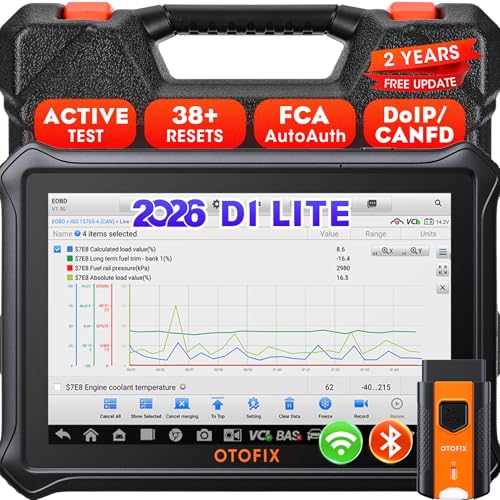
- 【2026 OTOFIX D1 Lite Gives the Best Value for Money】OTOFIX D1 Lite bidirectional scan tool is more FASTER and SMARTER with 2026 Enhanced Hardwares & New Functions! 👍Alternative Bluetooth +USB connect 👍2G+64GB 👍4x ARM Cortex-A35 (1.5GHz) Processor (5X Faster CPU) 👍Android 9.0 OS 👍5G GHz WiFi 👍CANFD&DOIP 👍 FCA AutoAuth 👍38+ Services 👍3K+ Bi-Directional Control 👍Full Systems Diagnose 👍2 Years Update 👍150+ Vehicle Coverage.
- 👍【Active Tests】 OTOFIX D1 Lite is a bi-directional scan tool that can send commands to, and also receive information from vehicle control modules. This way, you can quickly locate and repair faulty auto parts. For Example: send direct commands to ask the vehicle to turn on/off the radiator fan, lights, sound horn, fuel pump, modulate throttle, open/close windows, operate mirrors and more. *Note that only available tests will be displayed in the menu.
- 👍【38+ Service Functions】 OTOFIX D1 Lite scan tool offers 38+ of the hottest service functions that are commonly used for car repairs. That include Oil reset/SAS/EPB/BMS/Throttle/ABS bleeding, and 2065-new SUS/ADBLUE/NOX/Headlamp resets (and more) to help restore your car status after repairs are done. Compared to other diagnostic scanners for cars, the OTOFIX D1 Lite scanner is much more fully-featured. *Note that specific functions available depend on the make/model/year of your car.
- 👍【All System Diagnostics + Cloud Report Management】 This 2026 car scanner OTOFIX D1 Lite provides troubleshooting and data for all ECUs: read/clear DTCs, view graphic live data/VIN, and locate system faults for safe driving. With Cloud Report Management, you can save detailed reports to cloud servers and easily shared them with others via QR codes/emails/text messages. Others can access these reports from any device (smartphones/tablets/PCs …) anytime, and you can better manage repair work.
- 👍【99% Car Coverage】 This one-station car scanner diagnostic for all cars works on 150+ major car brands across the world. 1) It supports CAN-FD/DoIP protocols: compatible with GMCAVALIER/TRAX/Encore/Envision/GL8(LSY)/CT4/CT5 after 2019; Volvo after 2018; Land Rover/Jaguar after 2017; and BM.W F/G all chassis. 2) For models equipped with security modules (such as Renault & 2018+ FCA SGW), its built-in AutoAuth allows you to easily break diagnostic barriers after registration.
This product presentation was made with AAWP plugin.
Last update on 2026-05-11 / Affiliate links / Images from Amazon Product Advertising API