
NHTSA ID Number: 10061653
Manufacturer Communication Number: T-SB-0194-12
TSB/Document Date: 2016-04-12
Summary
SUMMARY TO BE PROVIDED ON A FUTURE DATE.
If the PDF is very large, it may not load in the preview below.
Some older TSBs had multiple PDFs — visit the NHTSA Website to view all PDFs.
If the TSB PDF does not show, download or view it on the NHTSA Website.
Click on the (+) Plus Sign
Then Click on Associated Document(s)

- 💝【Questions? We’re Here Anytime】MK808S is a...
- 🔥🔥🔥【2026 NEWLY RELEASED BI-DIRECTIONAL...
- 【28+ MOST POPULAR RESET SERVICE FOR 150 MAKES】Autel...
- 【ALL SYSTEM DIAGNOSTICS, FACTORY-LEVEL SCANNER】The...
- 【AUT0 SCAN & AUT0V1N, 10X FASTER】How much have you spent...


- 💯【Conta.ct us for Support Directly】If you met any...
- 🔥🔥🔥【2026 AUTEL FLAGSHIP MK900BT MK900-BT, NEW...
- 🚗【3000+ ACTIVE TESTS (50➡3000+), SAME AS MS...
- 🚗【40+ HOT SERVICES FOR 150 MAKES (28+➡40+)】Full...
- 🚗【OE ALL SYSTEM DIAGNOSE, AUTO SCAN 2.0: SCAN LICENSE...
This product presentation was made with AAWP plugin.
Search NHTSA Database for Recalls
Search NHTSA Database for Vehicle Investigations
View Latest Vehicle Investigations
Search NHTSA Database for Vehicle Complaints
View Latest Vehicle Complaints
TSB/Document ID: T-SB-0194-12
Replacement Service Bulletin Number:
MFR Communication Date: 2012-10-16
MFR Internal Campaign ID/Software Version:
Communication Type: Service Bulletin/Repair Instructions
NHTSA Components: EQUIPMENT:OTHER:OWNERS/SERVICE/OTHER MANUAL
MFR Component System:
MFR Component Subsystem:
Previous TSB | Next TSB |
@TOYOTA
Technical Service Bulletin
October 16, 2012
T-SB-0194-12
Maintenance for HV & Auxiliary Batteries
Service
Category
General
Section
Pre-Delivery Service
Toyota Supports ~
ASE Certification ~
USA
Market
Applicability
YEAR(S)
MODEL(S)
2013
Prius, Prius C, Prius
PHV, Prius V
ADDITIONAL INFORMATION
Introduction
Prius vehicles are equipped with 2 types of batteries:
• Hybrid Vehicle (HV) battery
• 12-volt auxiliary battery
If Prius vehicles are put into storage, the state of charge (SOC) of its HV battery and auxiliary
battery will gradually decrease. To prevent the auxiliary battery from becoming discharged during
storage, proper maintenance is necessary.
Please perform the following maintenance service for the HV battery and 12-volt auxiliary battery.
NOTE
• Before disconnecting the auxiliary battery, confirm the shift lever is in the "P" position and
apply the parking brake completely. The shift lever CANNOT be shifted from the "P" position
with the 12-volt auxiliary battery disconnected.
• If the negative (-) terminal of the auxiliary battery is reconnected, even if the power button is in
the "START" mode, the hybrid system may NOT start. In this case, push the "POWER" button
and select the "START" mode again to start the hybrid system (the " READY" light is ON). If the
hybrid system still does NOT start (the "READY" light is OFF), refer to the Repair Manual.
Warranty Information
OP CODE
DESCRIPTION
TIME
OFP
T1
T2
N/A
Not Applicable to Warranty
-
-
-
-
© 2012 Toyota Motor Sales, USA
Page 1 of 7
T-SB-0194-12
October 16, 2012
Page 2 of 7
Maintenance for HV & Auxiliary Batteries
Maintenance Items
CONDITION*
MAINTENANCE OPERATION
Before Delivery
Fully charge 12-volt auxiliary battery (deliver the vehicle to
the customer after it is fully charged 12.6 V or more).
To Store for 30 Days or More
Disconnect the negative (-)terminal of the 12-volt
auxiliary battery in the luggage compartment to prevent
the SOC of the auxiliary battery from decreasing during
storage due to parasitic current.
Just After Unloading & Every 2 Months
Keep the Hybrid System ON for 30 minutes with the
transm ission in the "P" position (in order to charge the
HV battery and the auxiliary battery).
* The condition also corresponds with the section titles within this TSB.
Required Tools & Equipment
SPECIAL SERVICE TOOLS (SST)
PART NUMBER
QTY
GR8 Battery Diagnostic Station*
00002-MCGR8
1
* Essential SST.
NOTE
The GR8 Battery Diagnostic Station (P/N 00002-MCGRB) supersedes the Automatic Trickle Charger
(P/N 00002-YA122-01) and Fast Battery Chargers (Associated P/N ASE6003 and Christie P/N
CAPPDQ). P/N 00002-YA122-01 , ASE6003, and CAPPDQ are now obsolete .
© 2012 Toyota Motor Sales, USA
T-SB-0194-12
October 16, 2012
Page 3 of 7
Maintenance for HV & Auxiliary Batteries
Before Delivery
Fully charge the 12-volt auxiliary battery:
1. Before charging the auxiliary battery, turn OFF all lights, accessories, and the hybrid system.
2. Open the back door and remove the battery cover.
3. Remove the positive(+) terminal cover.
Figure 1.
1
I
Positive Terminal
4. Check the battery SOC.
• If the battery voltage is LESS THAN 12.6 V, then continue to step 5.
• If the battery voltage is 12.6 V or MORE, replace the positive(+) terminal cover, install
battery cover and close the back door.
NOTE
• If measuring the voltage with the negative (-) terminal connected, turn OFF the power
switch and turn ON the headlights for 20 to 30 seconds. This will remove the surface
charge from the battery.
• If the engine has been running before measuring the voltage, wait 20 minutes or more after
the engine stops. This removes the surface charge.
© 2012 Toyota Motor Sales, USA
October 16, 2012
T-SB-0194-12
Maintenance for HV & Auxiliary Batteries
Before Delivery
Fully charge the 12-volt auxiliary battery: (Continued)
5. Test/charge the 12-volt auxiliary battery using the
GR8 Battery Diagnostic Station.
Figure 2.
A. Connect the red charger clamp to the positive
(+) battery terminal and the black charger
clamp to the negative(- ) battery terminal.
B. Plug the charger into a grounded 110-volt
nominal outlet and flip the power switch to the
"ON" position .
C. Once the charger is properly turned ON ,
perform a diagnostic charge.
The GR8 Battery Diagnostic Station will
indicate result when complete.
If the battery tests bad ("Replace Battery"),
then replace the auxiliary battery.
1
NOTE
If the auxiliary battery was stored at 32° F
(0°C) or below, charge the auxiliary battery
in a room above 32° F (0°C).
CAUTION
• Charge in a well-ventilated area.
• Do NOT allow sparks or fire near the
auxiliary battery.
If the GR8 Battery Diagnostic Station is NOT
available , you may charge the 12-volt battery
by cycling the vehicle on to "READY."
• Run time will vary depending on the state
of charge.
• If this method is used , you must confirm
that the battery is charged to 12.8 volts
using a DVOM .
© 2012 Toyota Motor Sales, USA
I
P/N 00002-MCGRB
Page 4 of 7
T-SB-0194-12
October 16, 2012
Maintenance for HV & Auxiliary Batteries
Before Delivery
Fully charge the 12-volt auxiliary battery: (Continued)
6. After charging the auxiliary battery, install the
positive(+) terminal cover.
Figure 3.
1
I
Positive Terminal
7. Install the battery cover and close the back door.
To Store for 30 Days or More
Disconnect the negative (-) terminal:
1. Turn OFF all lights, accessories, and the hybrid system.
2. Open back door and remove the battery cover
3. Disconnect the negative (-)terminal.
Figure 4.
1
© 2012 Toyota Motor Sales, USA
I
Negative Terminal
Page 5 of 7
October 16, 2012
T-SB-0194-12
Page
6 of 7
Maintenance for HV & Auxiliary Batteries
To Store for 30 Days or More
Disconnect the negative(-) terminal: (Continued)
4. Install the battery cover and close the back door.
NOTE
When it is necessary to move the vehicle, reconnect the negative (-) terminal.
When removing the vehicle from storage, connect the negative (-) terminal:
1. Open the back door and remove the battery cover.
2. Connect the negative (-)terminal.
Figure 5.
Torque: 6.0 N*m (61 kgf*cm, 4.4 ft*lbf)
1
I
Negative Terminal
3. Install the battery cover and close the back door.
NOTE
After recharging the auxiliary battery, the hybrid system may NOT start. Follow the procedure
below to initialize the system.
• Put the shift lever in the "P" position.
• Open and close any of the doors.
• Restart the hybrid system.
© 2012 Toyota Motor Sales, USA
•
@TOYOTA
T-SB-0194-12
October 16, 2012
Page 7 of 7
Maintenance for HV & Auxiliary Batteries
Every Two Months
Cycle vehicle to "READY" ON :
NOTE
• When the remaining capacity of the HV battery is low, the gasoline engine automatically starts
and the HV battery is charged by the generator. The 12-volt auxiliary battery is also charged by
the HV battery regardless of the gasoline engine operation.
• Be sure to reconnect the negative (-) terminal of the auxiliary battery BEFORE performing
this procedure.
1. Park the vehicle in open air or connect the exhaust extraction hose to the exhaust pipe.
2. Apply the parking brake.
3. With the brake pedal depressed, push the
"POWER" button and select the "START' mode
and check that the "READY" light in the meter
illuminates when the hybrid system starts (the
"READY" light is ON).
Figure 6.
"\.\!J.1~
/,.,,,,,
-(READY)-
~
4. Turn OFF all lights and accessories.
5. Check that the shift lever is in the "P" position.
6. Keep the "READY" light on and charge the HV battery for 30 minutes.
NOTE
• If the amount of charging energy is small, the display may NOT indicate the energy flow.
• Ensure there is a sufficient amount of fuel for the vehicle to run for 30 minutes.
© 2012 Toyota Motor Sales, USA
...........
------------~

- OBD2 Bluetooth Scanner Lifetime Update: Ediag Elite offers revolutionary Advantage Lifetime Updates with unlimited access to the superior 15+ reset service, bidirectional testing and full system diagnostics.The Ediag Elite is an excellent Bluetooth OBD2 scanner diagnostic tool ideal for DIY's and private car owners.
- Bidirectional Test for Quickly Locating Problems: The Bidirectional Scan tool allows you to send commands directly from your smartphone to your vehicle for active testing. This feature helps to quickly narrow down problems such as air conditioning clutches, windows, doors, sunroofs, etc., reducing diagnostic time for mechanics and helping DIY users locate faults more easily. In addition, Ediag Elite provides fault analysis and repair guidance to help you solve problems efficiently.
- 15+ Maintenance Resets: The current version introduces 15+ popular special features: Oil Reset, Headlight Matching, Bleeding Reset, TPMS Reset, BMS Reset, Gear Box Relearn, Throttle Learning, Injector Coding, SAS Reset and more special functions in system diagnose menu. These functions make it easy for owners to carry out the necessary maintenance and servicing, ensuring that your vehicle stays in top condition, prolonging its service life and preventing common problems and breakdowns. Note: The Special function vary by model& year, Reach us check compatibility.
- Wide Compatibility CANFD & FCA
 Autoauth: Compatible with GM, Ford, Toyota, Chrysler, Honda, Mazda, Nissan, Mitsubishi, Hyundai, KIA with standard OBD2 port from 1996 to newer. More car brands and features will be released gradually. Newest Ediag Elite scanner supports CANFD Protocol and FCA cars. Note: Coverage may vary on different vehicle by model& year ,Please contact us to confirm compatibility before purchase.
 - Perfect for Monitoring The Health of Your Vehicle: Ediag Elite is designed to make vehicle maintenance simple and efficient. With intelligent Auto VIN quick recognition, it is easy to connect to your car without the need for manual input. Real-time data is visualized in a variety of formats, including graphs, numeric, meter displays and clear 4-in-1 data charts, allowing you to effortlessly monitor real-time data. Data logging/reporting is available for playback and further analysis

- No Annual Fees & 2026 Upgraded CAN FD: Why pay $199/year or more for updates? The 2026 newest Kingbolen K7 obd2 scanner features have been upgraded to Lifetime Updates without subscription fees, saving you significant costs in the long run. K7 scan tool also adds the CAN FD protocol for the latest GM models (2019+), enabling faster data transfer, reducing the risk of undetected errors
- 2026 Newest Top-tier Car Scanner: Kingbolen K7 diagnostic scan tool is equipped with most capabilities for daily repair/maintenance: Wireless diagnosis via Bluetooth, Bidirectional Test, ECU Online/Offline Code, 31+ Resets, PMI for Ford, Lincoln, Mazda, Global version for 100+ brand vehicles and 17 languages, no area limit, FCA AutoAuth
- OE-Level Full Systems Scan Tool: K7 professional diagnostic scanner with Auto Vin can do one-click to scan ECUs on most of vehicles, like pcm, ecm, eps, bcm, tpms, sas, a/c system... to read/clear code, view live data, freeze frame, read ecu info. 4-in-1 data stream graphics can make data viewing more intuitive. Detailed diagnostic reports will help you easily master the car situation as it can be shared by bluetooth or email! Adding workshop information can help your customers to know more
- Bidirectional Test/Active Test & ECU Code: Stop guessing and start fixing. Bidirectional scan tool Kingbolen K7 can perform real active test that can send commands to the vehicle's ECU to drive the actuators to work, like window, rear mirrors, sunroof, door, solenoids, wipers, headlamp, etc, helping you quickly find out bad parts and pinpoint faulty issues. K7 bidirectional scanner will be a good choice to save money and time on car repairs when performing complex maintenance and repair
- 31 Reset Functions: Avoid expensive dealership visits for simple services. Experience tells us that just a small repair service may cost a lot of money. Kingbolen K7 is a professional diagnostic scanner with 31 common maintenance services like Oil /SAS/EPB/TPMS Reset, Battery Matching, ABS Bleeding, Injector Code, etc. It effectively handles most of the car reset and relearning jobs, perfect for experienced DIYers and mechanics. Note: Functions in the menu vary across vehicles. Kindly check the compatibility before purchase
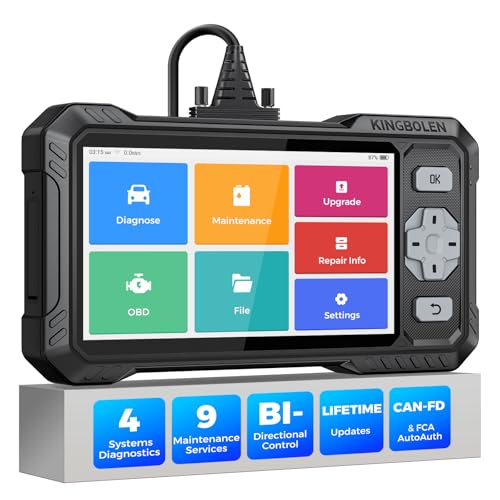
- WHY S608 STANDS OUT:2026 Kingbolen S608 is the only scanner <200 bucks that offers powerful active tests on Engine, ABS, SRS, and Transmission systems. Offers 9 resets,Covers 110+ global brands with a 6.2'' larger touchscreen
- KINGBOLEN'S NEW BIDIRECTIONAL SCAN TOOL: As the 2026 upgraded version of S600, our Newest S608 obd2 scanner has the powerful Bi-directional Control on Engine, ABS, SRS, and Transmission systems. It can send commands to the ECUs of actuators for functional tests and work status checks, such as ABS, fuel injectors, adjusting throttle, coolant pumps, EVAP test, fuel trim reset, etc. No more Guesswork. Quickly identify problem components without teardown, get fuss-free results in seconds.
- 【9 HOT RESET SERVICES CAR SCANNER】Tired of costly mechanic trips for common resets? The Kingbolen S608 obd2 scanner lets you do it yourself, even for beginners—quickly and effortlessly! It offers 9 hot reset functions: Oil/EPB Reset, ABS Bleeding, SAS Calibration, DPF Regeneration, Injector Coding, BMS Matching, Throttle Adaptation, Gear Learning. Stop paying mechanics for 5-minute jobs. Save hundreds per year! 🚗*Function vary from vehicle models. reach us to check compatibility firstly!
- 【4 SYSTEM DIAGNOSTIC TOOL + FULL OBDII FUNCTIONS】Kingbolen S608 is an OBDII scanner and 4 systems diagnostic tool made for home mechanics, DIYers, and professionals. You can access Engine, ABS, SRS, Transmission fault codes, track live data in graphs, and onboard DTC library lookup to find the right troubleshooting procedure, and diagnose with full 10 OBD2 test modes to fix most of emission issues. Give your aging cars routine maintenance to avoid costly repairs, a breakdown, or even a crash.
- 【NEW CAN FD, FCA/RENAULT SGW, 140+ BRANDS】Kingbolen S608 scanner for car supports 140+ vehicle brands, 100,000+ models, 28 languages and can be used worldwide. S608 stays up-to-date with modern vehicles, allows secure access to 2017+ FCA cars and 2015+ Renault cars (📢*Need to purchase an AutoAuth/Renault account by yourself), and supports the latest CAN-FD protocol for 2019+ GM/Chrysler, enabling 2X faster data transfer and more precise diagnostics. 🚗*Check compatibility before purchase.
This product presentation was made with AAWP plugin.
Last update on 2026-05-13 / Affiliate links / Images from Amazon Product Advertising API