
NHTSA ID Number: 10057136
Manufacturer Communication Number: SD-64-4976
TSB/Document Date: 2015-04-21
Summary
BENDIX : TO AVOID LANE DRIFTING, THE AUTOVUE DEPARTURE SYSTEM GIVES DRIVERS ABILITY TO CONTROL DRIFTING. *LJ
If the PDF is very large, it may not load in the preview below.
Some older TSBs had multiple PDFs — visit the NHTSA Website to view all PDFs.
If the TSB PDF does not show, download or view it on the NHTSA Website.
Click on the (+) Plus Sign
Then Click on Associated Document(s)

- 💝【Questions? We’re Here Anytime】MK808S is a...
- 🔥🔥🔥【2026 NEWLY RELEASED BI-DIRECTIONAL...
- 【28+ MOST POPULAR RESET SERVICE FOR 150 MAKES】Autel...
- 【ALL SYSTEM DIAGNOSTICS, FACTORY-LEVEL SCANNER】The...
- 【AUT0 SCAN & AUT0V1N, 10X FASTER】How much have you spent...


- 💯【Conta.ct us for Support Directly】If you met any...
- 🔥🔥🔥【2026 AUTEL FLAGSHIP MK900BT MK900-BT, NEW...
- 🚗【3000+ ACTIVE TESTS (50➡3000+), SAME AS MS...
- 🚗【40+ HOT SERVICES FOR 150 MAKES (28+➡40+)】Full...
- 🚗【OE ALL SYSTEM DIAGNOSE, AUTO SCAN 2.0: SCAN LICENSE...
This product presentation was made with AAWP plugin.
Search NHTSA Database for Recalls
Search NHTSA Database for Vehicle Investigations
View Latest Vehicle Investigations
Search NHTSA Database for Vehicle Complaints
View Latest Vehicle Complaints
TSB/Document ID: SD-64-4976
Replacement Service Bulletin Number:
MFR Communication Date: 2014-11-01
MFR Internal Campaign ID/Software Version:
Communication Type: Service Bulletin/Repair Instructions
NHTSA Components: ELECTRICAL SYSTEM:SOFTWARE
MFR Component System:
MFR Component Subsystem:
Previous TSB | Next TSB |
SD-64-4976
SB-10057136-1804
®
AutoVue® Lane Departure Warning (LDW) System by Bendix CVS
1.0 DESCRIPTION
1.1 SYSTEM COMPONENTS
®
The AutoVue Lane Departure Warning (LDW) System by
Bendix CVS gives drivers the ability to combat lane drift
related to: drowsiness/fatigue, distractions, and adverse/
unfavorable weather conditions.
At speeds above 37 mph (60 kmph), the AutoVue system
tracks visible lane markings including both solid and dashed
shoulder lines, center lines, and lines between lanes.
When an unexpected lane change takes place – a lane
change without an activated turn signal – the system alerts
the driver to make a correction.
The system components include a digital camera mounted
near the middle of the windshield inside the cab, an enable/
disable switch (typically with status lamps), a driver alert
system (speakers and/or a vibrating seat), and a central
processing unit in the overhead console.
Some vehicles connect the AutoVue system to the vehicle’s
telematics communication system (See Appendix A:
Bendix™ SafetyDirect® system).
The camera is
mounted to the
windshield
The AutoVue LDW system is intended only as an
aid for a conscientious and alert driver. It may not
provide any warning of unintended lane departures
under certain conditions. Do not rely solely on
the system to safely operate the vehicle. It does
not warn of all possible hazards. For example, the
system cannot help prevent an accident if the driver
is impaired or not driving safely.
Ultimate responsibility for the safe operation of the
vehicle remains with the driver at all times.
®
Vehicle Equipped with AutoVue
LDW System by Bendix CVS
FIGURE 1 - AUTOVUE® LDW SYSTEM (BOXES ADDED TO
ILLUSTRATE ACTIVE LANE DETECTION)
Windshield-mounted
Camera
Painted Road Stripes
CAMERA FIELD OF VIEW
NOT TO SCALE
For vehicles traveling above 37 mph (60 kmph), the
GREY area approximates the zone where the system’s
processor is evaluating the vehicle’s positon in the lane.
The rectangles illustrate zones where the
AutoVue LDW system makes specific
measurements about the lane ahead.
FIGURE 2 - AUTOVUE® LDW SYSTEM BY BENDIX CVS - OPERATIONAL VIEW
1
GENERAL SAFETY GUIDELINES
WARNING! PLEASE READ AND FOLLOW THESE INSTRUCTIONS
TO AVOID PERSONAL INJURY OR DEATH:
When working on or around a vehicle, the following guidelines should be observed AT ALL TIMES:
▲ Park the vehicle on a level surface, apply the
parking brakes and always block the wheels.
Always wear personal protection equipment.
▲ Stop the engine and remove the ignition key
when working under or around the vehicle.
When working in the engine compartment,
the engine should be shut off and the ignition
key should be removed. Where circumstances
require that the engine be in operation, EXTREME
CAUTION should be used to prevent personal
injury resulting from contact with moving,
rotating, leaking, heated or electrically-charged
components.
▲ Do not attempt to install, remove, disassemble
or assemble a component until you have read,
and thoroughly understand, the recommended
procedures. Use only the proper tools and
observe all precautions pertaining to use of those
tools.
▲ If the work is being performed on the vehicle’s
air brake system, or any auxiliary pressurized air
systems, make certain to drain the air pressure
from all reservoirs before beginning ANY work
on the vehicle. If the vehicle is equipped with a
Bendix® AD-IS® air dryer system, a Bendix® DRM™
dryer reservoir module, or a Bendix® AD-9si™ air
dryer, be sure to drain the purge reservoir.
▲ F o l l o w i n g t h e v e h i c l e m a n u f a c t u r e r ’s
recommended procedures, deactivate the
electrical system in a manner that safely removes
all electrical power from the vehicle.
▲ Never exceed manufacturer’s recommended
pressures.
▲ Never connect or disconnect a hose or line
containing pressure; it may whip. Never remove
a component or plug unless you are certain all
system pressure has been depleted.
▲ Use only genuine Bendix ® brand replacement
parts, components and kits. Replacement
hardware, tubing, hose, fittings, etc. must be of
equivalent size, type and strength as original
equipment and be designed specifically for such
applications and systems.
▲ Components with stripped threads or damaged
parts should be replaced rather than repaired.
Do not attempt repairs requiring machining or
welding unless specifically stated and approved
by the vehicle and component manufacturer.
▲ Prior to returning the vehicle to service, make
certain all components and systems are restored
to their proper operating condition.
▲ For vehicles with Automatic Traction Control
(ATC), the ATC function must be disabled (ATC
indicator lamp should be ON) prior to performing
any vehicle maintenance where one or more
wheels on a drive axle are lifted off the ground
and moving.
▲ The power MUST be temporarily disconnected
from the radar sensor whenever any tests USING
A DYNAMOMETER are conducted on a Bendix®
Wingman® Advanced™-equipped vehicle.
▲ You should consult the vehicle manufacturer's operating and service manuals, and any related literature,
in conjunction with the Guidelines above.
Due to the inherent limitations of image recognition
technology, the lane departure warning (LDW)
technology — on rare occasions — may not be
able to detect or may misinterpret lane markings.
At these times, alerts may not occur, or erroneous
alerts may occur.
Bendix active and supportive safety technologies,
including AutoVue® LDW, do not replace the need
for safe drivers. No commercial vehicle safety
technology replaces the most important safety
component of all – a skilled, alert professional
driver exercising safe driving habits, as well as
continuous, comprehensive driver training.
IMPORTANT: It is the responsibility of the driver to remain
vigilant and change driving practices depending on traffic
and road conditions.
Ultimate responsibility for the safe operation of the
vehicle remains with the driver at all times.
2
SD SHEET INDEX
1.0 Description . . . . . . . . . . . . . . . . . . . . . . . . . . . . . . . . . . . . . . . . . . . . . . 1
1.1 System Components . . . . . . . . . . . . . . . . . . . . . . . . . . . . . . . . . . . . . . . . . 1
2.0 System Operation: What To Expect When Using The AutoVue® LDW System By Bendix CVS . . . 4
2.1 Potential False And Missed Alerts . . . . . . . . . . . . . . . . . . . . . . . . . . . . . . . . . . 5
2.2 Setting Diagnostic Trouble Codes . . . . . . . . . . . . . . . . . . . . . . . . . . . . . . . . . . 5
2.3 Maintenance . . . . . . . . . . . . . . . . . . . . . . . . . . . . . . . . . . . . . . . . . . . . . 5
2.4 Camera and ECU Interchangeability . . . . . . . . . . . . . . . . . . . . . . . . . . . . . . . . . 5
2.5 Alert Volume . . . . . . . . . . . . . . . . . . . . . . . . . . . . . . . . . . . . . . . . . . . . . 5
2.6 Windshield Mounting Information . . . . . . . . . . . . . . . . . . . . . . . . . . . . . . . . . . . 6
3.0 Troubleshooting . . . . . . . . . . . . . . . . . . . . . . . . . . . . . . . . . . . . . . . . . . . . 7
3.1 General Safety Guidelines . . . . . . . . . . . . . . . . . . . . . . . . . . . . . . . . . . . . . . 7
3.2 Diagnostic Trouble Codes (DTCs) . . . . . . . . . . . . . . . . . . . . . . . . . . . . . . . . . . 7
3.3 Table of AutoVue LDW System Diagnostic Trouble Codes (DTCs) . . . . . . . . . . . . . . . . 7-11
3.4 Advanced Troubleshooting . . . . . . . . . . . . . . . . . . . . . . . . . . . . . . . . . . . . . . 13
3.5 Clearing Diagnostic Trouble Codes (DTCs) . . . . . . . . . . . . . . . . . . . . . . . . . . . . . 14
Appendix A - SafetyDirect® by Bendix CVS . . . . . . . . . . . . . . . . . . . . . . . . . . . . . . . . 15
The system uses speakers to emit a distinctive “rumble
strip” sound on the appropriate side, (or optional vibration
from the left or right portions of the driver’s seat alert if a
non-audible warning is preferred).
The AutoVue LDW system is optimized to reduce false
alarms, however the driver may temporarily use the enable/
disable switch to silence multiple occurrences.
Mounting Bracket
(affixed to the
windshield)
Typical System Components
Key
1.
2.
3.
4.
5.
Description
Lane Departure Warning (LDW) processor
Camera with windshield bracket
Two 3½-inch speakers with covers (optional)
Two vibrating seat motors (optional)
Dash-mounted enable/disable switch
3
Note: The camera
is removed from the
bracket by sliding
upwards
Camera
Lens
FIGURE 4 - AUTOVUE® CAMERA
The AutoVue LDW system has two lamps: an amber
status lamp, and a green enable/disable lamp. There is
also a switch to permit the driver to temporarily disable
the system. Some vehicles have the lamps and switch
combined. See Figure 5 below.
4
2
5
1
Green Enable/
Disable Lamp
FIGURE 3 - AUTOVUE® LDW SYSTEM BY BENDIX CVS
See Figure 3 for a list of the typical components used for
AutoVue® LDW systems by Bendix CVS.
Amber Status
Lamp
FIGURE 5 EXAMPLE OF
AN AUTOVUE
SYSTEM
SWITCH.
The design will
vary by vehicle
OEM. The switch
and lamps may
be separate.
3
2.0 SYSTEM OPERATION:
WHAT TO EXPECT WHEN USING THE
AUTOVUE® LDW SYSTEM BY BENDIX CVS
What to Expect in Normal Operating Conditions
Situation
Green
Amber
Typical System Actions
Enable/Disable
Status Lamp
Lamp
Self-test at power-up.
On and remains
illuminated.
On and
remains
illuminated.
Starting the vehicle supplies power to
the system. At start‑up, the system
performs a self-test, then sounds
two chirps through [first the left, then
the right] the speakers. For vehicles
which have systems with vibrating seat
motors, the same sequence is followed
to indicate the system is ready. Once
the vehicle is running and the system is
ready, the green ENABLED lamp and
amber STATUS lamp illuminate.
Driver may test the enable/
disable switch: press ONCE.
Lamp off.
Lamp off.
None.
Driver may test the enable/
Lamp illuminates.
disable switch: press AGAIN.
Lamp
illuminated.
None.
Active system Diagnostic
Trouble Code (DTC) is
present.
Lamp
illuminated.
System disabled.
(Awaits system service)
Vehicle exceeds 37 mph
(60 Kmph), lane markings on
Lamp remains
both sides are being tracked,
illuminated.
and there are no active
system DTCs.
Lamp off.
None. (System is now active).
(With turn signal ON) Driver Lamp remains
changes lanes.
illuminated.
Lamp off.
None.
Lamp remains
illuminated.
Lamp off.
The speaker on the side of the
vehicle towards which it is moving/
drifting will emit a “rumble
strip” sound. (If installed, driver’s
seat vibration will also/instead be
activated.)
Vehicle slows to 37 mph
(60 Kmph), or below, and/or
one or both lane markings
are no longer able to be
tracked by the system.
Lamp remains
illuminated.
Lamp
illuminated.
None (system is NOT active).
Driver temporarily disables
the system by pressing the
disable switch (for example,
construction areas with
poorly marked lines may
cause multiple false alerts.)
Lamp off.
Lamp off.
The system will automatically
re‑enable after 15 minutes.
At
StartUp
On (Without turn signal) Driver
the drifts out of lane/changes
lanes.
Road
Lamp off.
FIGURE 6 - OPERATIONAL SCENARIOS WITH THE AUTOVUE LDW SYSTEM
4
2.1 POTENTIAL FALSE AND MISSED ALERTS
In certain unusual traffic or roadway conditions, the AutoVue® LDW system by Bendix CVS may issue a false alert.
Drivers should take into account the road conditions, and any other factors they are encountering, as they choose how
to react to any alerts they receive from the AutoVue LDW system.
Overview of Potential Issues
Issue
Description
A system Diagnostic
Trouble Code (DTC)
is present.
If the AutoVue LDW system finds a problem at power-up or during operation, it will set a
DTC and will disable the system. The amber lamp will be ON, and the green lamp OFF.
System cannot
discover right and
left lane markings.
•
Mis-installed camera (incorrect placement, not level, loose, etc. See page 6 for full
details of camera installation specifications.) Note: When re-mounting a camera bracket,
use Bendix windshield adhesive ‑ p/n 493088201 ‑ do not use substitutes.
•
Road markings are hard to see (faded/missing lane markings, standing water, snow, or
mud/sand/dirt/debris on the road).
•
Inclement weather (heavy rain, fog, snow, smoke, ice or sleet, etc. is blocking the lane
markings).
•
Camera’s view is not clear (glass not clean, chipped or cracked, not installed where the
windshield wiper cleans the glass, other distortion).
Headlight(s) are not operating or are mis-aimed.
Sun glare or other light source blinds the camera, obscures the lane markings, or makes
other road markings (e.g. tar strips) look like lane markings.
®
Use J1939 detection software to find the DTC code. Go to the Troubleshooting Section
(page 7) to find the recommended repair.
•
•
FIGURE 7 - EXAMPLES OF POTENTIAL ISSUES
NOTE: These are potential situations and responses that might occur when using the AutoVue LDW system. All possible
situations and responses are not covered here.
2.2 SETTING DIAGNOSTIC TROUBLE CODES
The AutoVue LDW system is self-monitored and if any
malfunction is detected, a Diagnostic Trouble Code (DTC)
will be set and the driver will be alerted by the amber status
lamp being illuminated, and the green enabled lamp will
be OFF. See the Troubleshooting Section (page 7), for
more information.
2.3 MAINTENANCE
In normal use, the AutoVue LDW system needs only a
clean, properly maintained windshield to ensure a clear
view of the road ahead.
2.4 CAMERA AND ECU
INTERCHANGEABILITY
AutoVue LDW systems are vehicle make and model
specific. Each part number is customized to a windshield
configuration and offset. When troubleshooting, or when
replacing cameras or Electronic Control Units (ECUs), only
use replacements with the same part number (or a direct
superceding replacement number supplied by Bendix).
2.5 ALERT VOLUME
Audible alert levels are pre-set at the factory and can not
be turned off, nor can the volume be adjusted.
5
2.6 WINDSHIELD MOUNTING INFORMATION
Top of Windshield
Model
Camera
Location
Code
Argosy
1
Cascadia (AM)
8
Cascadia (OEM)
10
Cent/Col.
1
A
B
Center Line
Vehicle
OEM*
Notch
in the
Camera
Bracket
114SD
Classic XL
FL70
2
M2
4300
8100
8600
9200
International®
2
Left: Use only Bendix windshield
adhesive when re‑mounting
a camera bracket.
9400
9900
Lonestar
Pro Star
Workstar/7000 Series
Mack®
9
2
T2000
2
T600/800
3
T600/800 Flt Wndshld
7
T660
3
T680
9
T700
2

- OBD2 Bluetooth Scanner Lifetime Update: Ediag Elite offers revolutionary Advantage Lifetime Updates with unlimited access to the superior 15+ reset service, bidirectional testing and full system diagnostics.The Ediag Elite is an excellent Bluetooth OBD2 scanner diagnostic tool ideal for DIY's and private car owners.
- Bidirectional Test for Quickly Locating Problems: The Bidirectional Scan tool allows you to send commands directly from your smartphone to your vehicle for active testing. This feature helps to quickly narrow down problems such as air conditioning clutches, windows, doors, sunroofs, etc., reducing diagnostic time for mechanics and helping DIY users locate faults more easily. In addition, Ediag Elite provides fault analysis and repair guidance to help you solve problems efficiently.
- 15+ Maintenance Resets: The current version introduces 15+ popular special features: Oil Reset, Headlight Matching, Bleeding Reset, TPMS Reset, BMS Reset, Gear Box Relearn, Throttle Learning, Injector Coding, SAS Reset and more special functions in system diagnose menu. These functions make it easy for owners to carry out the necessary maintenance and servicing, ensuring that your vehicle stays in top condition, prolonging its service life and preventing common problems and breakdowns. Note: The Special function vary by model& year, Reach us check compatibility.
- Wide Compatibility CANFD & FCA
 Autoauth: Compatible with GM, Ford, Toyota, Chrysler, Honda, Mazda, Nissan, Mitsubishi, Hyundai, KIA with standard OBD2 port from 1996 to newer. More car brands and features will be released gradually. Newest Ediag Elite scanner supports CANFD Protocol and FCA cars. Note: Coverage may vary on different vehicle by model& year ,Please contact us to confirm compatibility before purchase.
 - Perfect for Monitoring The Health of Your Vehicle: Ediag Elite is designed to make vehicle maintenance simple and efficient. With intelligent Auto VIN quick recognition, it is easy to connect to your car without the need for manual input. Real-time data is visualized in a variety of formats, including graphs, numeric, meter displays and clear 4-in-1 data charts, allowing you to effortlessly monitor real-time data. Data logging/reporting is available for playback and further analysis

- No Annual Fees & 2026 Upgraded CAN FD: Why pay $199/year or more for updates? The 2026 newest Kingbolen K7 obd2 scanner features have been upgraded to Lifetime Updates without subscription fees, saving you significant costs in the long run. K7 scan tool also adds the CAN FD protocol for the latest GM models (2019+), enabling faster data transfer, reducing the risk of undetected errors
- 2026 Newest Top-tier Car Scanner: Kingbolen K7 diagnostic scan tool is equipped with most capabilities for daily repair/maintenance: Wireless diagnosis via Bluetooth, Bidirectional Test, ECU Online/Offline Code, 31+ Resets, PMI for Ford, Lincoln, Mazda, Global version for 100+ brand vehicles and 17 languages, no area limit, FCA AutoAuth
- OE-Level Full Systems Scan Tool: K7 professional diagnostic scanner with Auto Vin can do one-click to scan ECUs on most of vehicles, like pcm, ecm, eps, bcm, tpms, sas, a/c system... to read/clear code, view live data, freeze frame, read ecu info. 4-in-1 data stream graphics can make data viewing more intuitive. Detailed diagnostic reports will help you easily master the car situation as it can be shared by bluetooth or email! Adding workshop information can help your customers to know more
- Bidirectional Test/Active Test & ECU Code: Stop guessing and start fixing. Bidirectional scan tool Kingbolen K7 can perform real active test that can send commands to the vehicle's ECU to drive the actuators to work, like window, rear mirrors, sunroof, door, solenoids, wipers, headlamp, etc, helping you quickly find out bad parts and pinpoint faulty issues. K7 bidirectional scanner will be a good choice to save money and time on car repairs when performing complex maintenance and repair
- 31 Reset Functions: Avoid expensive dealership visits for simple services. Experience tells us that just a small repair service may cost a lot of money. Kingbolen K7 is a professional diagnostic scanner with 31 common maintenance services like Oil /SAS/EPB/TPMS Reset, Battery Matching, ABS Bleeding, Injector Code, etc. It effectively handles most of the car reset and relearning jobs, perfect for experienced DIYers and mechanics. Note: Functions in the menu vary across vehicles. Kindly check the compatibility before purchase
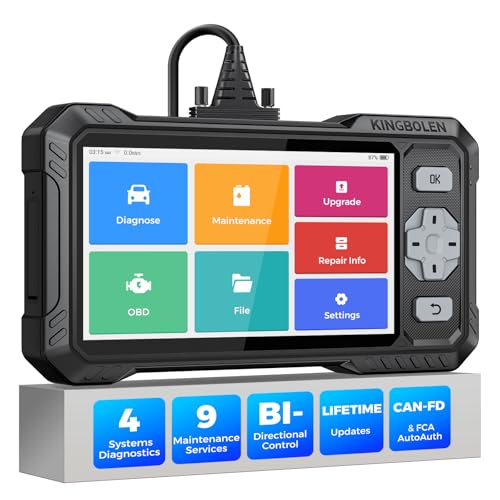
- WHY S608 STANDS OUT:2026 Kingbolen S608 is the only scanner <200 bucks that offers powerful active tests on Engine, ABS, SRS, and Transmission systems. Offers 9 resets,Covers 110+ global brands with a 6.2'' larger touchscreen
- KINGBOLEN'S NEW BIDIRECTIONAL SCAN TOOL: As the 2026 upgraded version of S600, our Newest S608 obd2 scanner has the powerful Bi-directional Control on Engine, ABS, SRS, and Transmission systems. It can send commands to the ECUs of actuators for functional tests and work status checks, such as ABS, fuel injectors, adjusting throttle, coolant pumps, EVAP test, fuel trim reset, etc. No more Guesswork. Quickly identify problem components without teardown, get fuss-free results in seconds.
- 【9 HOT RESET SERVICES CAR SCANNER】Tired of costly mechanic trips for common resets? The Kingbolen S608 obd2 scanner lets you do it yourself, even for beginners—quickly and effortlessly! It offers 9 hot reset functions: Oil/EPB Reset, ABS Bleeding, SAS Calibration, DPF Regeneration, Injector Coding, BMS Matching, Throttle Adaptation, Gear Learning. Stop paying mechanics for 5-minute jobs. Save hundreds per year! 🚗*Function vary from vehicle models. reach us to check compatibility firstly!
- 【4 SYSTEM DIAGNOSTIC TOOL + FULL OBDII FUNCTIONS】Kingbolen S608 is an OBDII scanner and 4 systems diagnostic tool made for home mechanics, DIYers, and professionals. You can access Engine, ABS, SRS, Transmission fault codes, track live data in graphs, and onboard DTC library lookup to find the right troubleshooting procedure, and diagnose with full 10 OBD2 test modes to fix most of emission issues. Give your aging cars routine maintenance to avoid costly repairs, a breakdown, or even a crash.
- 【NEW CAN FD, FCA/RENAULT SGW, 140+ BRANDS】Kingbolen S608 scanner for car supports 140+ vehicle brands, 100,000+ models, 28 languages and can be used worldwide. S608 stays up-to-date with modern vehicles, allows secure access to 2017+ FCA cars and 2015+ Renault cars (📢*Need to purchase an AutoAuth/Renault account by yourself), and supports the latest CAN-FD protocol for 2019+ GM/Chrysler, enabling 2X faster data transfer and more precise diagnostics. 🚗*Check compatibility before purchase.
This product presentation was made with AAWP plugin.
Last update on 2026-05-12 / Affiliate links / Images from Amazon Product Advertising API