
NHTSA ID Number: 10121231
Manufacturer Communication Number: VHW-15-03
TSB/Document Date: 2017-10-31
Summary
VAS 6160A Diagnostic Tablet ? Unpacking and Setup Instructions
Service Information
Diagnostic Device Hardware & Windows®
Number: VHW-15-03
Subject: VAS 6160A Diagnostic Tablet – Unpacking and Setup
Instructions
Date: Jan 8, 2015
Supersedes VVT-14-12 due to updated ServiceNet section titles.
Table of Contents
Section
Page
1.0
Additional Documentation
1
2.0
Safety Instructions
2
3.0
Important Information
4
4.0
Unpacking Instructions
5
5.0
Contents of Carton
6
6.0
Install Rechargeable Battery Pack
6
7.0
Connecting to Power
7
8.0
Windows 7 Startup & Initial Setup
8
9.0
Network Setup
16
10.0
Install Offboard Diagnostic Information System Service (ODIS Service)
17
11.0
VAS 5054A Transmitter Head Setup
17
12.0
Windows 7 Updates
19
13.0
Warranty Registration
22
14.0
Malfunctions and Support
22
1.0 – Additional Documentation
These unpacking and setup instructions contain references to Service Information (SI) documents with
additional instructions needed before placing the laptop into service. These documents are all posted in
the Vehicle Diagnostics section in ServiceNet.
Locate and print the following documents to have on hand before proceeding with these instructions:
SI Document
Subcategory
Document Titles
ODIS Service Installation Phase 1 - Preparation & License Request Instructions (eShop)
ODIS Service
ODIS Service Installation Phase 2 - Software Installation & Configuration Instructions
ODIS Service Installation Phase 3 - Security Certificate Request & Installation Instructions
ODIS Service Infomedia Setup Instructions
Diagnostic
Device Hardware
& Windows
VAS Diagnostic Device Computer Name Builder
VAS 5054A Transmitter Head - Bluetooth & EDIC Configuration - ODIS Service Only
VAS 5054A Transmitter Head - USB Configuration - ODIS Service Only
Page 1 of 22
© 2015 Volkswagen Group of America, Inc.
All rights reserved. Information contained in this document is based on the latest information available at the time of printing and is subject to the copyright and other intellectual
property rights of Volkswagen Group of America, Inc., its affiliated companies and its licensors. All rights are reserved to make changes at any time without notice. No part of this
document may be reproduced, stored in a retrieval system, or transmitted in any form or by any means, electronic, mechanical, photocopying, recording, or otherwise, nor may these
materials be modified or reposted to other sites, without the prior expressed written permission of the publisher.
Service Information
2.0 – Safety Instructions
2.1 – Explanation of Symbols
Symbols with the following meanings are used in the safety instructions of the Operating Manuals, the
startup/unpacking instructions and other documentation provided, in screen displays on the tester during
operation and on the products themselves:
Warning!
Text with this symbol contains information regarding your safety and how you
can reduce the risk of serious or fatal injuries. The Warning symbol deserves
special attention with respect to your safety.
Caution!
Text with this symbol contains information on how you can prevent damage to
the vehicle and to the device. The Caution symbol informs you that failure to
comply with such information can result in damage to the vehicle and/or tester.
Note
Text with this symbol contains additional, useful information. The Note symbol
indicates important information on the product, its use and other items.
2.2 – Reference to Additional Safety Instructions
The following contains the general safety instructions that apply to all VAS diagnostic console, tablet and
tablet devices. Additional safety instructions can be found in the applicable device Operating Manuals. It is
thus important to read the device Operating Manual prior to use. Safety instructions may also appear on
the screen of the tester and displayed by the diagnostic software. Heed all instructions displayed.
2.3 – Important Safety Instructions
Warning!
1. Read all instructions.
2. If the power cable or unit is damaged, the equipment may be not used until inspected by a
qualified technician.
3. Do not allow any cables or leads to drape over the edges of tables, benches or stands.
Prevent hot parts or rotating fans from coming into contact with cables or leads.
4. Use of an extension cable is prohibited. When performing tests, only the specified cables
and leads may be used.
5. Always unplug the equipment when it is not in use. Never unplug the power cable from
the outlet by pulling on the cable. Grasp the connector to disconnect the equipment from
the power outlet.
6. The tester may not be used in the vicinity of open fuel containers, as there is otherwise
the risk of fire or explosion.
7. When you are working on internal combustion engines, ensure adequate ventilation.
Otherwise, there is a risk of poisoning.
Continued …3/
Page 2 of 22
© 2015 Volkswagen Group of America, Inc.
All rights reserved. Information contained in this document is based on the latest information available at the time of printing and is subject to the copyright and other intellectual
property rights of Volkswagen Group of America, Inc., its affiliated companies and its licensors. All rights are reserved to make changes at any time without notice. No part of this
document may be reproduced, stored in a retrieval system, or transmitted in any form or by any means, electronic, mechanical, photocopying, recording, or otherwise, nor may these
materials be modified or reposted to other sites, without the prior expressed written permission of the publisher.
Service Information
Warning!
8. Use the equipment only in the manner described. Use only the accessories listed by the
manufacturer.
9. Risk of explosion. The equipment has spark-generating components inside and for this
reason must not be used in areas with flammable vapors. The equipment should be
operated at a height of at least 460 mm (18 inches) above the floor, since gasoline and
other possible vapors collect at floor level.
10. The equipment complies with Safety Class 1 when under power and is equipped with a
safety tested power cable. Connect the equipment only to electrical service or power
outlets with a grounded protective conductor (TN network).
11. Fasten the diagnosis tablet securely to the rear seat of the vehicle during test drives. A
second person on the rear seat must operate the diagnosis tablet. For safety reasons,
operation on the front seat and without being fastened securely is prohibited (e.g. risk of
triggering the airbag).
12. Electric ignition systems have voltages of up to approx. 30 kV. General Safety guidelines
for workshops are to be observed at all times.
13. Opening of the tester, including its accessories, by unauthorized personnel can result in
serious risk to the individual and the equipment.
14. If the power cable, a diagnostic or measuring cable, the tester or any other accessory
under power is damaged, their use is prohibited until a qualified technician has given
approval to do so.
15. If you will not be using the equipment for a longer period of time, please switch it off at the
on/off switch and disconnect it from the power if the rechargeable battery is charged.
Switching off at the on/off switch alone does not ensure that the power supply, charging
circuit or any connected accessory has been disconnected from power.
16. Data transmission lines should not be connected or disconnected during a thunderstorm
nor should the equipment itself be operated.
2.4 – Safety Instructions for Wireless Units
Warning!
1. No antenna modifications, e.g. relocation or use of other antennas or transmitters, are
permitted on units approved for wireless operation.
2. Do not use a portable transmitter (e.g. wireless network (WLAN) or Bluetooth device) in
the vicinity of unshielded detonator caps or in an explosive atmosphere, unless the device
has been modified in a way that permits such use.
3. Information regarding Bluetooth and W-LAN approval in various countries may be found in
the diagnostic software operating manual.
Continued …4/
Page 3 of 22
© 2015 Volkswagen Group of America, Inc.
All rights reserved. Information contained in this document is based on the latest information available at the time of printing and is subject to the copyright and other intellectual
property rights of Volkswagen Group of America, Inc., its affiliated companies and its licensors. All rights are reserved to make changes at any time without notice. No part of this
document may be reproduced, stored in a retrieval system, or transmitted in any form or by any means, electronic, mechanical, photocopying, recording, or otherwise, nor may these
materials be modified or reposted to other sites, without the prior expressed written permission of the publisher.
Service Information
Caution!
1. Line voltage fluctuations and deviations exceeding the permissible tolerance can result in
malfunction and damage to the diagnostic device.
2. When operating the VAS 6160A in a workshop cart, ensure that the power adapter has
adequate ventilation. Remember that the charging circuit is operating even when the tester is
switched off. This is also true in the power saving mode.
3. When connecting other make vehicles:
• The VAS 6160A diagnostic tablet was developed and specified for vehicles manufactured
by the Volkswagen Group. Connecting the tester or remote diagnosis head interface
directly to a vehicle from another manufacturer, may cause damage to the vehicle’s
electrical system.
• If attempting to use the generally applicable OBD functions for self-diagnosis of other
make vehicles, the OBD adapter cable VAS 5052/16 should be connected between the
diagnostic head and diagnosis connection in the vehicle.
4. When handling the rechargeable battery:
• The rechargeable battery should be replaced only by properly trained personnel.
• Never short-circuit the rechargeable battery.
• Never throw the rechargeable battery into a fire.
• Dispose of/recycle the rechargeable battery only when discharged and in accordance with
local regulations.
3.0 – Important Information
3.1 – Shipping Damage / Incomplete Shipment
Please check the following items when unpacking/starting your VAS 6160A:
1. Packaging damaged:
•
Have the damage confirmed in writing on the shipping documents by the delivery service and
report it immediately.
2. Packaging in good condition, but contents damaged:
• Report damage to Snap-on immediately.
3. Incomplete shipment:
•
Please check the contents list as per instructions in Section 5.0 – Contents of Carton to
determine whether your shipment is complete. Report issues to Snap-on immediately.
Page 4 of 22
© 2015 Volkswagen Group of America, Inc.
All rights reserved. Information contained in this document is based on the latest information available at the time of printing and is subject to the copyright and other intellectual
property rights of Volkswagen Group of America, Inc., its affiliated companies and its licensors. All rights are reserved to make changes at any time without notice. No part of this
document may be reproduced, stored in a retrieval system, or transmitted in any form or by any means, electronic, mechanical, photocopying, recording, or otherwise, nor may these
materials be modified or reposted to other sites, without the prior expressed written permission of the publisher.
Service Information
3.2 – Temperature Equalization
Caution!
If the VAS 6160A is delivered during winter months, efforts must be made to prevent the
formation of condensation within the device. For this reason we recommend the device be left
unattended at room temperature for approximately 3 hours prior to connecting/switching on for
temperature compensation purposes.
3.3 – Safety and Startup Instructions
Please read the safety and startup instructions carefully prior to startup.
3.4 – Purchase Documentation
Please retain your shipping documents as proof of purchase and delivery.
3.5 - Additional Instructions
Note
•
These unpacking and setup instructions include cross-references to other Service
Information documents with additional instructions needed prior to placing the tablet into
service. These additional documents are all posted on ServiceNet.
•
If you have not already done so, be prepared to locate the cross-referenced documents!
•
Print the documents if necessary and perform the necessary instruction steps before
continuing with the remaining instructions in this document.
•
Discard all printed copies of all documents, including this one, after use. Revised
versions may be issued at any time. Always check ServiceNet for the latest versions.
•
Be aware that as of the publication date of this document, new VAS 6160A are shipped with
Windows 7 operating systems.
4.0 – Unpacking Instructions
The VAS 6160A is delivered with the tablet unit and docking station (port replicator) packed separately in
the main shipping box.
1. Unpack all parts; then remove the protective film from the tablet and the docking station (port
replicator).
2. Dispose of the packaging material in accordance with local regulations.
3. Check the contents for completeness as instructed in Section 5.0 - Contents of Carton.
4. In case of incomplete shipment, report the issue immediately to Snap-on (SBS).
Page 5 of 22
© 2015 Volkswagen Group of America, Inc.
All rights reserved. Information contained in this document is based on the latest information available at the time of printing and is subject to the copyright and other intellectual
property rights of Volkswagen Group of America, Inc., its affiliated companies and its licensors. All rights are reserved to make changes at any time without notice. No part of this
document may be reproduced, stored in a retrieval system, or transmitted in any form or by any means, electronic, mechanical, photocopying, recording, or otherwise, nor may these
materials be modified or reposted to other sites, without the prior expressed written permission of the publisher.
Service Information
5.0 - Contents of Carton
Confirm your VAS 6160A shipment contains the following items (check the boxes provided):
1. VAS 6160A
2. Docking Station with CD/DVD drive
3. A/C Power Adapter/cables
4. VAS 5054A Transmitter Head
5. VAS 5054A USB Cable (“Rugged
1
3
USB 2.0”)
6. Stylus
Rechargeable Battery*
Operating Manuals for Panasonic CF-D1
5
series tablet and docking station*
2
6
4
*Not shown
6.0 – Install Rechargeable Battery Pack
Caution!
When handling the rechargeable battery:
• The battery should be replaced only by properly trained personnel.
• Never short-circuit the battery.
• Never throw the battery into a fire.
• Dispose of/recycle the battery only when discharged and in accordance with local regulations.
Remove battery from its packaging and install as follows:
1. On the left-hand underside of the tablet, slide the battery compartment lock to the right and downward
as illustrated -arrows-, then open the battery compartment cover:
Page 6 of 22
© 2015 Volkswagen Group of America, Inc.
All rights reserved. Information contained in this document is based on the latest information available at the time of printing and is subject to the copyright and other intellectual
property rights of Volkswagen Group of America, Inc., its affiliated companies and its licensors. All rights are reserved to make changes at any time without notice. No part of this
document may be reproduced, stored in a retrieval system, or transmitted in any form or by any means, electronic, mechanical, photocopying, recording, or otherwise, nor may these
materials be modified or reposted to other sites, without the prior expressed written permission of the publisher.
Service Information
2. Slide the battery pack into the compartment -arrow- until it connects firmly with the contacts:
3. Close battery compartment cover and re-secure the battery compartment cover/lock.
Caution!
Ensure battery compartment cover is locked at all times. Otherwise, the battery pack may fall out
during use or transport.
Note
For optimum battery performance and service life, please heed the battery charging and recalibration
instructions included with the Panasonic CF-D1 Operating Manual.
7.0 – Connecting to Power
The tablet is connected to power either via the docking station (port replicator) connection to the A/C
power adapter, directly via the A/C power adapter or run from the internal rechargeable battery pack.
Caution!
•
•
•
The A/C power adapter includes a country-specific power cable (UL-approved or CSA-approved,
oil-resistant power cord).
Operation on ungrounded or impedance-grounded electrical networks (IT electrical networks) is
prohibited.
Use only the original Panasonic CF-D1 power adapter. For additional information (part number
etc.), refer to the CF-D1 Operating Manual.
Page 7 of 22
© 2015 Volkswagen Group of America, Inc.
All rights reserved. Information contained in this document is based on the latest information available at the time of printing and is subject to the copyright and other intellectual
property rights of Volkswagen Group of America, Inc., its affiliated companies and its licensors. All rights are reserved to make changes at any time without notice. No part of this
document may be reproduced, stored in a retrieval system, or transmitted in any form or by any means, electronic, mechanical, photocopying, recording, or otherwise, nor may these
materials be modified or reposted to other sites, without the prior expressed written permission of the publisher.
Service Information
8.0 – Windows 7 Startup & Initial Setup
8.1 – Preparation
Initial startup must be performed with the tablet removed from the docking station (port replicator) and
the wireless switch in the OFF position. Additional information can be found in the Panasonic CF-D1
Operating Manual.
1. On the upper left-hand side of the tablet, open the access cover marked “SC / EX”. If necessary, slide
the wireless operation switch to the OFF position -arrow-:
2. Connect the A/C power adapter cable to a 115V A/C outlet and the DC IN 15.6V port -arrow- on the
lower right-hand side of the tablet:
8.2 - Interface Connections
For additional information, on interface connections, refer to the Panasonic CF-D1 and docking station
(port replicator) Operating Manuals.
8.3 - Switching the Unit On and Off
Switch on the tablet by pressing the on/off button for approximately 1 second. The tablet boots and
displays a series of automatic setup, registry and service screens followed by the initial Windows setup
screen. No user intervention is required during this time.
Caution!
•
When switching the tablet off after normal use, DO NOT press and hold the on/off button for
longer than 5 seconds! This executes a forced shutdown which may result in hard drive faults.
•
To switch off the tablet after normal use, click the Windows “Start” symbol from the desktop and
then select “Shut down”.
Page 8 of 22

- 💯【Conta.ct us for Support Directly】If you met any...
- 🔥🔥🔥【2026 AUTEL FLAGSHIP MK900BT MK900-BT, NEW...
- 🚗【3000+ ACTIVE TESTS (50➡3000+), SAME AS MS...
- 🚗【40+ HOT SERVICES FOR 150 MAKES (28+➡40+)】Full...
- 🚗【OE ALL SYSTEM DIAGNOSE, AUTO SCAN 2.0: SCAN LICENSE...

- 【TURN OFF CEL】 This AL319 car scanner diagnostic tool...
- 【EXTENSIVE APPLICATION】 Autel AL319 Compatible with...
- 【FOR END USER & DIYERS】 This error code reader AL319 is...
- 【USER-FRIENDLY DESIGN】 This OBD2 scanner and check...
- 【HIGH-QUALITY SERVICES】 12 months war.ranty from the...
This product presentation was made with AAWP plugin.
If the PDF is very large, it may not load in the preview below.
Some older TSBs had multiple PDFs — visit the NHTSA Website to view all PDFs.
If the TSB PDF does not show, download or view it on the NHTSA Website.
Click on the (+) Plus Sign
Then Click on Associated Document(s)
Search NHTSA Database for Recalls
Search NHTSA Database for Vehicle Investigations
View Latest Vehicle Investigations
Search NHTSA Database for Vehicle Complaints
View Latest Vehicle Complaints
TSB/Document ID: VHW-15-03
Replacement Service Bulletin Number:
MFR Communication Date: 2015-01-08
MFR Internal Campaign ID/Software Version:
Communication Type: Service Bulletin/Repair Instructions
NHTSA Components: ELECTRICAL SYSTEM:SOFTWARE
MFR Component System:
MFR Component Subsystem:
Previous TSB | Next TSB |

- 【OE-Level Full System Diagnostics-Lifetime F*REE Software Updates】The VDIAGTOOL D200 OBD2 Scanner for cars is a all system bidirectional scan tool that enjoy lifetime f*ree software updates, delivers complete system coverage. reading/clearing codes across engine, transmission, ABS, SAS, EPB, TPMS plus full access to body, chassis, powertrain and all control modules. This D200 Bidirectional car scanner works with most 1996+ OBD2 gasoline and hybrid
 cars and light trucks. It does NOT support pure electric and heavy-duty trucks. PLEASE CHECK COMPATIBILITY BEFORE ORDERING or Contact us with VIN to confirm compatibility.
 - 【Supports OBD2 Full Functions-ZERO Subscription Fees】D200 Bidirectional OBD2 Scanner is a upgarde of universal car code reader. It supports OBD2 full functions to help you turn off the annoying instrument fault indicator, such as read/clear codes, O2 sensor test, I/M readiness, on-board monitor test, datastream, freeze frame, E-VAP system test, and retrieve vehicle information. This professional obd2 scanner diagnostic tool can full access to diagnostics, reset tools and maintenance features with a single payment. NOTE: The fault code can only be cleared after the vehicle's malfunction has been repaired; please ensure the vehicle issue is fixed before clearing the code.
- 【D200 Hidden 2 Advantages: 1. $169 Expandable 49+ Advanced Resets. 2. $199 Get J2534 P*a*s*s-Thru Programming】Your core car diagnostics and 26 reset remain lifetime f*ree for everyday maintenance. When you need deeper repair capability, upgrade with 3-year access for $169 in Store on VDIAGTOOL App, gaining 49+ advanced resets. D200 configured with J2534 hardware, upgrade only when you need without replacing the entire device. You also can Lifetime Unlock for $199 in Store one-time, perform module programming, software re~flashing and ECU data updates directly. Supports 17+ major brands, including for BMW, for Audi, for GM, for Ford and more. Note:D200 does‘t provide any OE software.
- 【Full Bidirectional Control / Active Tests】The D200 car scanner diagnostic tool is a true bidirectional scan tool that lets you send commands directly to the vehicle’s ECU for active tests. Quickly test fuel pumps, relays, solenoids, injectors, cooling fans, windows, sunroofs and more to verify operation instantly. Get dealership-level diagnostic control at a fraction of the cost (ofter $100-200$ per diagnostic visit), reduce guessworkand confirm repairs faster, avoid unnecessary parts replacement, towing fees and wait times.
- 【26 F*ree Essential Reset & Relearn Functions – Everyday Maintenance Made Easy】Handle common maintenance and repair jobs without visiting the shop. The D200 code readers & scan tools includes 26 f*ree high-demand reset functions, including Oil Reset, EPB Service, SAS Calibration, ABS Brake Bleeding, Throttle Relearn, Injector Coding, Headlight Adjustment, Tire Size Reset and more. Perfect for home car owners, mechanics and DIYers – just plug and diagnose anytime, anywhere! Note: Service functions vary by vehicle model—please confirm compatibility.
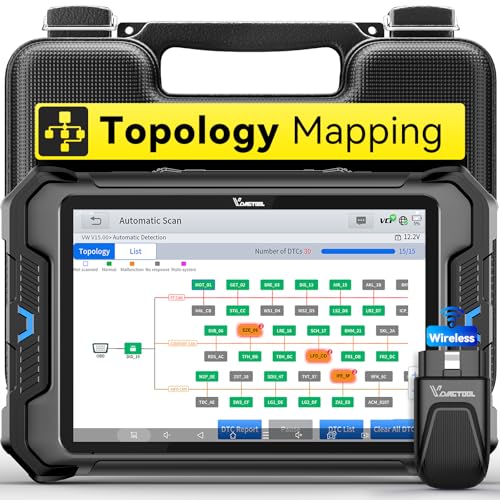
- Smarter Diagnostics, Broader Coverage, Greater Value Than $1,000+ Tools: The game-changing VD80BT OBD2 scanner delivers 4000+ active tests, 42+ hot services, advanced ECU coding, PMI & V.A.G Guided—all in one scanner for car. With OE-level full system scan and intelligent topology mapping that cuts diagnostic time by up to 50%, you'll work smarter and faster. Supporting FCA AutoAuth, CAN FD & DoIP protocols, this car scanner covers over 10,000 vehicle models worldwide. Built for serious pros and DIYers, it features 8" HD screen & 4+64GB storage, 7.3V fast charging with long-lasting battery, and 33–66ft stable wireless connection—making it the most complete diagnostic solution you’ll ever own
- Intuitive Topology Map, Fast Locate Faults: Why waste time clicking module by module? VD80BT car diagnostic scanner takes diagnostics to the next level with its intuitive Topology Map—a premium feature usually found in $1000+ obd scanner. With one tap, it performs all system scan and presents all modules and DTCs in a clear, color-coded layout, boosting diagnostic efficiency by up to 200% and helping you locate issues instantly and reduce repair time and costs. Whether you're a pro boosting efficiency or a beginner learning diagnostics, this obd2 scanner diagnostic tool makes fault-finding faster and smarter for you. Note: varies by vehicle model, please check compatibility before purchase
- Wireless Connectivity Simplifies Bi-Directional Control: With 4000+ active tests, including throttle reset, window calibration and solenoid check, VD80BT bidirectional scan tool lets you diagnose and verify functions faster, smarter, and more efficiently. This scanner for car redefines flexibility in bi-directional control through a fully wireless connection, freeing you from the constraints of wired car diagnostic tool in the workshop. Imagine actively controlling components like the A/C clutch, fuel injector, ABS pump, or radiator fan within a wireless range of 33–66ft around the vehicle—all while enjoying stable, high-speed wireless diagnostic and real-time data monitoring
- 42+ Hot Services, One Powerful Scanner for Car: Why pay a shop $100 just to reset a light? VD80BT car scanner diagnostic tool gives you 42+ hot services from basic resets to advanced maintenance tasks like Crank Sensor Relearn, Injector Coding, ABS Bleeding, Oil Reset, Throttle Relearn, EPB, BMS Reset, Tire Size Reset and more. Plus, it offers 100+ vehicle-specific features including Idle Relearn, VIN Write, Brake Fluid Replacement, Fuel Trim Reset, ABS Initialization and more. Whether you’re resetting TPMS or fixing a stubborn SAS, this car computer diagnostic reader delivers shop-grade precision at a fraction of the cost. Varies by model. Send VIN to verify compatibility before purchase
- OE-Level Full System Diagnostics in Your Hands: Dominate diagnostics like a dealership with VD80BT scan tool for all vehicles, delivering factory-grade scanning for aLL systems—including ABS, SRS, ECM, TCM and more. View up to 8 PID graphs simultaneously to quickly catch intermittent issues and troubleshoot with confidence. Easily read and clear DTCs, retrieve freeze frame data, and run active tests for faster, more accurate repairs. It’s like having a dealership-grade scan tool in your pocket, complete with data playback and CSV export for in-depth analysis. Stop guessing and start fixing with surgical precision—professional diagnostics made simple and portable. Check compatibility Please

- Affordable Solution for Professional-grade Car Diagnostics & Repair: As the budget-friendly OBD2 scanner under $300, the VD70 Lite car diagnostic tool offers 31+ hot resets, full bi-directional controls with 4000+ active tests, all system diagnostics, 8-in-One live data graphing (export as CSV Export/Recording/Playback), CAN FD & DoIP protocols, and long-term free update. Additional features include Auto VIN & Auto Scan, diagnostic report sharing/printing, with coverage for over 10,000 vehicle models worldwide, suitable for DIYers, Car Owners, Technicians, and Mechanics on car repairs and maintenance tasks.
- OBD2 Scanner with Full Bi-directional Control: The Bidirectional scan tool VIDAGTOOL VD70 Lite performs 4000+ active tests that can send execution commands to the ECU module and identify the repair status, covering for windows, doors, ABS, valves, wipers, headlights, rear mirrors, sunroof,and more in-vehicle components. This bidirectional OBD2 scanner is a must-have diagnostic tool for auto technicians and mechanics on a budget! The available function tests vary by model—please check compatibility via vdiagtool2 @ outlook . c o m before purchase.
- OE All Systems Diagnostics & 8-IN-One Data Graphing: VD70 Lite is a dealer-level car scanner diagnostic tool with Auto VIN that can do in-depth diagnostics for 100+ modern car brands, covering all systems including engine, transmission, airbag, ABS, ESP, TPMS, radio, etc, to read/clear code, view live data, freeze frame, and read ECU info. This advanced OBD2 Scanner with 8-in-one data graphing and detailed diagnostic reports makes data viewing more intuitive, ensures quickly accurate repairs by identifying issues, and easily masters the car situation.
- Stay Ahead with 31+ Reset for Faster & Easier Repairs: VDIAGTOOL VD70 Lite scanner for car meets almost all daily maintenance needs for both home mechanics and workshops as a professional automotive scan tool. It can perform Oil Reset, ABS Bleed, Crank Sensor Relearn, Idle Relearn, Injector Coding, Window Initialization, HVAC Calibration, Suspension Calibration, Throttle Matching, etc, ensuring efficient repairs and complete maintenance. Besides, long-term free updates keep its functionality and broad vehicle compatibility up to date. Functions vary by model, please send us the Vehicle Model, Year, VIN for compatibility before purchase.
- 150+ Models, 10000+ Car Coverage & 22 Languages:As a powerful car computer diagnostic tool, VD70 Lite helps you to quickly troubleshoot issues for 95% of US, European, and Asian vehicles. Supporting 22 languages makes it a global car diagnostic scanner for auto mechanics worldwide without language barriers. Note: Simply provide your tool’s S/N and reach out to vdiagtool2 @ outlook . c o m to change the menu language.

This product presentation was made with AAWP plugin.
Last update on 2026-06-09 / Affiliate links / Images from Amazon Product Advertising API